Reference information regarding the primary ClusterCockpit component “cc-backend” (GitHub Repo).
This is the multi-page printable view of this section. Click here to print.
cc-backend
ClusterCockpit Backend References
- 1: Command Line
- 2: Configuration
- 3: Environment
- 4: REST API
- 5: Authentication Handbook
- 6: Job Archive Handbook
- 7: Schemas
- 7.1: Application Config Schema
- 7.2: Cluster Schema
- 7.3: Job Data Schema
- 7.4: Job Statistics Schema
- 7.5: Unit Schema
- 7.6: Job Archive Metadata Schema
- 7.7: Job Archive Metrics Data Schema
- 8: Tools
- 8.1: archive-manager
- 8.2: archive-migration
- 8.3: convert-pem-pubkey
- 8.4: gen-keypair
- 8.5: grepCCLog.pl
- 8.6: Metric Generator Script
1 - Command Line
ClusterCockpit Command Line Options
This page describes the command line options for the cc-backend executable.
-add-user <username>:[admin,support,manager,api,user]:<password>
Function: Add a new user. Only one role can be assigned.
Example: -add-user abcduser:manager:somepass
-apply-tags
Function: Run taggers on all completed jobs and exit.
-config <path>
Function: Specify alternative path to config.json.
Default: ./config.json
Example: -config ./configfiles/configuration.json
-del-user <username>
Function: Remove an existing user.
Example: -del-user abcduser
-dev
Function: Enable development components: GraphQL Playground and Swagger UI.
-force-db
Function: Force database version, clear dirty flag and exit.
-gops
Function: Listen via github.com/google/gops/agent (for debugging).
-import-job <path-to-meta.json>:<path-to-data.json>, ...
Function: Import a job. Argument format: <path-to-meta.json>:<path-to-data.json>,...
Example: -import-job ./to-import/job1-meta.json:./to-import/job1-data.json,./to-import/job2-meta.json:./to-import/job2-data.json
-init
Function: Setup var directory, initialize sqlite database file, config.json and .env.
-init-db
Function: Go through job-archive and re-initialize the job, tag, and
jobtag tables (all running jobs will be lost!).
Caution: All running jobs will be lost!
-jwt <username>
Function: Generate and print a JWT for the user specified by its username.
Example: -jwt abcduser
-logdate
Function: Set this flag to add date and time to log messages.
-loglevel <level>
Function: Sets the logging level.
Arguments: debug | info | warn | err | crit
Default: warn
Example: -loglevel debug
-migrate-db
Function: Migrate database to supported version and exit.
-revert-db
Function: Migrate database to previous version and exit.
-server
Function: Start a server, continues listening on port after initialization and argument handling.
-sync-ldap
Function: Sync the hpc_user table with ldap.
-version
Function: Show version information and exit.
2 - Configuration
ClusterCockpit Configuration Option References
cc-backend requires a JSON configuration file. The configuration files is
structured into sections. Every section is configured either in a separate
JSON object or using a separate file. Sections are split into two categories:
- Required sections define integral settings, which are required for
cc-backendto start, and work, properly. - Optional Sections define additional options for specific use-cases or on-site requirements. We recommend to read through the available optional settings, e.g. the file archive config.
When a section is put in a separate file
the section key has to have a -file suffix, example:
"auth-file": "./var/auth.json"
To override the default config file path, specify the location of a JSON
configuration file with the -config <file path> command line option.
Configuration Options
Required Sections
Primary configuration sections, which key (e.g. main) has to exist on cc-backend start, or the application will shut down with an error.
Subsequent settings within the primary sections might be optional.
Section main
addr: Type string (Optional). Address where the http (or https) server will listen on (for example: ‘0.0.0.0:80’). Defaultlocalhost:8080.api-allowed-ips: Type array of strings (Optional). IPv4 addresses from which the secured administrator API endpoint functions/api/*can be reached. Default: No restriction. The previous*wildcard is still supported but obsolete.user: Type string (Optional). Drop root permissions once .env was read and the port was taken. Only applicable if using privileged port.group: Type string. Drop root permissions once .env was read and the port was taken. Only applicable if using privileged port.disable-authentication: Type bool (Optional). Disable authentication (for everything: API, Web-UI, …). Defaultfalse.embed-static-files: Type bool (Optional). If all files inweb/frontend/publicshould be served from within the binary itself (they are embedded) or not. Defaulttrue.static-files: Type string (Optional). Folder where static assets can be found, ifembed-static-filesisfalse. No default.db: Type string (Optional). The db file path. Default:./var/job.db.enable-job-taggers: Type bool (Optional). Enable automatic job taggers for application and job class detection. Requires to provide tagger rules. Default:false.validate: Type bool (Optional). Validate all input JSON documents against JSON schema. Default:false.session-max-age: Type string (Optional). Specifies for how long a session shall be valid as a string parsable by time.ParseDuration(). If 0 or empty, the session/token does not expire! Default168h.https-cert-fileandhttps-key-file: Type string (Optional). If both those options are not empty, use HTTPS using those certificates. Default: No HTTPS.redirect-http-to: Type string (Optional). If not the empty string andaddrdoes not end in “:80”, redirect every request incoming at port 80 to that url.stop-jobs-exceeding-walltime: Type int (Optional). If not zero, automatically mark jobs as stopped running X seconds longer than their walltime. Only applies if walltime is set for job. Default0.short-running-jobs-duration: Type int (Optional). Do not show running jobs shorter than X seconds. Default300.emission-constant: Type integer (Optional). Energy Mix CO2 Emission Constant [g/kWh]. If entered, UI displays estimated CO2 emission for job based on jobs’ total Energy.resampling: Type object (Optional). If configured, will enable dynamic downsampling of metric data using the configured values.minimum-points: Type integer. This option allows user to specify the minimum points required for resampling; Example: 600. If minimum-points: 600, assuming frequency of 60 seconds per sample, then a resampling would trigger only for jobs > 10 hours (600 / 60 = 10).resolutions: Type array [integer]. Array of resampling target resolutions, in seconds; Example: [600,300,60].trigger: Type integer. Trigger next zoom level at less than this many visible datapoints.
machine-state-dir: Type string (Optional). Where to store MachineState files. Used for persisting machine state between restarts.systemd-unit: Type string (Optional). Systemd unit name used for the system log viewer integration. Default:clustercockpit.api-subjects: Type object (Optional). NATS subjects configuration for subscribing to job and node events. When configured, the REST API endpoints forstart_jobandstop_jobare disabled in favor of NATS messaging. Default: No NATS API.subject-job-event: Type string (required). NATS subject for job events (start_job, stop_job).subject-node-state: Type string (required). NATS subject for node state updates.
nodestate-retention: Type object (Optional). Configuration for automatic cleanup of old node state records from the database. Runs daily. Default: No retention (node states accumulate indefinitely).policy: Type string (required). Retention policy. Possible values:delete(remove old records),move(archive to Parquet format then delete).age: Type integer (Optional). Retention age in hours. Records older than this are affected. Default:24.target-kind: Type string (Optional). Target storage kind for Parquet archiving:fileors3. Only applicable formovepolicy. Default:file.target-path: Type string (Optional). Filesystem path for Parquet file storage. Only applicable fortarget-kindfile.target-endpoint: Type string (Optional). S3 endpoint URL. Only applicable fortarget-kinds3.target-bucket: Type string (Optional). S3 bucket name. Only applicable fortarget-kinds3.target-access-key: Type string (Optional). S3 access key. Only applicable fortarget-kinds3.target-secret-key: Type string (Optional). S3 secret key. Only applicable fortarget-kinds3.target-region: Type string (Optional). S3 region. Only applicable fortarget-kinds3.target-use-path-style: Type bool (Optional). Use path-style S3 addressing. Required for MinIO and some S3-compatible services. Only applicable fortarget-kinds3.max-file-size-mb: Type integer (Optional). Maximum Parquet file size in MB before splitting into a new file. Default:128.
Section auth
jwts: Type object (required). For JWT Authentication.max-age: Type string (required). Configure how long a token is valid. As string parsable by time.ParseDuration().cookie-name: Type string (Optional). Cookie that should be checked for a JWT token.validate-user: Type bool (Optional). Deny login for users not in database (but defined in JWT). Overwrite roles in JWT with database roles.trusted-issuer: Type string (Optional). Issuer that should be accepted when validating external JWTs.sync-user-on-login: Type bool (Optional). Add non-existent user to DB at login attempt with values provided in JWT.update-user-on-login: Type bool (Optional). Update existent user in DB at login attempt with values provided in JWT. Name, Roles (excluding admin) and Projects are updated.
ldap: Type object (Optional). For LDAP Authentication and user synchronisation. Defaultnil.url: Type string (required). URL of LDAP directory server.user-base: Type string (required). Base DN of user tree root.search-dn: Type string (required). DN for authenticating LDAP admin account with general read rights.user-bind: Type string (required). Expression used to authenticate users via LDAP bind. Must containuid={username}.user-filter: Type string (required). Filter to extract users for syncing.username-attr: Type string (Optional). Attribute with full user name. Defaults togecosif not provided.sync-interval: Type string (Optional). Interval used for syncing local user table with LDAP directory. Parsed using time.ParseDuration.uid-attr: Type string (Optional). LDAP attribute used as login username. Defaults touidif not provided.sync-del-old-users: Type bool (Optional). Delete obsolete users in database.sync-user-on-login: Type bool (Optional). Add non-existent user to DB at login attempt if user exists in LDAP directory.update-user-on-login: Type bool. Update existent user in DB at login attempt with values provided. Name, Roles (excluding admin) and Projects are updated.
oidc: Type object (Optional). For OpenID Connect Authentication. Defaultnil.provider: Type string (required). OpenID Connect provider URL.sync-user-on-login: Type bool. Add non-existent user to DB at login attempt with values provided.update-user-on-login: Type bool. Update existent user in DB at login attempt with values provided. Name, Roles (excluding admin) and Projects are updated.
Section metric-store
retention-in-memory: Type string (required). Keep the metrics within memory for given time interval. Retention for X hours, then the metrics would be freed. Buffers that are still used by running jobs will be kept.memory-cap: Type integer (required). If memory used exceeds value in GB, buffers still used by long running jobs will be freed.num-workers: Type integer (Optional). Number of concurrent workers for checkpoint and archive operations. Default: If not set defaults tomin(runtime.NumCPU()/2+1, 10)checkpoints: Type object (required). Configuration for checkpointing the metrics buffersfile-format: Type string (Optional). Format to use for checkpoint files. Can bejson(human-readable, periodic) orwal(binary snapshot + Write-Ahead Log, crash-safe). Default:wal.directory: Type string (Optional). Path in which the checkpoints should be placed. Default:./var/checkpoints.
cleanup: Type object (Optional). Configuration for the cleanup process. The cleanup interval always equals theretention-in-memoryinterval. If not set, themodedefaults todelete.mode: Type string (Optional). The mode for cleanup. Can bedeleteorarchive. Default:delete.directory: Type string (required if mode isarchive). Directory where to put the archive files.
nats-subscriptions: Type array (Optional). List of NATS subjects the metric store should subscribe to. Items are of type object with the following attributes:subscribe-to: Type string (required). NATS subject to subscribe to.cluster-tag: Type string (Optional). Allow lines without a cluster tag, use this as default.
Section cron
commit-job-worker: Type string. Frequency of commit job worker. Default:2mduration-worker: Type string. Frequency of duration worker. Default:5mfootprint-worker: Type string. Frequency of footprint. Default:10m
Optional Sections
Secondary configuration sections, which key (e.g. nats) can be missing from the configuration without interfering with cc-backend starts.
Subsequent settings within the secondary sections might be optional.
Section archive
If section is not provided, the default is kind set to file with path set to ./var/job-archive.
kind: Type string (required). Set archive backend. Supported values:file,s3,sqlite.path: Type string (Optional). Path to the job-archive. Only applicable forfilebackend. Default:./var/job-archive.db-path: Type string (Optional). Path to SQLite database file. Only applicable forsqlitebackend.endpoint: Type string (Optional). S3 endpoint URL. Only applicable fors3backend. Required for S3-compatible services like MinIO.access-key: Type string (Optional). S3 access key ID. Only applicable fors3backend.secret-key: Type string (Optional). S3 secret access key. Only applicable fors3backend.bucket: Type string (Optional). S3 bucket name. Only applicable fors3backend.region: Type string (Optional). S3 region. Only applicable fors3backend.use-path-style: Type bool (Optional). Use path-style S3 URLs. Required for MinIO and some S3-compatible services. Only applicable fors3backend.compression: Type integer (Optional). Setup automatic compression for jobs older than number of days. Default:7.retention: Type object (Optional). Enable retention policy for archive and database. Retention jobs run once daily at fixed times.policy: Type string (required). Retention policy. Possible values:none(disabled),delete(remove from archive and optionally DB),copy(copy to target without removing source),move(copy to target then remove source).format: Type string (Optional). Output format forcopyandmovepolicies. Possible values:json(standard archive format, default),parquet(columnar Parquet format for long-term storage).include-db: Type bool (Optional). Also remove jobs from database when deleting from archive. Default:true.omit-tagged: Type string (Optional). Control which tagged jobs are skipped by the retention policy. Possible values:none(apply retention to all jobs, default),all(skip any job that has at least one tag),user(skip jobs that have user-created tags; auto-tagger tags of typeapporjobClassdo not count as user tags).age: Type integer (Optional). Act on jobs with startTime older than age (in days). Default:7.target-kind: Type string (Optional). Target storage kind forcopyandmovepolicies:fileors3. Default:file.target-path: Type string (Optional). Filesystem path for the target storage. Only applicable fortarget-kindfile.target-endpoint: Type string (Optional). S3 endpoint URL for target. Only applicable fortarget-kinds3.target-bucket: Type string (Optional). S3 bucket name for target. Only applicable fortarget-kinds3.target-access-key: Type string (Optional). S3 access key for target. Only applicable fortarget-kinds3.target-secret-key: Type string (Optional). S3 secret key for target. Only applicable fortarget-kinds3.target-region: Type string (Optional). S3 region for target. Only applicable fortarget-kinds3.target-use-path-style: Type bool (Optional). Use path-style S3 URLs for target. Only applicable fortarget-kinds3.max-file-size-mb: Type integer (Optional). Maximum Parquet file size in MB before splitting into a new file. Only applicable whenformatisparquet. Default:512.
Section nats
address: Type string. Address of the NATS server (e.g.,nats://localhost:4222).username: Type string (Optional). Username for NATS authentication.password: Type string (Optional). Password for NATS authentication (optional).creds-file-path: Type string (Optional). Path to NATS credentials file for authentication (optional).
Section metric-store-external
Configures external cc-metric-store instances for reading
metric data. This is an array of objects, each mapping a scope (cluster name or
* wildcard) to an external metric store URL. When configured alongside the
internal metric-store section, the external stores extend the available metric
sources.
Each array entry has the following properties:
scope: Type string (required). Scope identifier for routing metric queries. Use a cluster name to route queries for that specific cluster, or*as a default fallback for any unmatched cluster.url: Type string (required). URL of the external cc-metric-store endpoint (e.g.,http://host:8082).token: Type string (required). Authentication token (JWT) for the external metric store.
Example:
"metric-store-external": [
  {
    "scope": "*",
    "url": "http://metricstore-default:8082",
    "token": "eyJhbGci..."
  },
  {
    "scope": "fritz",
    "url": "http://metricstore-fritz:8084",
    "token": "eyJhbGci..."
  }
]
Section ui
The ui section specifies defaults for the web user interface. The defaults
which metrics to show in different views can be overwritten per cluster or
subcluster.
job-list: Type object (Optional). Job list defaults. Applies to user and jobs views.use-paging: Type bool (Optional). If classic paging is used instead of continuous scrolling by default.show-footprint: Type bool (Optional). If footprint bars are shown as first column by default.
node-list: Type object (Optional). Node list defaults. Applies to node list view.use-paging: Type bool (Optional). If classic paging is used instead of continuous scrolling by default.
job-view: Type object (Optional). Job view defaults.show-polar-plot: Type bool (Optional). If the job metric footprints polar plot is shown by default.show-footprint: Type bool (Optional). If the annotated job metric footprint bars are shown by default.show-roofline: Type bool (Optional). If the job roofline plot is shown by default.show-stat-table: Type bool (Optional). If the job metric statistics table is shown by default.
metric-config: Type object (Optional). Global initial metric selections for primary views of all clusters.job-list-metrics: Type array [string] (Optional). Initial metrics shown for new users in job lists (User and jobs view).job-view-plot-metrics: Type array [string] (Optional). Initial metrics shown for new users as job view metric plots.job-view-table-metrics: Type array [string] (Optional). Initial metrics shown for new users in job view statistics table.clusters: Type array of objects (Optional). Overrides for global defaults by cluster and subcluster.name: Type string (required). The name of the cluster.job-list-metrics: Type array [string] (Optional). Initial metrics shown for new users in job lists (User and jobs view) for this cluster.job-view-plot-metrics: Type array [string] (Optional). Initial metrics shown for new users as job view timeplots for this cluster.job-view-table-metrics: Type array [string] (Optional). Initial metrics shown for new users in job view statistics table for this cluster.sub-clusters: Type array of objects (Optional). The array of overrides per subcluster.name: Type string (required). The name of the subcluster.job-list-metrics: Type array [string] (Optional). Initial metrics shown for new users in job lists (User and jobs view) for subcluster.job-view-plot-metrics: Type array [string] (Optional). Initial metrics shown for new users as job view timeplots for subcluster.job-view-table-metrics: Type array [string] (Optional). Initial metrics shown for new users in job view statistics table for subcluster.
plot-configuration: Type object (Optional). Initial settings for plot render options.color-background: Type bool (Optional). If the metric plot backgrounds are initially colored by threshold limits.plots-per-row: Type integer (Optional). How many plots are initially rendered per row. Applies to job, single node, and analysis views.line-width: Type integer (Optional). Initial thickness of rendered plotlines. Applies to metric plot, job compare plot and roofline.color-scheme: Type array [string] (Optional). Initial colorScheme to be used for metric plots.
3 - Environment
ClusterCockpit Environment Variables
All security-related configurations, e.g. keys and passwords, are set using
environment variables. It is supported to set these by means of a .env file in
the project root.
Environment Variables
JWT_PUBLIC_KEYandJWT_PRIVATE_KEY: Base64 encoded Ed25519 keys used for JSON Web Token (JWT) authentication. You can generate your own keypair usinggo run ./tools/gen-keypair/. The release binaries also include thegen-keypairtool for x86-64. For more information, see the JWT documentation.SESSION_KEY: Some random bytes used as secret for cookie-based sessionsLDAP_ADMIN_PASSWORD: The LDAP admin user password (optional)CROSS_LOGIN_JWT_HS512_KEY: Used for token based logins via another authentication service (optional)OID_CLIENT_ID: OpenID connect client id (optional)OID_CLIENT_SECRET: OpenID connect client secret (optional)
Template .env file
Below is an example .env file.
Copy it as .env into the project root and adapt it for your needs.
# Base64 encoded Ed25519 keys (DO NOT USE THESE TWO IN PRODUCTION!)
# You can generate your own keypair using `go run tools/gen-keypair/main.go`
JWT_PUBLIC_KEY="kzfYrYy+TzpanWZHJ5qSdMj5uKUWgq74BWhQG6copP0="
JWT_PRIVATE_KEY="dtPC/6dWJFKZK7KZ78CvWuynylOmjBFyMsUWArwmodOTN9itjL5POlqdZkcnmpJ0yPm4pRaCrvgFaFAbpyik/Q=="

# Base64 encoded Ed25519 public key for accepting externally generated JWTs
# Keys in PEM format can be converted, see `tools/convert-pem-pubkey/Readme.md`
CROSS_LOGIN_JWT_PUBLIC_KEY=""

# Some random bytes used as secret for cookie-based sessions (DO NOT USE THIS ONE IN PRODUCTION)
SESSION_KEY="67d829bf61dc5f87a73fd814e2c9f629"

# Password for the ldap server (optional)
LDAP_ADMIN_PASSWORD="mashup"
4 - REST API
ClusterCockpit RESTful API Endpoint Reference
REST API Authorization
In ClusterCockpit JWTs are signed using a public/private key pair using ED25519.
Because tokens are signed using public/private key pairs, the signature also
certifies that only the party holding the private key is the one that signed it.
JWT tokens in ClusterCockpit are not encrypted, means all information is clear
text. Expiration of the generated tokens can be configured in config.json using
the max-age option in the jwts object. Example:
"jwts": {
    "max-age": "168h"
},
The party that generates and signs JWT tokens has to be in possession of the
private key and any party that accepts JWT tokens must possess the public key to
validate it. cc-backed therefore requires both keys, the private one to
sign generated tokens and the public key to validate tokens that are provided by
REST API clients.
Generate ED25519 key pairs
We provide a tool as part of cc-backend to generate a ED25519 keypair.
The tool is called gen-keypair and provided as part of the release binaries.
You can easily build it yourself in the cc-backend source tree with:
go build tools/gen-keypair
To use it just call it without any arguments:
./gen-keypair
Usage of Swagger UI documentation
Swagger UI is a REST API documentation and testing framework. To use the Swagger UI for testing you have to run an instance of cc-backend on localhost (and use the default port 8080):
./cc-backend -server
You may want to start the demo as described here .
This Swagger UI is also available as part of cc-backend if you start it with
the dev option:
./cc-backend -server -dev
You may access it at this URL.
Conditional Endpoints
When api-subjects is configured in the main section of config.json (i.e.,
NATS messaging is enabled for job events), the REST API endpoints
/api/jobs/start_job/ and /api/jobs/stop_job/ are disabled. Job
start/stop operations are then handled exclusively via NATS. All other REST
endpoints remain available regardless of NATS configuration.
API Endpoint Groups
The REST API is organized into several route groups:
- Admin API (
/api/): Full job and cluster management, requires admin/API role JWT. - User API (
/userapi/): Read-only job query endpoints for regular users. - Metric Store API (
/metricstore/): Metric data ingestion, health checks, and debugging endpoints. - Config API (
/config/): User management and configuration, uses session authentication. - Frontend API (
/frontend/): JWT generation and user config updates, uses session authentication.
Swagger API Reference
Non-Interactive Documentation
This reference is rendered using theswaggerui plugin based on the original definition file found in the ClusterCockpit repository, but without a serving backend.This means that all interactivity (“Try It Out”) will not return actual data. However, a Curl call and a compiled Request URL will still be displayed, if an API endpoint is executed.Administrator API
Endpoints displayed here correspond to the administrator/api/ endpoints, but user-accessible /userapi/ endpoints are functionally identical. See these lists for information about accessibility.5 - Authentication Handbook
How to configure and use the authentication backends
Introduction
cc-backend supports the following authentication methods:
- Local login, with credentials stored in SQL database
- LDAP login, with authentication to a LDAP directory
- OpenID Connect login, with authentication against a KeyCloak instance
- JWT login, with authentication via JSON Web Token:
- With token provided in HTML request header
- With token provided in cookie
All above methods create a session cookie that is then used for subsequent authentication of requests. Multiple authentication methods can be configured at the same time. If LDAP is enabled it takes precedence over local authentication. The OpenID Connect method against a KeyCloak instance enables many more authentication methods using the ability of KeyCloak to act as an Identity Broker.
The REST API uses stateless authentication via a JWT token, which means that every requests must be authenticated.
Authorization control
cc-backend uses roles to decide if a user is authorized to access certain
information. The roles and their rights are described in more detail here.
General configuration options
All configuration is part of the cc-backend configuration file config.json.
The primary key for authentication configuration options is auth.
All security sensitive options as passwords and tokens are passed in terms of
environment variables. cc-backend supports to read an .env file upon startup
and set the environment variables contained there.
Duration of session
Per default the maximum duration of a session is 7 days. To change this the
option main.session-max-age has to be set to a string that can be parsed by the
Golang time.ParseDuration() function.
For most use cases the largest unit h is the only relevant option.
To enable unlimited session duration set main.session-max-age either to 0 or empty
string.
Example
"main": {
  "session-max-age": "24h",
}
Local authentication
No configuration is required for local authentication.
Usage
You can add an user on the command line using the flag -add-user:
./cc-backend -add-user <username>:<roles>:<password>
Example:
./cc-backend -add-user fritz:admin,api:myPass
Roles can be admin, support, manager, api, and user.
Users can be deleted using the flag -del-user:
./cc-backend -del-user fritz
Warning
The option-del-user as currently implemented will delete ALL users that
match the username independent of its origin. This means it will also delete
user records that were added from LDAP or JWT tokens.LDAP authentication
Configuration
To enable LDAP authentication the following set of options are required as
attributes of the auth.ldap JSON object:
url: URL of the LDAP directory server. This must be a complete URL including the protocol and not only the host name. Example:ldaps://ldsrv.mydomain.com.user-base: Base DN of user tree root. Example:ou=people,ou=users,dc=rz,dc=mydomain,dc=com.search-dn: DN for authenticating an LDAP admin account with general read rights. This is required for the sync on login and the sync options. Example:cn=monitoring,ou=adm,ou=profile,ou=manager,dc=rz,dc=mydomain,dc=comuser-bind: Expression used to authenticate users via LDAP bind. Must containuid={username}. Example:uid={username},ou=people,ou=users,dc=rz,dc=mydomain,dc=com.user-filter: Filter to extract users for syncing. Example:(&(objectclass=posixAccount)).
Optional configuration options are:
username-attr: Attribute with full user name. Defaults togecosif not provided.sync-interval: Interval used for syncing SQL user table with LDAP directory. Parsed using time.ParseDuration. The sync interval is always relative to the timecc-backendwas started. Example:24h.sync-del-old-users: Type boolean. Delete users in SQL database if not in LDAP directory anymore. This of course only applies to users that were added from LDAP.sync-user-on-login: Type boolean. Add non-existent user to database at login attempt if user exists in LDAP directory. This option enables that users can login at once after they are added to the LDAP directory. Does not update user on recurring LDAP logins.update-user-on-login: Type boolean. Update existent users in DB at login attempt if user exists in LDAP directory. This option updates changed source attributes, for example the name, if the database value differs. Does not add users on first-time LDAP login.
Example
"auth": {
  "ldap": {
    "url": "ldaps://ldsrv.mydomain.com",
    "user-base": "ou=people,ou=users,dc=rz,dc=mydomain,dc=com",
    "search-dn": "cn=monitoring,ou=adm,ou=profile,ou=manager,dc=rz,dc=mydomain,dc=com",
    "user-bind": "uid={username},ou=people,ou=users,dc=rz,dc=mydomain,dc=com",
    "user-filter": "(&(objectclass=posixAccount))"
  },
}
Environment
The LDAP authentication method requires the environment variable
LDAP_ADMIN_PASSWORD for the search-dn account that is used to sync users.
Usage
If LDAP is configured it is the first authentication method that is tried if a
user logs in using the login form. A sync with the LDAP directory can also be
triggered from the command line using the flag -sync-ldap.
OpenID Connect authentication
Configuration
To enable OpenID Connect authentication the following set of options are
required below a top-level auth.oidc key:
provider: The base URL of your OpenID Connect provider. Example:https://auth.example.com/realms/mycloud.
Optional configuration options are:
sync-user-on-login: Type boolean. Add non-existent user to DB at login attempt if user exists in KeyCloak realm. This option enables that users can login at once after they are added to the KeyCloak realm. Does not update user on recurring OIDC logins.update-user-on-login: Type boolean. Update existent users in DB at login attempt if user exists in KeyCloak realm. This option updates changed source attributes, for example the name, if the database value differs. Does not add users on first-time OIDC login.
Example
"oidc": {
  "provider": "https://auth.server.com:8080/realms/nhr-cloud"
},
Environment
Furthermore the following environment variables have to be set (in the .env
file):
OID_CLIENT_ID: Set this to the Client ID you configured in Keycloak (see below).OID_CLIENT_SECRET: Set this to the Client ID secret available in your Keycloak Open ID Client configuration at theCredentialstab (see below).
Required settings in KeyCloak
The OpenID Connect implementation was only tested against the KeyCloak provider.
Steps to setup KeyCloak:
- Create a new realm. This will determine the provider URL.
- Create a new OpenID Connect client
- Set a Client ID
- The Client ID secret is automatically generated after the client has been created.
- Enable
client authentication - For Access settings set:
Root URL: This is the base URL of your cc-backend instance.Valid redirect URLs: Set this tooidc-callback.- Add an additional URL including the full HTTP path, e.g.
http://localhost:8088/oidc-callback - If HTTPS is used, also add the HTTPS path, e.g.
https://localhost:8088/oidc-callback
- Add an additional URL including the full HTTP path, e.g.
Web origins: Set this also to the base URL of your cc-backend instance.
- Set a Client ID
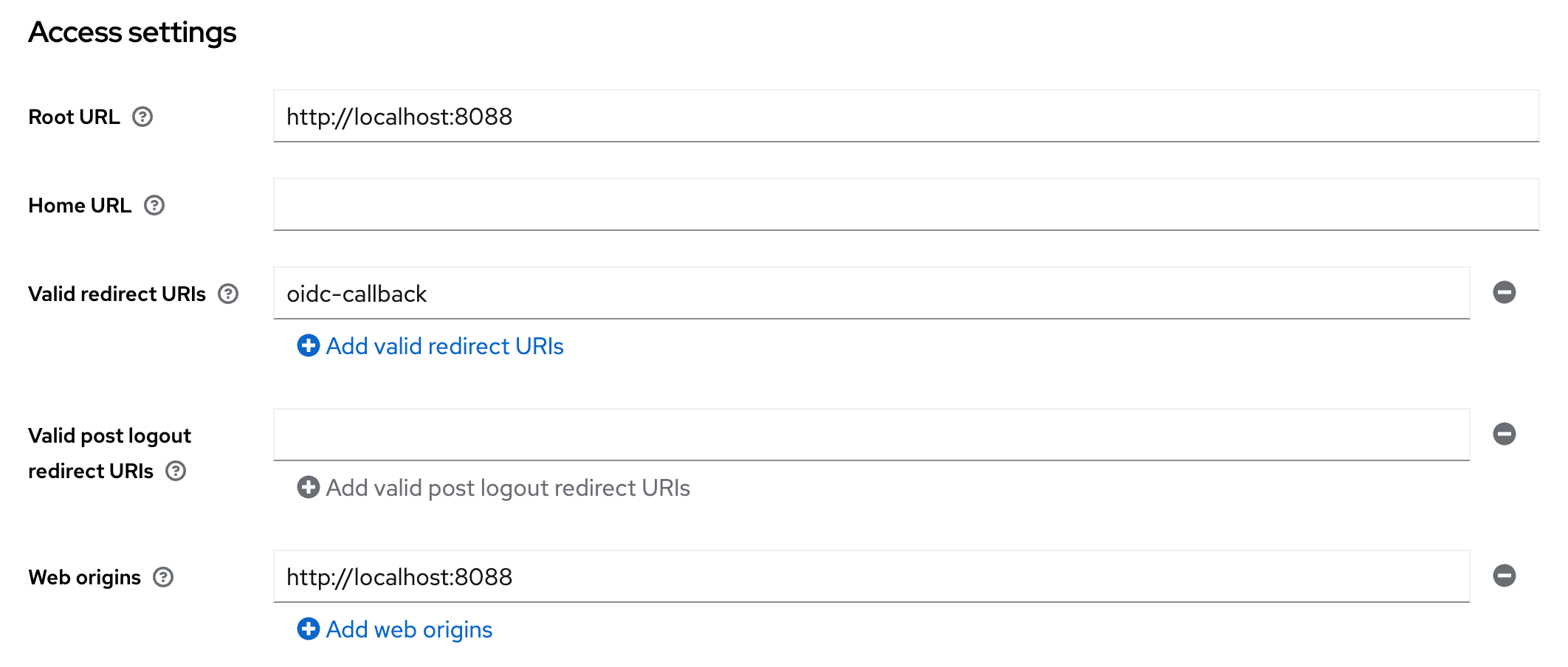
Keycloak client Access settings
- Enable PKCE:
- Click on Advanced tab. Further click on Advanced Settings on the right side.
- Set the option
Proof Key for Code Exchange Code Challenge MethodtoS256.
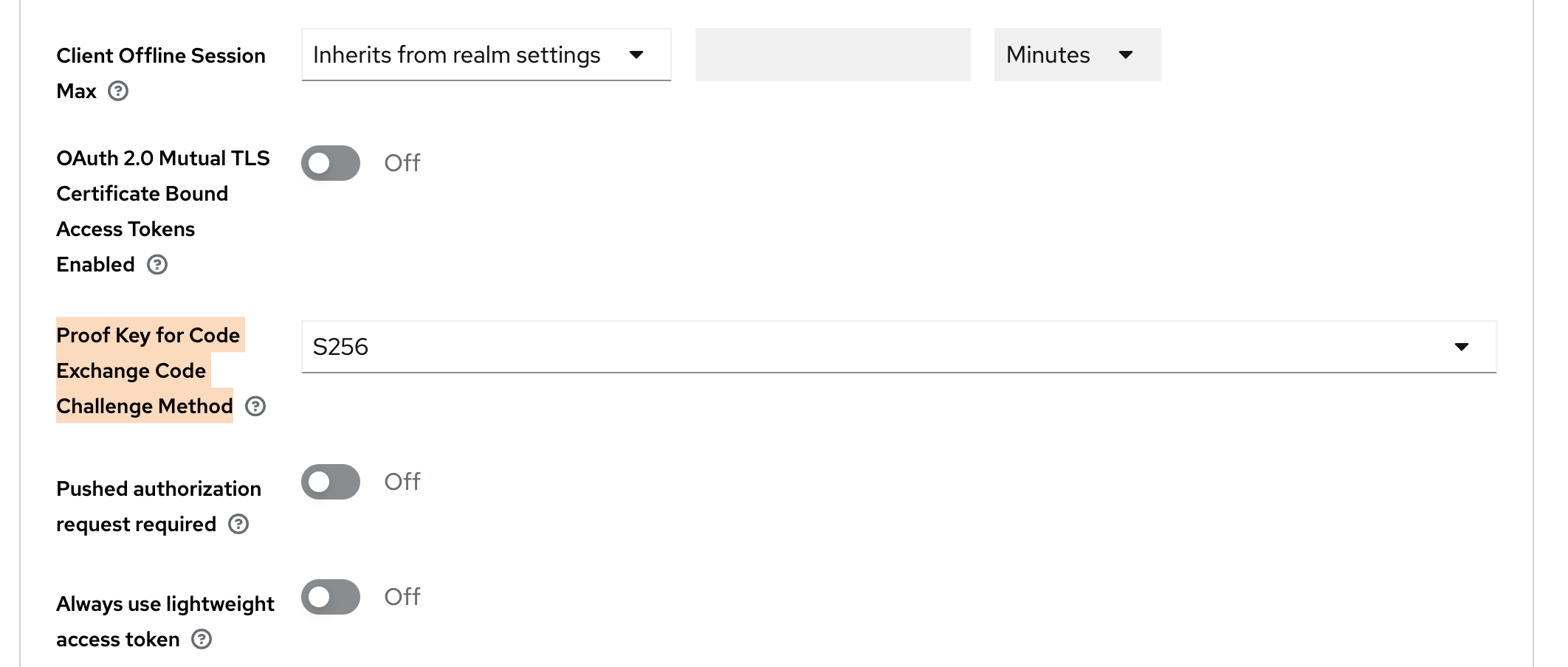
Keycloak advanced client settings for PKCE
Everything else can be left to the default.
Do not forget to create users in your realm before testing.
Usage
If the auth.oidc config key is correctly set and the required environment variables
are available, an additional button for OpenID Connect Login is shown below the
login mask. If pressed this button will redirect to the OpenID Connect login.
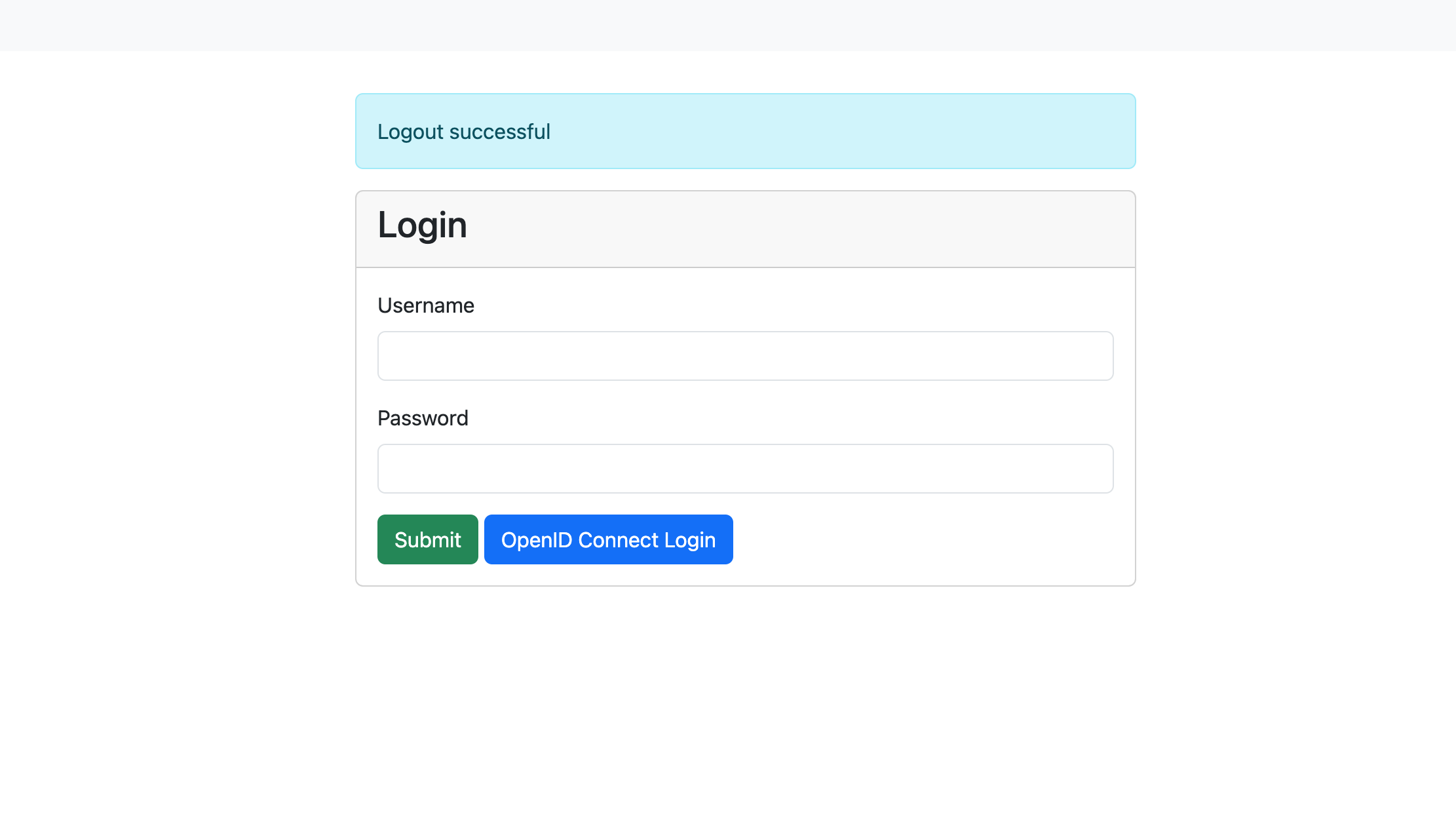
Login mask with OpenID Connect enabled
Info
If you are using a modified login.tmpl in ./var/. check for the following condition, else, add it below the submit button:
[... CONTENT ...]
  <button type="submit" class="btn btn-success">Submit</button>
  {{if .Infos.hasOpenIDConnect}}
      <a class="btn btn-primary" href="/oidc-login">OpenID Connect Login</a>
  {{end}}
[...CONTENT...]
JWT token authentication
JSON web tokens are a standardized method for representing encoded claims securely between two parties. In ClusterCockpit they are used for authorization to use REST APIs as well as a method to delegate authentication to a third party. This section only describes JWT based authentication for initiating a user session.
Two variants exist:
- [1] Session Authenticator: Passes JWT token in the HTTP header Authorization using the Bearer prefix or using the query key login-token.
Example for Authorization header:
Authorization: Bearer S0VLU0UhIExFQ0tFUiEK
Example for query key used as form action in external application:
<form method="post" action="$CCROOT/jwt-login?login-token=S0VLU0UhIExFQ0tFUiEK" target="_blank">
  <button type="submit">Access CC</button>
</form>
- [2] Cookie Session Authenticator: Reads the JWT token from a named cookie provided by the request, which is deleted after the session was successfully initiated. This is a more secure alternative to the standard header based solution.
JWT Configuration
- [0] Basic required configuration:
In order to enable JWT based transactions generally, the following has to be true:
- The
jwtsJSON object has to exist withinconfig.json, even if no other attribute is set within.- We recommend to set
max-ageattribute: Specifies for how long a JWT token shall be valid, defined as a string parsable bytime.ParseDuration(). - This will only affect JWTs generated by ClusterCockpit, e.g. for the use with REST-API endpoints.
- We recommend to set
In addition, the the following environment variables are used:
JWT_PRIVATE_KEY: The applications own private key to be used with JWT transactions. Required for cookie based logins and REST-API communication.JWT_PUBLIC: The applications own public key to be used with JWT transactions. Required for cookie based logins and REST-API communication.[1] Configuration for JWT Session Authenticator:
Compatible signing methods are: HS256, HS512
Only a shared (symmetric) key saved as environment variable CROSS_LOGIN_JWT_HS512_KEY is required.
- [2] Configuration for JWT Cookie Session Authenticator:
Tokens are signed with: Ed25519/EdDSA
To enable JWT authentication via cookie the following set of options are required as attributes of the jwts JSON object:
cookie-name(String): Specifies which cookie should be checked for a JWT token (if no authorization header is present)trusted-issuer(String): Specifies which issuer should be accepted when validating external JWTs (iss-claim)
In addition, the Cookie Session Authenticator method requires the following environment variable:
CROSS_LOGIN_JWT_PUBLIC_KEY: Primary public key for this method, validates identity of tokens received fromtrusted-issuerand must therefore match accordingly.[3] Optional configuration attributes of the
jwtsJSON object, valid for both [1] and [2], are:validate-user(Bool): Load user by username encoded insub-claim from database, including roles, denying login if not matched in database. Ignores all other claims. By design not combinable with bothsync-user-on-loginand/orupdate-user-on-loginoptions.sync-user-on-login(Bool): If user encoded in token does not exist in database, add a new user entry. Does not update user on recurring JWT logins.update-user-on-login(Bool): If user encoded in token does exist in database, update the user entry with all encoded information. Does not add users on first-time JWT login.
JWT Usage
- [1] Usage for JWT Session Authenticator:
The endpoint for initiating JWT logins in ClusterCockpit is /jwt-login
For login with JWT Header, the header has to include the Authorization: Bearer $TOKEN information when accessing this endpoint.
For login with JWT request parameter, the external website has to submit an action with the parameter ?login-token=$TOKEN (See example above).
In both cases, the JWT should contain the following parameters:
sub: The subject, in this case this is the username. Will be used for user matching ifvalidate-useris set.exp: Expiration in Unix epoch time. Can be small as the token is only used during login.name: The full name of the person assigned to this account. Will be used to update user table.roles: String array with roles of user.projects: [Optional] String array with projects of user. Relevant if user hasmanager-role.[2] Usage for JWT Cookie Session Authenticator:
The token must be set within a cookie with a name matching the configured cookie-name.
The JWT should then contain the following parameters:
sub: The subject, in this case this is the username. Will be used for user matching ifvalidate-useris set.exp: Expiration in Unix epoch time. Can be small as the token is only used during login.name: The full name of the person assigned to this account. Will be used to update user table.roles: String array with roles of user.
6 - Job Archive Handbook
All you need to know about the ClusterCockpit Job Archive
The job archive specifies an exchange format for job meta and performance metric data. It consists of two parts:
- a Json file format
- a Directory hierarchy / Key specification
By using an open, portable and simple specification based on JSON objects it is possible to exchange job performance data for research and analysis purposes as well as use it as a robust way for archiving job performance data.
The current release supports new SQLite and S3 object store based job archive backends. Those are still experimental and for production we still recommend to use the proven file based job archive. One major disadvantage of the file based job archive backend is that for large job counts it will consume a lot of inodes.
Trying the new job-archive backends
We provide the tool archive-manager that allows to convert between different
job-archive formats. This allows to convert your existing file-based job-archive
into either a SQLite or S3 variant. Please be aware that for large archives this
may take a long time. You can find details about how to use this tool in the
archive-manager reference
documentation.
Specification for file path / key
To manage the number of directories within a single directory a tree approach is used splitting the integer job ID. The job id is split in junks of 1000 each. Usually 2 layers of directories is sufficient but the concept can be used for an arbitrary number of layers.
For a 2 layer schema this can be achieved with (code example in Perl):
$level1 = $jobID/1000;
$level2 = $jobID%1000;
$dstPath = sprintf("%s/%s/%d/%03d", $trunk, $destdir, $level1, $level2);
While for the SQLite and S3 object store based backend the systematic to introduce layers is obsolete we kept it to keep the naming consistent. This means what is the path in case of the file based backend is used as a object key and column value there.
Example
For the job ID 1034871 on cluster large with start time 1768978339 the key
is ./large/1034/871/1768978339.
Create a Job archive from scratch
In case you place the job-archive in the ./var folder create the folder with:
mkdir -p ./var/job-archive
The job-archive is versioned, the current version is documented in the Release Notes. Currently you have to create the version file manually when initializing the job-archive:
echo 3 > ./var/job-archive/version.txt
Directory layout
ClusterCockpit supports multiple clusters, for each cluster you need to create a
directory named after the cluster and a cluster.json file specifying the metric
list and hardware partitions within the clusters. Hardware partitions are
subsets of a cluster with homogeneous hardware (CPU type, memory capacity, GPUs)
that are called subclusters in ClusterCockpit.
For above configuration the job archive directory hierarchy looks like the following:
./var/job-archive/
     version.txt
     fritz/
        cluster.json
     alex/
        cluster.json
     woody/
        cluster.json
Note
Thecluster.json files currently have to be provided and maintained by the administrator!You find help how-to create a cluster.json file in the How to create a
cluster.json file guide.
Json file format
Overview
Every cluster must be configured in a cluster.json file.
The job data consists of two files:
meta.json: Contains job meta information and job statistics.data.json: Contains complete job data with time series
The description of the json format specification is available as [[json
schema|https://json-schema.org/]] format file. The latest version of the json
schema is part of the cc-backend source tree. For external reference it is
also available in a separate repository.
Specification cluster.json
The json schema specification in its raw format is available at the cc-lib GitHub repository. A variant rendered for better readability is found in the references.
Specification meta.json
The json schema specification in its raw format is available at the cc-lib GitHub repository. A variant rendered for better readability is found in the references.
Specification data.json
The json schema specification in its raw format is available at the cc-lib GitHub repository. A variant rendered for better readability is found in the references.
Metric time series data is stored for a fixed time step. The time step is set
per metric. If no value is available for a metric time series data timestamp
null is entered.
7 - Schemas
ClusterCockpit Schema References
ClusterCockpit Schema References for
- Application Configuration
- Cluster Configuration
- Job Data
- Job Statistics
- Units
- Job Archive Job Metadata
- Job Archive Job Metricdata
The schemas in their raw form can be found in the ClusterCockpit GitHub repository.
Manual Updates
Changes to the original JSON schemas found in the repository are not automatically rendered in this reference documentation.The raw JSON schemas are parsed and rendered for better readability using the json-schema-for-humans utility.Last Update: 04.12.20247.1 - Application Config Schema
ClusterCockpit Application Config Schema Reference
A detailed description of each of the application configuration options can be found in the config documentation.
The following schema in its raw form can be found in the ClusterCockpit GitHub repository.
Manual Updates
Changes to the original JSON schema found in the repository are not automatically rendered in this reference documentation.Last Update: 04.12.2024cc-backend configuration file schema
- 1. Property
cc-backend configuration file schema > addr - 2. Property
cc-backend configuration file schema > apiAllowedIPs - 3. Property
cc-backend configuration file schema > user - 4. Property
cc-backend configuration file schema > group - 5. Property
cc-backend configuration file schema > disable-authentication - 6. Property
cc-backend configuration file schema > embed-static-files - 7. Property
cc-backend configuration file schema > static-files - 8. Property
cc-backend configuration file schema > db-driver - 9. Property
cc-backend configuration file schema > db - 10. Property
cc-backend configuration file schema > archive- 10.1. Property
cc-backend configuration file schema > archive > kind - 10.2. Property
cc-backend configuration file schema > archive > path - 10.3. Property
cc-backend configuration file schema > archive > compression - 10.4. Property
cc-backend configuration file schema > archive > retention- 10.4.1. Property
cc-backend configuration file schema > archive > retention > policy - 10.4.2. Property
cc-backend configuration file schema > archive > retention > include-db - 10.4.3b. Property
cc-backend configuration file schema > archive > retention > omit-tagged - 10.4.3. Property
cc-backend configuration file schema > archive > retention > age - 10.4.4. Property
cc-backend configuration file schema > archive > retention > location
- 10.4.1. Property
- 10.1. Property
- 11. Property
cc-backend configuration file schema > disable-archive - 12. Property
cc-backend configuration file schema > validate - 13. Property
cc-backend configuration file schema > session-max-age - 14. Property
cc-backend configuration file schema > https-cert-file - 15. Property
cc-backend configuration file schema > https-key-file - 16. Property
cc-backend configuration file schema > redirect-http-to - 17. Property
cc-backend configuration file schema > stop-jobs-exceeding-walltime - 18. Property
cc-backend configuration file schema > short-running-jobs-duration - 19. Property
cc-backend configuration file schema > emission-constant - 20. Property
cc-backend configuration file schema > cron-frequency - 21. Property
cc-backend configuration file schema > enable-resampling - 22. Property
cc-backend configuration file schema > jwts- 22.1. Property
cc-backend configuration file schema > jwts > max-age - 22.2. Property
cc-backend configuration file schema > jwts > cookieName - 22.3. Property
cc-backend configuration file schema > jwts > validateUser - 22.4. Property
cc-backend configuration file schema > jwts > trustedIssuer - 22.5. Property
cc-backend configuration file schema > jwts > syncUserOnLogin
- 22.1. Property
- 23. Property
cc-backend configuration file schema > oidc - 24. Property
cc-backend configuration file schema > ldap- 24.1. Property
cc-backend configuration file schema > ldap > url - 24.2. Property
cc-backend configuration file schema > ldap > user_base - 24.3. Property
cc-backend configuration file schema > ldap > search_dn - 24.4. Property
cc-backend configuration file schema > ldap > user_bind - 24.5. Property
cc-backend configuration file schema > ldap > user_filter - 24.6. Property
cc-backend configuration file schema > ldap > username_attr - 24.7. Property
cc-backend configuration file schema > ldap > sync_interval - 24.8. Property
cc-backend configuration file schema > ldap > sync_del_old_users - 24.9. Property
cc-backend configuration file schema > ldap > syncUserOnLogin
- 24.1. Property
- 25. Property
cc-backend configuration file schema > clusters- 25.1. cc-backend configuration file schema > clusters > clusters items
- 25.1.1. Property
cc-backend configuration file schema > clusters > clusters items > name - 25.1.2. Property
cc-backend configuration file schema > clusters > clusters items > metricDataRepository- 25.1.2.1. Property
cc-backend configuration file schema > clusters > clusters items > metricDataRepository > kind - 25.1.2.2. Property
cc-backend configuration file schema > clusters > clusters items > metricDataRepository > url - 25.1.2.3. Property
cc-backend configuration file schema > clusters > clusters items > metricDataRepository > token
- 25.1.2.1. Property
- 25.1.3. Property
cc-backend configuration file schema > clusters > clusters items > filterRanges- 25.1.3.1. Property
cc-backend configuration file schema > clusters > clusters items > filterRanges > numNodes - 25.1.3.2. Property
cc-backend configuration file schema > clusters > clusters items > filterRanges > duration - 25.1.3.3. Property
cc-backend configuration file schema > clusters > clusters items > filterRanges > startTime
- 25.1.3.1. Property
- 25.1.1. Property
- 25.1. cc-backend configuration file schema > clusters > clusters items
- 26. Property
cc-backend configuration file schema > ui-defaults- 26.1. Property
cc-backend configuration file schema > ui-defaults > plot_general_colorBackground - 26.2. Property
cc-backend configuration file schema > ui-defaults > plot_general_lineWidth - 26.3. Property
cc-backend configuration file schema > ui-defaults > plot_list_jobsPerPage - 26.4. Property
cc-backend configuration file schema > ui-defaults > plot_view_plotsPerRow - 26.5. Property
cc-backend configuration file schema > ui-defaults > plot_view_showPolarplot - 26.6. Property
cc-backend configuration file schema > ui-defaults > plot_view_showRoofline - 26.7. Property
cc-backend configuration file schema > ui-defaults > plot_view_showStatTable - 26.8. Property
cc-backend configuration file schema > ui-defaults > system_view_selectedMetric - 26.9. Property
cc-backend configuration file schema > ui-defaults > job_view_showFootprint - 26.10. Property
cc-backend configuration file schema > ui-defaults > job_list_usePaging - 26.11. Property
cc-backend configuration file schema > ui-defaults > analysis_view_histogramMetrics - 26.12. Property
cc-backend configuration file schema > ui-defaults > analysis_view_scatterPlotMetrics - 26.13. Property
cc-backend configuration file schema > ui-defaults > job_view_nodestats_selectedMetrics - 26.14. Property
cc-backend configuration file schema > ui-defaults > job_view_selectedMetrics - 26.15. Property
cc-backend configuration file schema > ui-defaults > plot_general_colorscheme - 26.16. Property
cc-backend configuration file schema > ui-defaults > plot_list_selectedMetrics
- 26.1. Property
Title: cc-backend configuration file schema
| Type | object |
| Required | No |
| Additional properties | Any type allowed |
| Property | Pattern | Type | Deprecated | Definition | Title/Description |
|---|---|---|---|---|---|
| - addr | No | string | No | - | Address where the http (or https) server will listen on (for example: ’localhost:80’). |
| - apiAllowedIPs | No | array of string | No | - | Addresses from which secured API endpoints can be reached |
| - user | No | string | No | - | Drop root permissions once .env was read and the port was taken. Only applicable if using privileged port. |
| - group | No | string | No | - | Drop root permissions once .env was read and the port was taken. Only applicable if using privileged port. |
| - disable-authentication | No | boolean | No | - | Disable authentication (for everything: API, Web-UI, …). |
| - embed-static-files | No | boolean | No | - | If all files in `web/frontend/public` should be served from within the binary itself (they are embedded) or not. |
| - static-files | No | string | No | - | Folder where static assets can be found, if embed-static-files is false. |
| - db-driver | No | enum (of string) | No | - | sqlite3 or mysql (mysql will work for mariadb as well). |
| - db | No | string | No | - | For sqlite3 a filename, for mysql a DSN in this format: https://github.com/go-sql-driver/mysql#dsn-data-source-name (Without query parameters!). |
| - archive | No | object | No | - | Configuration keys for job-archive |
| - disable-archive | No | boolean | No | - | Keep all metric data in the metric data repositories, do not write to the job-archive. |
| - validate | No | boolean | No | - | Validate all input json documents against json schema. |
| - session-max-age | No | string | No | - | Specifies for how long a session shall be valid as a string parsable by time.ParseDuration(). If 0 or empty, the session/token does not expire! |
| - https-cert-file | No | string | No | - | Filepath to SSL certificate. If also https-key-file is set use HTTPS using those certificates. |
| - https-key-file | No | string | No | - | Filepath to SSL key file. If also https-cert-file is set use HTTPS using those certificates. |
| - redirect-http-to | No | string | No | - | If not the empty string and addr does not end in :80, redirect every request incoming at port 80 to that url. |
| - stop-jobs-exceeding-walltime | No | integer | No | - | If not zero, automatically mark jobs as stopped running X seconds longer than their walltime. Only applies if walltime is set for job. |
| - short-running-jobs-duration | No | integer | No | - | Do not show running jobs shorter than X seconds. |
| - emission-constant | No | integer | No | - | . |
| - cron-frequency | No | object | No | - | Frequency of cron job workers. |
| - enable-resampling | No | object | No | - | Enable dynamic zoom in frontend metric plots. |
| + jwts | No | object | No | - | For JWT token authentication. |
| - oidc | No | object | No | - | - |
| - ldap | No | object | No | - | For LDAP Authentication and user synchronisation. |
| + clusters | No | array of object | No | - | Configuration for the clusters to be displayed. |
| - ui-defaults | No | object | No | - | Default configuration for web UI |
1. Property cc-backend configuration file schema > addr
| Type | string |
| Required | No |
Description: Address where the http (or https) server will listen on (for example: ’localhost:80’).
2. Property cc-backend configuration file schema > apiAllowedIPs
| Type | array of string |
| Required | No |
Description: Addresses from which secured API endpoints can be reached
| Array restrictions | |
|---|---|
| Min items | N/A |
| Max items | N/A |
| Items unicity | False |
| Additional items | False |
| Tuple validation | See below |
| Each item of this array must be | Description |
|---|---|
| apiAllowedIPs items | - |
2.1. cc-backend configuration file schema > apiAllowedIPs > apiAllowedIPs items
| Type | string |
| Required | No |
3. Property cc-backend configuration file schema > user
| Type | string |
| Required | No |
Description: Drop root permissions once .env was read and the port was taken. Only applicable if using privileged port.
4. Property cc-backend configuration file schema > group
| Type | string |
| Required | No |
Description: Drop root permissions once .env was read and the port was taken. Only applicable if using privileged port.
5. Property cc-backend configuration file schema > disable-authentication
| Type | boolean |
| Required | No |
Description: Disable authentication (for everything: API, Web-UI, …).
6. Property cc-backend configuration file schema > embed-static-files
| Type | boolean |
| Required | No |
Description: If all files in web/frontend/public should be served from within the binary itself (they are embedded) or not.
7. Property cc-backend configuration file schema > static-files
| Type | string |
| Required | No |
Description: Folder where static assets can be found, if embed-static-files is false.
8. Property cc-backend configuration file schema > db-driver
| Type | enum (of string) |
| Required | No |
Description: sqlite3 or mysql (mysql will work for mariadb as well).
Must be one of:
- “sqlite3”
- “mysql”
9. Property cc-backend configuration file schema > db
| Type | string |
| Required | No |
Description: For sqlite3 a filename, for mysql a DSN in this format: https://github.com/go-sql-driver/mysql#dsn-data-source-name (Without query parameters!).
10. Property cc-backend configuration file schema > archive
| Type | object |
| Required | No |
| Additional properties | Any type allowed |
Description: Configuration keys for job-archive
| Property | Pattern | Type | Deprecated | Definition | Title/Description |
|---|---|---|---|---|---|
| + kind | No | enum (of string) | No | - | Backend type for job-archive |
| - path | No | string | No | - | Path to job archive for file backend |
| - compression | No | integer | No | - | Setup automatic compression for jobs older than number of days |
| - retention | No | object | No | - | Configuration keys for retention |
10.1. Property cc-backend configuration file schema > archive > kind
| Type | enum (of string) |
| Required | Yes |
Description: Backend type for job-archive
Must be one of:
- “file”
- “s3”
10.2. Property cc-backend configuration file schema > archive > path
| Type | string |
| Required | No |
Description: Path to job archive for file backend
10.3. Property cc-backend configuration file schema > archive > compression
| Type | integer |
| Required | No |
Description: Setup automatic compression for jobs older than number of days
10.4. Property cc-backend configuration file schema > archive > retention
| Type | object |
| Required | No |
| Additional properties | Any type allowed |
Description: Configuration keys for retention
| Property | Pattern | Type | Deprecated | Definition | Title/Description |
|---|---|---|---|---|---|
| + policy | No | enum (of string) | No | - | Retention policy |
| - include-db | No | boolean | No | - | Also remove jobs from database |
| - omit-tagged | No | enum (of string) | No | - | Skip tagged jobs from retention |
| - age | No | integer | No | - | Act on jobs with startTime older than age (in days) |
| - location | No | string | No | - | The target directory for retention. Only applicable for retention move. |
10.4.1. Property cc-backend configuration file schema > archive > retention > policy
| Type | enum (of string) |
| Required | Yes |
Description: Retention policy
Must be one of:
- “none”
- “delete”
- “move”
10.4.2. Property cc-backend configuration file schema > archive > retention > include-db
| Type | boolean |
| Required | No |
Description: Also remove jobs from database
10.4.3b. Property cc-backend configuration file schema > archive > retention > omit-tagged
| Type | enum (of string) |
| Required | No |
Description: Control which tagged jobs are excluded from the retention policy.
Must be one of:
"none"— apply retention to all jobs (default)"all"— skip any job that has at least one tag"user"— skip jobs with user-created tags; auto-tagger tags of typeapporjobClassare not considered user tags
10.4.3. Property cc-backend configuration file schema > archive > retention > age
| Type | integer |
| Required | No |
Description: Act on jobs with startTime older than age (in days)
10.4.4. Property cc-backend configuration file schema > archive > retention > location
| Type | string |
| Required | No |
Description: The target directory for retention. Only applicable for retention move.
11. Property cc-backend configuration file schema > disable-archive
| Type | boolean |
| Required | No |
Description: Keep all metric data in the metric data repositories, do not write to the job-archive.
12. Property cc-backend configuration file schema > validate
| Type | boolean |
| Required | No |
Description: Validate all input json documents against json schema.
13. Property cc-backend configuration file schema > session-max-age
| Type | string |
| Required | No |
Description: Specifies for how long a session shall be valid as a string parsable by time.ParseDuration(). If 0 or empty, the session/token does not expire!
14. Property cc-backend configuration file schema > https-cert-file
| Type | string |
| Required | No |
Description: Filepath to SSL certificate. If also https-key-file is set use HTTPS using those certificates.
15. Property cc-backend configuration file schema > https-key-file
| Type | string |
| Required | No |
Description: Filepath to SSL key file. If also https-cert-file is set use HTTPS using those certificates.
16. Property cc-backend configuration file schema > redirect-http-to
| Type | string |
| Required | No |
Description: If not the empty string and addr does not end in :80, redirect every request incoming at port 80 to that url.
17. Property cc-backend configuration file schema > stop-jobs-exceeding-walltime
| Type | integer |
| Required | No |
Description: If not zero, automatically mark jobs as stopped running X seconds longer than their walltime. Only applies if walltime is set for job.
18. Property cc-backend configuration file schema > short-running-jobs-duration
| Type | integer |
| Required | No |
Description: Do not show running jobs shorter than X seconds.
19. Property cc-backend configuration file schema > emission-constant
| Type | integer |
| Required | No |
Description: .
20. Property cc-backend configuration file schema > cron-frequency
| Type | object |
| Required | No |
| Additional properties | Any type allowed |
Description: Frequency of cron job workers.
| Property | Pattern | Type | Deprecated | Definition | Title/Description |
|---|---|---|---|---|---|
| - duration-worker | No | string | No | - | Duration Update Worker [Defaults to ‘5m’] |
| - footprint-worker | No | string | No | - | Metric-Footprint Update Worker [Defaults to ‘10m’] |
20.1. Property cc-backend configuration file schema > cron-frequency > duration-worker
| Type | string |
| Required | No |
Description: Duration Update Worker [Defaults to ‘5m’]
20.2. Property cc-backend configuration file schema > cron-frequency > footprint-worker
| Type | string |
| Required | No |
Description: Metric-Footprint Update Worker [Defaults to ‘10m’]
21. Property cc-backend configuration file schema > enable-resampling
| Type | object |
| Required | No |
| Additional properties | Any type allowed |
Description: Enable dynamic zoom in frontend metric plots.
| Property | Pattern | Type | Deprecated | Definition | Title/Description |
|---|---|---|---|---|---|
| + trigger | No | integer | No | - | Trigger next zoom level at less than this many visible datapoints. |
| + resolutions | No | array of integer | No | - | Array of resampling target resolutions, in seconds. |
21.1. Property cc-backend configuration file schema > enable-resampling > trigger
| Type | integer |
| Required | Yes |
Description: Trigger next zoom level at less than this many visible datapoints.
21.2. Property cc-backend configuration file schema > enable-resampling > resolutions
| Type | array of integer |
| Required | Yes |
Description: Array of resampling target resolutions, in seconds.
| Array restrictions | |
|---|---|
| Min items | N/A |
| Max items | N/A |
| Items unicity | False |
| Additional items | False |
| Tuple validation | See below |
| Each item of this array must be | Description |
|---|---|
| resolutions items | - |
21.2.1. cc-backend configuration file schema > enable-resampling > resolutions > resolutions items
| Type | integer |
| Required | No |
22. Property cc-backend configuration file schema > jwts
| Type | object |
| Required | Yes |
| Additional properties | Any type allowed |
Description: For JWT token authentication.
| Property | Pattern | Type | Deprecated | Definition | Title/Description |
|---|---|---|---|---|---|
| + max-age | No | string | No | - | Configure how long a token is valid. As string parsable by time.ParseDuration() |
| - cookieName | No | string | No | - | Cookie that should be checked for a JWT token. |
| - validateUser | No | boolean | No | - | Deny login for users not in database (but defined in JWT). Overwrite roles in JWT with database roles. |
| - trustedIssuer | No | string | No | - | Issuer that should be accepted when validating external JWTs |
| - syncUserOnLogin | No | boolean | No | - | Add non-existent user to DB at login attempt with values provided in JWT. |
22.1. Property cc-backend configuration file schema > jwts > max-age
| Type | string |
| Required | Yes |
Description: Configure how long a token is valid. As string parsable by time.ParseDuration()
22.2. Property cc-backend configuration file schema > jwts > cookieName
| Type | string |
| Required | No |
Description: Cookie that should be checked for a JWT token.
22.3. Property cc-backend configuration file schema > jwts > validateUser
| Type | boolean |
| Required | No |
Description: Deny login for users not in database (but defined in JWT). Overwrite roles in JWT with database roles.
22.4. Property cc-backend configuration file schema > jwts > trustedIssuer
| Type | string |
| Required | No |
Description: Issuer that should be accepted when validating external JWTs
22.5. Property cc-backend configuration file schema > jwts > syncUserOnLogin
| Type | boolean |
| Required | No |
Description: Add non-existent user to DB at login attempt with values provided in JWT.
23. Property cc-backend configuration file schema > oidc
| Type | object |
| Required | No |
| Additional properties | Any type allowed |
23.1. The following properties are required
- provider
24. Property cc-backend configuration file schema > ldap
| Type | object |
| Required | No |
| Additional properties | Any type allowed |
Description: For LDAP Authentication and user synchronisation.
| Property | Pattern | Type | Deprecated | Definition | Title/Description |
|---|---|---|---|---|---|
| + url | No | string | No | - | URL of LDAP directory server. |
| + user_base | No | string | No | - | Base DN of user tree root. |
| + search_dn | No | string | No | - | DN for authenticating LDAP admin account with general read rights. |
| + user_bind | No | string | No | - | Expression used to authenticate users via LDAP bind. Must contain uid={username}. |
| + user_filter | No | string | No | - | Filter to extract users for syncing. |
| - username_attr | No | string | No | - | Attribute with full username. Default: gecos |
| - sync_interval | No | string | No | - | Interval used for syncing local user table with LDAP directory. Parsed using time.ParseDuration. |
| - sync_del_old_users | No | boolean | No | - | Delete obsolete users in database. |
| - syncUserOnLogin | No | boolean | No | - | Add non-existent user to DB at login attempt if user exists in Ldap directory |
24.1. Property cc-backend configuration file schema > ldap > url
| Type | string |
| Required | Yes |
Description: URL of LDAP directory server.
24.2. Property cc-backend configuration file schema > ldap > user_base
| Type | string |
| Required | Yes |
Description: Base DN of user tree root.
24.3. Property cc-backend configuration file schema > ldap > search_dn
| Type | string |
| Required | Yes |
Description: DN for authenticating LDAP admin account with general read rights.
24.4. Property cc-backend configuration file schema > ldap > user_bind
| Type | string |
| Required | Yes |
Description: Expression used to authenticate users via LDAP bind. Must contain uid={username}.
24.5. Property cc-backend configuration file schema > ldap > user_filter
| Type | string |
| Required | Yes |
Description: Filter to extract users for syncing.
24.6. Property cc-backend configuration file schema > ldap > username_attr
| Type | string |
| Required | No |
Description: Attribute with full username. Default: gecos
24.7. Property cc-backend configuration file schema > ldap > sync_interval
| Type | string |
| Required | No |
Description: Interval used for syncing local user table with LDAP directory. Parsed using time.ParseDuration.
24.8. Property cc-backend configuration file schema > ldap > sync_del_old_users
| Type | boolean |
| Required | No |
Description: Delete obsolete users in database.
24.9. Property cc-backend configuration file schema > ldap > syncUserOnLogin
| Type | boolean |
| Required | No |
Description: Add non-existent user to DB at login attempt if user exists in Ldap directory
25. Property cc-backend configuration file schema > clusters
| Type | array of object |
| Required | Yes |
Description: Configuration for the clusters to be displayed.
| Array restrictions | |
|---|---|
| Min items | N/A |
| Max items | N/A |
| Items unicity | False |
| Additional items | False |
| Tuple validation | See below |
| Each item of this array must be | Description |
|---|---|
| clusters items | - |
25.1. cc-backend configuration file schema > clusters > clusters items
| Type | object |
| Required | No |
| Additional properties | Any type allowed |
| Property | Pattern | Type | Deprecated | Definition | Title/Description |
|---|---|---|---|---|---|
| + name | No | string | No | - | The name of the cluster. |
| + metricDataRepository | No | object | No | - | Type of the metric data repository for this cluster |
| + filterRanges | No | object | No | - | This option controls the slider ranges for the UI controls of numNodes, duration, and startTime. |
25.1.1. Property cc-backend configuration file schema > clusters > clusters items > name
| Type | string |
| Required | Yes |
Description: The name of the cluster.
25.1.2. Property cc-backend configuration file schema > clusters > clusters items > metricDataRepository
| Type | object |
| Required | Yes |
| Additional properties | Any type allowed |
Description: Type of the metric data repository for this cluster
| Property | Pattern | Type | Deprecated | Definition | Title/Description |
|---|---|---|---|---|---|
| + kind | No | enum (of string) | No | - | - |
| + url | No | string | No | - | - |
| - token | No | string | No | - | - |
25.1.2.1. Property cc-backend configuration file schema > clusters > clusters items > metricDataRepository > kind
| Type | enum (of string) |
| Required | Yes |
Must be one of:
- “influxdb”
- “prometheus”
- “cc-metric-store”
- “test”
25.1.2.2. Property cc-backend configuration file schema > clusters > clusters items > metricDataRepository > url
| Type | string |
| Required | Yes |
25.1.2.3. Property cc-backend configuration file schema > clusters > clusters items > metricDataRepository > token
| Type | string |
| Required | No |
25.1.3. Property cc-backend configuration file schema > clusters > clusters items > filterRanges
| Type | object |
| Required | Yes |
| Additional properties | Any type allowed |
Description: This option controls the slider ranges for the UI controls of numNodes, duration, and startTime.
| Property | Pattern | Type | Deprecated | Definition | Title/Description |
|---|---|---|---|---|---|
| + numNodes | No | object | No | - | UI slider range for number of nodes |
| + duration | No | object | No | - | UI slider range for duration |
| + startTime | No | object | No | - | UI slider range for start time |
25.1.3.1. Property cc-backend configuration file schema > clusters > clusters items > filterRanges > numNodes
| Type | object |
| Required | Yes |
| Additional properties | Any type allowed |
Description: UI slider range for number of nodes
| Property | Pattern | Type | Deprecated | Definition | Title/Description |
|---|---|---|---|---|---|
| + from | No | integer | No | - | - |
| + to | No | integer | No | - | - |
25.1.3.1.1. Property cc-backend configuration file schema > clusters > clusters items > filterRanges > numNodes > from
| Type | integer |
| Required | Yes |
25.1.3.1.2. Property cc-backend configuration file schema > clusters > clusters items > filterRanges > numNodes > to
| Type | integer |
| Required | Yes |
25.1.3.2. Property cc-backend configuration file schema > clusters > clusters items > filterRanges > duration
| Type | object |
| Required | Yes |
| Additional properties | Any type allowed |
Description: UI slider range for duration
| Property | Pattern | Type | Deprecated | Definition | Title/Description |
|---|---|---|---|---|---|
| + from | No | integer | No | - | - |
| + to | No | integer | No | - | - |
25.1.3.2.1. Property cc-backend configuration file schema > clusters > clusters items > filterRanges > duration > from
| Type | integer |
| Required | Yes |
25.1.3.2.2. Property cc-backend configuration file schema > clusters > clusters items > filterRanges > duration > to
| Type | integer |
| Required | Yes |
25.1.3.3. Property cc-backend configuration file schema > clusters > clusters items > filterRanges > startTime
| Type | object |
| Required | Yes |
| Additional properties | Any type allowed |
Description: UI slider range for start time
| Property | Pattern | Type | Deprecated | Definition | Title/Description |
|---|---|---|---|---|---|
| + from | No | string | No | - | - |
| + to | No | null | No | - | - |
25.1.3.3.1. Property cc-backend configuration file schema > clusters > clusters items > filterRanges > startTime > from
| Type | string |
| Required | Yes |
| Format | date-time |
25.1.3.3.2. Property cc-backend configuration file schema > clusters > clusters items > filterRanges > startTime > to
| Type | null |
| Required | Yes |
26. Property cc-backend configuration file schema > ui-defaults
| Type | object |
| Required | No |
| Additional properties | Any type allowed |
Description: Default configuration for web UI
| Property | Pattern | Type | Deprecated | Definition | Title/Description |
|---|---|---|---|---|---|
| + plot_general_colorBackground | No | boolean | No | - | Color plot background according to job average threshold limits |
| + plot_general_lineWidth | No | integer | No | - | Initial linewidth |
| + plot_list_jobsPerPage | No | integer | No | - | Jobs shown per page in job lists |
| + plot_view_plotsPerRow | No | integer | No | - | Number of plots per row in single job view |
| + plot_view_showPolarplot | No | boolean | No | - | Option to toggle polar plot in single job view |
| + plot_view_showRoofline | No | boolean | No | - | Option to toggle roofline plot in single job view |
| + plot_view_showStatTable | No | boolean | No | - | Option to toggle the node statistic table in single job view |
| + system_view_selectedMetric | No | string | No | - | Initial metric shown in system view |
| + job_view_showFootprint | No | boolean | No | - | Option to toggle footprint ui in single job view |
| + job_list_usePaging | No | boolean | No | - | Option to switch from continous scroll to paging |
| + analysis_view_histogramMetrics | No | array of string | No | - | Metrics to show as job count histograms in analysis view |
| + analysis_view_scatterPlotMetrics | No | array of array | No | - | Initial scatter plto configuration in analysis view |
| + job_view_nodestats_selectedMetrics | No | array of string | No | - | Initial metrics shown in node statistics table of single job view |
| + job_view_selectedMetrics | No | array of string | No | - | - |
| + plot_general_colorscheme | No | array of string | No | - | Initial color scheme |
| + plot_list_selectedMetrics | No | array of string | No | - | Initial metric plots shown in jobs lists |
26.1. Property cc-backend configuration file schema > ui-defaults > plot_general_colorBackground
| Type | boolean |
| Required | Yes |
Description: Color plot background according to job average threshold limits
26.2. Property cc-backend configuration file schema > ui-defaults > plot_general_lineWidth
| Type | integer |
| Required | Yes |
Description: Initial linewidth
26.3. Property cc-backend configuration file schema > ui-defaults > plot_list_jobsPerPage
| Type | integer |
| Required | Yes |
Description: Jobs shown per page in job lists
26.4. Property cc-backend configuration file schema > ui-defaults > plot_view_plotsPerRow
| Type | integer |
| Required | Yes |
Description: Number of plots per row in single job view
26.5. Property cc-backend configuration file schema > ui-defaults > plot_view_showPolarplot
| Type | boolean |
| Required | Yes |
Description: Option to toggle polar plot in single job view
26.6. Property cc-backend configuration file schema > ui-defaults > plot_view_showRoofline
| Type | boolean |
| Required | Yes |
Description: Option to toggle roofline plot in single job view
26.7. Property cc-backend configuration file schema > ui-defaults > plot_view_showStatTable
| Type | boolean |
| Required | Yes |
Description: Option to toggle the node statistic table in single job view
26.8. Property cc-backend configuration file schema > ui-defaults > system_view_selectedMetric
| Type | string |
| Required | Yes |
Description: Initial metric shown in system view
26.9. Property cc-backend configuration file schema > ui-defaults > job_view_showFootprint
| Type | boolean |
| Required | Yes |
Description: Option to toggle footprint ui in single job view
26.10. Property cc-backend configuration file schema > ui-defaults > job_list_usePaging
| Type | boolean |
| Required | Yes |
Description: Option to switch from continous scroll to paging
26.11. Property cc-backend configuration file schema > ui-defaults > analysis_view_histogramMetrics
| Type | array of string |
| Required | Yes |
Description: Metrics to show as job count histograms in analysis view
| Array restrictions | |
|---|---|
| Min items | N/A |
| Max items | N/A |
| Items unicity | False |
| Additional items | False |
| Tuple validation | See below |
| Each item of this array must be | Description |
|---|---|
| analysis_view_histogramMetrics items | - |
26.11.1. cc-backend configuration file schema > ui-defaults > analysis_view_histogramMetrics > analysis_view_histogramMetrics items
| Type | string |
| Required | No |
26.12. Property cc-backend configuration file schema > ui-defaults > analysis_view_scatterPlotMetrics
| Type | array of array |
| Required | Yes |
Description: Initial scatter plto configuration in analysis view
| Array restrictions | |
|---|---|
| Min items | N/A |
| Max items | N/A |
| Items unicity | False |
| Additional items | False |
| Tuple validation | See below |
| Each item of this array must be | Description |
|---|---|
| analysis_view_scatterPlotMetrics items | - |
26.12.1. cc-backend configuration file schema > ui-defaults > analysis_view_scatterPlotMetrics > analysis_view_scatterPlotMetrics items
| Type | array of string |
| Required | No |
| Array restrictions | |
|---|---|
| Min items | 1 |
| Max items | N/A |
| Items unicity | False |
| Additional items | False |
| Tuple validation | See below |
| Each item of this array must be | Description |
|---|---|
| analysis_view_scatterPlotMetrics items items | - |
26.12.1.1. cc-backend configuration file schema > ui-defaults > analysis_view_scatterPlotMetrics > analysis_view_scatterPlotMetrics items > analysis_view_scatterPlotMetrics items items
| Type | string |
| Required | No |
26.13. Property cc-backend configuration file schema > ui-defaults > job_view_nodestats_selectedMetrics
| Type | array of string |
| Required | Yes |
Description: Initial metrics shown in node statistics table of single job view
| Array restrictions | |
|---|---|
| Min items | N/A |
| Max items | N/A |
| Items unicity | False |
| Additional items | False |
| Tuple validation | See below |
| Each item of this array must be | Description |
|---|---|
| job_view_nodestats_selectedMetrics items | - |
26.13.1. cc-backend configuration file schema > ui-defaults > job_view_nodestats_selectedMetrics > job_view_nodestats_selectedMetrics items
| Type | string |
| Required | No |
26.14. Property cc-backend configuration file schema > ui-defaults > job_view_selectedMetrics
| Type | array of string |
| Required | Yes |
| Array restrictions | |
|---|---|
| Min items | N/A |
| Max items | N/A |
| Items unicity | False |
| Additional items | False |
| Tuple validation | See below |
| Each item of this array must be | Description |
|---|---|
| job_view_selectedMetrics items | - |
26.14.1. cc-backend configuration file schema > ui-defaults > job_view_selectedMetrics > job_view_selectedMetrics items
| Type | string |
| Required | No |
26.15. Property cc-backend configuration file schema > ui-defaults > plot_general_colorscheme
| Type | array of string |
| Required | Yes |
Description: Initial color scheme
| Array restrictions | |
|---|---|
| Min items | N/A |
| Max items | N/A |
| Items unicity | False |
| Additional items | False |
| Tuple validation | See below |
| Each item of this array must be | Description |
|---|---|
| plot_general_colorscheme items | - |
26.15.1. cc-backend configuration file schema > ui-defaults > plot_general_colorscheme > plot_general_colorscheme items
| Type | string |
| Required | No |
26.16. Property cc-backend configuration file schema > ui-defaults > plot_list_selectedMetrics
| Type | array of string |
| Required | Yes |
Description: Initial metric plots shown in jobs lists
| Array restrictions | |
|---|---|
| Min items | N/A |
| Max items | N/A |
| Items unicity | False |
| Additional items | False |
| Tuple validation | See below |
| Each item of this array must be | Description |
|---|---|
| plot_list_selectedMetrics items | - |
26.16.1. cc-backend configuration file schema > ui-defaults > plot_list_selectedMetrics > plot_list_selectedMetrics items
| Type | string |
| Required | No |
Generated using json-schema-for-humans on 2024-12-04 at 16:45:59 +0100
7.2 - Cluster Schema
ClusterCockpit Cluster Schema Reference
The following schema in its raw form can be found in the ClusterCockpit GitHub repository.
Manual Updates
Changes to the original JSON schema found in the repository are not automatically rendered in this reference documentation.Last Update: 04.12.2024HPC cluster description
- 1. Property
HPC cluster description > name - 2. Property
HPC cluster description > metricConfig- 2.1. HPC cluster description > metricConfig > metricConfig items
- 2.1.1. Property
HPC cluster description > metricConfig > metricConfig items > name - 2.1.2. Property
HPC cluster description > metricConfig > metricConfig items > unit - 2.1.3. Property
HPC cluster description > metricConfig > metricConfig items > scope - 2.1.4. Property
HPC cluster description > metricConfig > metricConfig items > timestep - 2.1.5. Property
HPC cluster description > metricConfig > metricConfig items > aggregation - 2.1.6. Property
HPC cluster description > metricConfig > metricConfig items > footprint - 2.1.7. Property
HPC cluster description > metricConfig > metricConfig items > energy - 2.1.8. Property
HPC cluster description > metricConfig > metricConfig items > lowerIsBetter - 2.1.9. Property
HPC cluster description > metricConfig > metricConfig items > peak - 2.1.10. Property
HPC cluster description > metricConfig > metricConfig items > normal - 2.1.11. Property
HPC cluster description > metricConfig > metricConfig items > caution - 2.1.12. Property
HPC cluster description > metricConfig > metricConfig items > alert - 2.1.13. Property
HPC cluster description > metricConfig > metricConfig items > subClusters- 2.1.13.1. HPC cluster description > metricConfig > metricConfig items > subClusters > subClusters items
- 2.1.13.1.1. Property
HPC cluster description > metricConfig > metricConfig items > subClusters > subClusters items > name - 2.1.13.1.2. Property
HPC cluster description > metricConfig > metricConfig items > subClusters > subClusters items > footprint - 2.1.13.1.3. Property
HPC cluster description > metricConfig > metricConfig items > subClusters > subClusters items > energy - 2.1.13.1.4. Property
HPC cluster description > metricConfig > metricConfig items > subClusters > subClusters items > lowerIsBetter - 2.1.13.1.5. Property
HPC cluster description > metricConfig > metricConfig items > subClusters > subClusters items > peak - 2.1.13.1.6. Property
HPC cluster description > metricConfig > metricConfig items > subClusters > subClusters items > normal - 2.1.13.1.7. Property
HPC cluster description > metricConfig > metricConfig items > subClusters > subClusters items > caution - 2.1.13.1.8. Property
HPC cluster description > metricConfig > metricConfig items > subClusters > subClusters items > alert - 2.1.13.1.9. Property
HPC cluster description > metricConfig > metricConfig items > subClusters > subClusters items > remove
- 2.1.13.1.1. Property
- 2.1.13.1. HPC cluster description > metricConfig > metricConfig items > subClusters > subClusters items
- 2.1.1. Property
- 2.1. HPC cluster description > metricConfig > metricConfig items
- 3. Property
HPC cluster description > subClusters- 3.1. HPC cluster description > subClusters > subClusters items
- 3.1.1. Property
HPC cluster description > subClusters > subClusters items > name - 3.1.2. Property
HPC cluster description > subClusters > subClusters items > processorType - 3.1.3. Property
HPC cluster description > subClusters > subClusters items > socketsPerNode - 3.1.4. Property
HPC cluster description > subClusters > subClusters items > coresPerSocket - 3.1.5. Property
HPC cluster description > subClusters > subClusters items > threadsPerCore - 3.1.6. Property
HPC cluster description > subClusters > subClusters items > flopRateScalar - 3.1.7. Property
HPC cluster description > subClusters > subClusters items > flopRateSimd - 3.1.8. Property
HPC cluster description > subClusters > subClusters items > memoryBandwidth - 3.1.9. Property
HPC cluster description > subClusters > subClusters items > nodes - 3.1.10. Property
HPC cluster description > subClusters > subClusters items > topology- 3.1.10.1. Property
HPC cluster description > subClusters > subClusters items > topology > node - 3.1.10.2. Property
HPC cluster description > subClusters > subClusters items > topology > socket - 3.1.10.3. Property
HPC cluster description > subClusters > subClusters items > topology > memoryDomain - 3.1.10.4. Property
HPC cluster description > subClusters > subClusters items > topology > die - 3.1.10.5. Property
HPC cluster description > subClusters > subClusters items > topology > core - 3.1.10.6. Property
HPC cluster description > subClusters > subClusters items > topology > accelerators- 3.1.10.6.1. HPC cluster description > subClusters > subClusters items > topology > accelerators > accelerators items
- 3.1.10.6.1.1. Property
HPC cluster description > subClusters > subClusters items > topology > accelerators > accelerators items > id - 3.1.10.6.1.2. Property
HPC cluster description > subClusters > subClusters items > topology > accelerators > accelerators items > type - 3.1.10.6.1.3. Property
HPC cluster description > subClusters > subClusters items > topology > accelerators > accelerators items > model
- 3.1.10.6.1.1. Property
- 3.1.10.6.1. HPC cluster description > subClusters > subClusters items > topology > accelerators > accelerators items
- 3.1.10.1. Property
- 3.1.1. Property
- 3.1. HPC cluster description > subClusters > subClusters items
Title: HPC cluster description
| Type | object |
| Required | No |
| Additional properties | Any type allowed |
Description: Meta data information of a HPC cluster
| Property | Pattern | Type | Deprecated | Definition | Title/Description |
|---|---|---|---|---|---|
| + name | No | string | No | - | The unique identifier of a cluster |
| + metricConfig | No | array of object | No | - | Metric specifications |
| + subClusters | No | array of object | No | - | Array of cluster hardware partitions |
1. Property HPC cluster description > name
| Type | string |
| Required | Yes |
Description: The unique identifier of a cluster
2. Property HPC cluster description > metricConfig
| Type | array of object |
| Required | Yes |
Description: Metric specifications
| Array restrictions | |
|---|---|
| Min items | 1 |
| Max items | N/A |
| Items unicity | False |
| Additional items | False |
| Tuple validation | See below |
| Each item of this array must be | Description |
|---|---|
| metricConfig items | - |
2.1. HPC cluster description > metricConfig > metricConfig items
| Type | object |
| Required | No |
| Additional properties | Any type allowed |
| Property | Pattern | Type | Deprecated | Definition | Title/Description |
|---|---|---|---|---|---|
| + name | No | string | No | - | Metric name |
| + unit | No | object | No | In embedfs://unit.schema.json | Metric unit |
| + scope | No | string | No | - | Native measurement resolution |
| + timestep | No | integer | No | - | Frequency of timeseries points |
| + aggregation | No | enum (of string) | No | - | How the metric is aggregated |
| - footprint | No | enum (of string) | No | - | Is it a footprint metric and what type |
| - energy | No | enum (of string) | No | - | Is it used to calculate job energy |
| - lowerIsBetter | No | boolean | No | - | Is lower better. |
| + peak | No | number | No | - | Metric peak threshold (Upper metric limit) |
| + normal | No | number | No | - | Metric normal threshold |
| + caution | No | number | No | - | Metric caution threshold (Suspicious but does not require immediate action) |
| + alert | No | number | No | - | Metric alert threshold (Requires immediate action) |
| - subClusters | No | array of object | No | - | Array of cluster hardware partition metric thresholds |
2.1.1. Property HPC cluster description > metricConfig > metricConfig items > name
| Type | string |
| Required | Yes |
Description: Metric name
2.1.2. Property HPC cluster description > metricConfig > metricConfig items > unit
| Type | object |
| Required | Yes |
| Additional properties | Any type allowed |
| Defined in | embedfs://unit.schema.json |
Description: Metric unit
2.1.3. Property HPC cluster description > metricConfig > metricConfig items > scope
| Type | string |
| Required | Yes |
Description: Native measurement resolution
2.1.4. Property HPC cluster description > metricConfig > metricConfig items > timestep
| Type | integer |
| Required | Yes |
Description: Frequency of timeseries points
2.1.5. Property HPC cluster description > metricConfig > metricConfig items > aggregation
| Type | enum (of string) |
| Required | Yes |
Description: How the metric is aggregated
Must be one of:
- “sum”
- “avg”
2.1.6. Property HPC cluster description > metricConfig > metricConfig items > footprint
| Type | enum (of string) |
| Required | No |
Description: Is it a footprint metric and what type
Must be one of:
- “avg”
- “max”
- “min”
2.1.7. Property HPC cluster description > metricConfig > metricConfig items > energy
| Type | enum (of string) |
| Required | No |
Description: Is it used to calculate job energy
Must be one of:
- “power”
- “energy”
2.1.8. Property HPC cluster description > metricConfig > metricConfig items > lowerIsBetter
| Type | boolean |
| Required | No |
Description: Is lower better.
2.1.9. Property HPC cluster description > metricConfig > metricConfig items > peak
| Type | number |
| Required | Yes |
Description: Metric peak threshold (Upper metric limit)
2.1.10. Property HPC cluster description > metricConfig > metricConfig items > normal
| Type | number |
| Required | Yes |
Description: Metric normal threshold
2.1.11. Property HPC cluster description > metricConfig > metricConfig items > caution
| Type | number |
| Required | Yes |
Description: Metric caution threshold (Suspicious but does not require immediate action)
2.1.12. Property HPC cluster description > metricConfig > metricConfig items > alert
| Type | number |
| Required | Yes |
Description: Metric alert threshold (Requires immediate action)
2.1.13. Property HPC cluster description > metricConfig > metricConfig items > subClusters
| Type | array of object |
| Required | No |
Description: Array of cluster hardware partition metric thresholds
| Array restrictions | |
|---|---|
| Min items | N/A |
| Max items | N/A |
| Items unicity | False |
| Additional items | False |
| Tuple validation | See below |
| Each item of this array must be | Description |
|---|---|
| subClusters items | - |
2.1.13.1. HPC cluster description > metricConfig > metricConfig items > subClusters > subClusters items
| Type | object |
| Required | No |
| Additional properties | Any type allowed |
| Property | Pattern | Type | Deprecated | Definition | Title/Description |
|---|---|---|---|---|---|
| + name | No | string | No | - | Hardware partition name |
| - footprint | No | enum (of string) | No | - | Is it a footprint metric and what type. Overwrite global setting |
| - energy | No | enum (of string) | No | - | Is it used to calculate job energy. Overwrite global |
| - lowerIsBetter | No | boolean | No | - | Is lower better. Overwrite global |
| - peak | No | number | No | - | - |
| - normal | No | number | No | - | - |
| - caution | No | number | No | - | - |
| - alert | No | number | No | - | - |
| - remove | No | boolean | No | - | Remove this metric for this subcluster |
2.1.13.1.1. Property HPC cluster description > metricConfig > metricConfig items > subClusters > subClusters items > name
| Type | string |
| Required | Yes |
Description: Hardware partition name
2.1.13.1.2. Property HPC cluster description > metricConfig > metricConfig items > subClusters > subClusters items > footprint
| Type | enum (of string) |
| Required | No |
Description: Is it a footprint metric and what type. Overwrite global setting
Must be one of:
- “avg”
- “max”
- “min”
2.1.13.1.3. Property HPC cluster description > metricConfig > metricConfig items > subClusters > subClusters items > energy
| Type | enum (of string) |
| Required | No |
Description: Is it used to calculate job energy. Overwrite global
Must be one of:
- “power”
- “energy”
2.1.13.1.4. Property HPC cluster description > metricConfig > metricConfig items > subClusters > subClusters items > lowerIsBetter
| Type | boolean |
| Required | No |
Description: Is lower better. Overwrite global
2.1.13.1.5. Property HPC cluster description > metricConfig > metricConfig items > subClusters > subClusters items > peak
| Type | number |
| Required | No |
2.1.13.1.6. Property HPC cluster description > metricConfig > metricConfig items > subClusters > subClusters items > normal
| Type | number |
| Required | No |
2.1.13.1.7. Property HPC cluster description > metricConfig > metricConfig items > subClusters > subClusters items > caution
| Type | number |
| Required | No |
2.1.13.1.8. Property HPC cluster description > metricConfig > metricConfig items > subClusters > subClusters items > alert
| Type | number |
| Required | No |
2.1.13.1.9. Property HPC cluster description > metricConfig > metricConfig items > subClusters > subClusters items > remove
| Type | boolean |
| Required | No |
Description: Remove this metric for this subcluster
3. Property HPC cluster description > subClusters
| Type | array of object |
| Required | Yes |
Description: Array of cluster hardware partitions
| Array restrictions | |
|---|---|
| Min items | 1 |
| Max items | N/A |
| Items unicity | False |
| Additional items | False |
| Tuple validation | See below |
| Each item of this array must be | Description |
|---|---|
| subClusters items | - |
3.1. HPC cluster description > subClusters > subClusters items
| Type | object |
| Required | No |
| Additional properties | Any type allowed |
| Property | Pattern | Type | Deprecated | Definition | Title/Description |
|---|---|---|---|---|---|
| + name | No | string | No | - | Hardware partition name |
| + processorType | No | string | No | - | Processor type |
| + socketsPerNode | No | integer | No | - | Number of sockets per node |
| + coresPerSocket | No | integer | No | - | Number of cores per socket |
| + threadsPerCore | No | integer | No | - | Number of SMT threads per core |
| + flopRateScalar | No | object | No | - | Theoretical node peak flop rate for scalar code in GFlops/s |
| + flopRateSimd | No | object | No | - | Theoretical node peak flop rate for SIMD code in GFlops/s |
| + memoryBandwidth | No | object | No | - | Theoretical node peak memory bandwidth in GB/s |
| + nodes | No | string | No | - | Node list expression |
| + topology | No | object | No | - | Node topology |
3.1.1. Property HPC cluster description > subClusters > subClusters items > name
| Type | string |
| Required | Yes |
Description: Hardware partition name
3.1.2. Property HPC cluster description > subClusters > subClusters items > processorType
| Type | string |
| Required | Yes |
Description: Processor type
3.1.3. Property HPC cluster description > subClusters > subClusters items > socketsPerNode
| Type | integer |
| Required | Yes |
Description: Number of sockets per node
3.1.4. Property HPC cluster description > subClusters > subClusters items > coresPerSocket
| Type | integer |
| Required | Yes |
Description: Number of cores per socket
3.1.5. Property HPC cluster description > subClusters > subClusters items > threadsPerCore
| Type | integer |
| Required | Yes |
Description: Number of SMT threads per core
3.1.6. Property HPC cluster description > subClusters > subClusters items > flopRateScalar
| Type | object |
| Required | Yes |
| Additional properties | Any type allowed |
Description: Theoretical node peak flop rate for scalar code in GFlops/s
| Property | Pattern | Type | Deprecated | Definition | Title/Description |
|---|---|---|---|---|---|
| - unit | No | object | No | In embedfs://unit.schema.json | Metric unit |
| - value | No | number | No | - | - |
3.1.6.1. Property HPC cluster description > subClusters > subClusters items > flopRateScalar > unit
| Type | object |
| Required | No |
| Additional properties | Any type allowed |
| Defined in | embedfs://unit.schema.json |
Description: Metric unit
3.1.6.2. Property HPC cluster description > subClusters > subClusters items > flopRateScalar > value
| Type | number |
| Required | No |
3.1.7. Property HPC cluster description > subClusters > subClusters items > flopRateSimd
| Type | object |
| Required | Yes |
| Additional properties | Any type allowed |
Description: Theoretical node peak flop rate for SIMD code in GFlops/s
| Property | Pattern | Type | Deprecated | Definition | Title/Description |
|---|---|---|---|---|---|
| - unit | No | object | No | In embedfs://unit.schema.json | Metric unit |
| - value | No | number | No | - | - |
3.1.7.1. Property HPC cluster description > subClusters > subClusters items > flopRateSimd > unit
| Type | object |
| Required | No |
| Additional properties | Any type allowed |
| Defined in | embedfs://unit.schema.json |
Description: Metric unit
3.1.7.2. Property HPC cluster description > subClusters > subClusters items > flopRateSimd > value
| Type | number |
| Required | No |
3.1.8. Property HPC cluster description > subClusters > subClusters items > memoryBandwidth
| Type | object |
| Required | Yes |
| Additional properties | Any type allowed |
Description: Theoretical node peak memory bandwidth in GB/s
| Property | Pattern | Type | Deprecated | Definition | Title/Description |
|---|---|---|---|---|---|
| - unit | No | object | No | In embedfs://unit.schema.json | Metric unit |
| - value | No | number | No | - | - |
3.1.8.1. Property HPC cluster description > subClusters > subClusters items > memoryBandwidth > unit
| Type | object |
| Required | No |
| Additional properties | Any type allowed |
| Defined in | embedfs://unit.schema.json |
Description: Metric unit
3.1.8.2. Property HPC cluster description > subClusters > subClusters items > memoryBandwidth > value
| Type | number |
| Required | No |
3.1.9. Property HPC cluster description > subClusters > subClusters items > nodes
| Type | string |
| Required | Yes |
Description: Node list expression
3.1.10. Property HPC cluster description > subClusters > subClusters items > topology
| Type | object |
| Required | Yes |
| Additional properties | Any type allowed |
Description: Node topology
| Property | Pattern | Type | Deprecated | Definition | Title/Description |
|---|---|---|---|---|---|
| + node | No | array of integer | No | - | HwTread lists of node |
| + socket | No | array of array | No | - | HwTread lists of sockets |
| + memoryDomain | No | array of array | No | - | HwTread lists of memory domains |
| - die | No | array of array | No | - | HwTread lists of dies |
| - core | No | array of array | No | - | HwTread lists of cores |
| - accelerators | No | array of object | No | - | List of of accelerator devices |
3.1.10.1. Property HPC cluster description > subClusters > subClusters items > topology > node
| Type | array of integer |
| Required | Yes |
Description: HwTread lists of node
| Array restrictions | |
|---|---|
| Min items | N/A |
| Max items | N/A |
| Items unicity | False |
| Additional items | False |
| Tuple validation | See below |
| Each item of this array must be | Description |
|---|---|
| node items | - |
3.1.10.1.1. HPC cluster description > subClusters > subClusters items > topology > node > node items
| Type | integer |
| Required | No |
3.1.10.2. Property HPC cluster description > subClusters > subClusters items > topology > socket
| Type | array of array |
| Required | Yes |
Description: HwTread lists of sockets
| Array restrictions | |
|---|---|
| Min items | N/A |
| Max items | N/A |
| Items unicity | False |
| Additional items | False |
| Tuple validation | See below |
| Each item of this array must be | Description |
|---|---|
| socket items | - |
3.1.10.2.1. HPC cluster description > subClusters > subClusters items > topology > socket > socket items
| Type | array of integer |
| Required | No |
| Array restrictions | |
|---|---|
| Min items | N/A |
| Max items | N/A |
| Items unicity | False |
| Additional items | False |
| Tuple validation | See below |
| Each item of this array must be | Description |
|---|---|
| socket items items | - |
3.1.10.2.1.1. HPC cluster description > subClusters > subClusters items > topology > socket > socket items > socket items items
| Type | integer |
| Required | No |
3.1.10.3. Property HPC cluster description > subClusters > subClusters items > topology > memoryDomain
| Type | array of array |
| Required | Yes |
Description: HwTread lists of memory domains
| Array restrictions | |
|---|---|
| Min items | N/A |
| Max items | N/A |
| Items unicity | False |
| Additional items | False |
| Tuple validation | See below |
| Each item of this array must be | Description |
|---|---|
| memoryDomain items | - |
3.1.10.3.1. HPC cluster description > subClusters > subClusters items > topology > memoryDomain > memoryDomain items
| Type | array of integer |
| Required | No |
| Array restrictions | |
|---|---|
| Min items | N/A |
| Max items | N/A |
| Items unicity | False |
| Additional items | False |
| Tuple validation | See below |
| Each item of this array must be | Description |
|---|---|
| memoryDomain items items | - |
3.1.10.3.1.1. HPC cluster description > subClusters > subClusters items > topology > memoryDomain > memoryDomain items > memoryDomain items items
| Type | integer |
| Required | No |
3.1.10.4. Property HPC cluster description > subClusters > subClusters items > topology > die
| Type | array of array |
| Required | No |
Description: HwTread lists of dies
| Array restrictions | |
|---|---|
| Min items | N/A |
| Max items | N/A |
| Items unicity | False |
| Additional items | False |
| Tuple validation | See below |
| Each item of this array must be | Description |
|---|---|
| die items | - |
3.1.10.4.1. HPC cluster description > subClusters > subClusters items > topology > die > die items
| Type | array of integer |
| Required | No |
| Array restrictions | |
|---|---|
| Min items | N/A |
| Max items | N/A |
| Items unicity | False |
| Additional items | False |
| Tuple validation | See below |
| Each item of this array must be | Description |
|---|---|
| die items items | - |
3.1.10.4.1.1. HPC cluster description > subClusters > subClusters items > topology > die > die items > die items items
| Type | integer |
| Required | No |
3.1.10.5. Property HPC cluster description > subClusters > subClusters items > topology > core
| Type | array of array |
| Required | No |
Description: HwTread lists of cores
| Array restrictions | |
|---|---|
| Min items | N/A |
| Max items | N/A |
| Items unicity | False |
| Additional items | False |
| Tuple validation | See below |
| Each item of this array must be | Description |
|---|---|
| core items | - |
3.1.10.5.1. HPC cluster description > subClusters > subClusters items > topology > core > core items
| Type | array of integer |
| Required | No |
| Array restrictions | |
|---|---|
| Min items | N/A |
| Max items | N/A |
| Items unicity | False |
| Additional items | False |
| Tuple validation | See below |
| Each item of this array must be | Description |
|---|---|
| core items items | - |
3.1.10.5.1.1. HPC cluster description > subClusters > subClusters items > topology > core > core items > core items items
| Type | integer |
| Required | No |
3.1.10.6. Property HPC cluster description > subClusters > subClusters items > topology > accelerators
| Type | array of object |
| Required | No |
Description: List of of accelerator devices
| Array restrictions | |
|---|---|
| Min items | N/A |
| Max items | N/A |
| Items unicity | False |
| Additional items | False |
| Tuple validation | See below |
| Each item of this array must be | Description |
|---|---|
| accelerators items | - |
3.1.10.6.1. HPC cluster description > subClusters > subClusters items > topology > accelerators > accelerators items
| Type | object |
| Required | No |
| Additional properties | Any type allowed |
| Property | Pattern | Type | Deprecated | Definition | Title/Description |
|---|---|---|---|---|---|
| + id | No | string | No | - | The unique device id |
| + type | No | enum (of string) | No | - | The accelerator type |
| + model | No | string | No | - | The accelerator model |
3.1.10.6.1.1. Property HPC cluster description > subClusters > subClusters items > topology > accelerators > accelerators items > id
| Type | string |
| Required | Yes |
Description: The unique device id
3.1.10.6.1.2. Property HPC cluster description > subClusters > subClusters items > topology > accelerators > accelerators items > type
| Type | enum (of string) |
| Required | Yes |
Description: The accelerator type
Must be one of:
- “Nvidia GPU”
- “AMD GPU”
- “Intel GPU”
3.1.10.6.1.3. Property HPC cluster description > subClusters > subClusters items > topology > accelerators > accelerators items > model
| Type | string |
| Required | Yes |
Description: The accelerator model
Generated using json-schema-for-humans on 2024-12-04 at 16:45:59 +0100
7.3 - Job Data Schema
ClusterCockpit Job Data Schema Reference
The following schema in its raw form can be found in the ClusterCockpit GitHub repository.
Manual Updates
Changes to the original JSON schema found in the repository are not automatically rendered in this reference documentation.Last Update: 04.12.2024Job metric data list
- 1. Property
Job metric data list > mem_used - 2. Property
Job metric data list > flops_any - 3. Property
Job metric data list > mem_bw - 4. Property
Job metric data list > net_bw - 5. Property
Job metric data list > ipc - 6. Property
Job metric data list > cpu_user - 7. Property
Job metric data list > cpu_load - 8. Property
Job metric data list > flops_dp - 9. Property
Job metric data list > flops_sp - 10. Property
Job metric data list > vectorization_ratio- 10.1. Property
Job metric data list > vectorization_ratio > node - 10.2. Property
Job metric data list > vectorization_ratio > socket - 10.3. Property
Job metric data list > vectorization_ratio > memoryDomain - 10.4. Property
Job metric data list > vectorization_ratio > core - 10.5. Property
Job metric data list > vectorization_ratio > hwthread
- 10.1. Property
- 11. Property
Job metric data list > cpu_power - 12. Property
Job metric data list > mem_power - 13. Property
Job metric data list > acc_utilization - 14. Property
Job metric data list > acc_mem_used - 15. Property
Job metric data list > acc_power - 16. Property
Job metric data list > clock - 17. Property
Job metric data list > eth_read_bw - 18. Property
Job metric data list > eth_write_bw - 19. Property
Job metric data list > filesystems- 19.1. Job metric data list > filesystems > filesystems items
- 19.1.1. Property
Job metric data list > filesystems > filesystems items > name - 19.1.2. Property
Job metric data list > filesystems > filesystems items > type - 19.1.3. Property
Job metric data list > filesystems > filesystems items > read_bw - 19.1.4. Property
Job metric data list > filesystems > filesystems items > write_bw - 19.1.5. Property
Job metric data list > filesystems > filesystems items > read_req - 19.1.6. Property
Job metric data list > filesystems > filesystems items > write_req - 19.1.7. Property
Job metric data list > filesystems > filesystems items > inodes - 19.1.8. Property
Job metric data list > filesystems > filesystems items > accesses - 19.1.9. Property
Job metric data list > filesystems > filesystems items > fsync - 19.1.10. Property
Job metric data list > filesystems > filesystems items > create - 19.1.11. Property
Job metric data list > filesystems > filesystems items > open - 19.1.12. Property
Job metric data list > filesystems > filesystems items > close - 19.1.13. Property
Job metric data list > filesystems > filesystems items > seek
- 19.1.1. Property
- 19.1. Job metric data list > filesystems > filesystems items
Title: Job metric data list
| Type | object |
| Required | No |
| Additional properties | Any type allowed |
Description: Collection of metric data of a HPC job
| Property | Pattern | Type | Deprecated | Definition | Title/Description |
|---|---|---|---|---|---|
| + mem_used | No | object | No | - | Memory capacity used |
| + flops_any | No | object | No | - | Total flop rate with DP flops scaled up |
| + mem_bw | No | object | No | - | Main memory bandwidth |
| + net_bw | No | object | No | - | Total fast interconnect network bandwidth |
| - ipc | No | object | No | - | Instructions executed per cycle |
| + cpu_user | No | object | No | - | CPU user active core utilization |
| + cpu_load | No | object | No | - | CPU requested core utilization (load 1m) |
| - flops_dp | No | object | No | - | Double precision flop rate |
| - flops_sp | No | object | No | - | Single precision flops rate |
| - vectorization_ratio | No | object | No | - | Fraction of arithmetic instructions using SIMD instructions |
| - cpu_power | No | object | No | - | CPU power consumption |
| - mem_power | No | object | No | - | Memory power consumption |
| - acc_utilization | No | object | No | - | GPU utilization |
| - acc_mem_used | No | object | No | - | GPU memory capacity used |
| - acc_power | No | object | No | - | GPU power consumption |
| - clock | No | object | No | - | Average core frequency |
| - eth_read_bw | No | object | No | - | Ethernet read bandwidth |
| - eth_write_bw | No | object | No | - | Ethernet write bandwidth |
| + filesystems | No | array of object | No | - | Array of filesystems |
1. Property Job metric data list > mem_used
| Type | object |
| Required | Yes |
| Additional properties | Any type allowed |
Description: Memory capacity used
| Property | Pattern | Type | Deprecated | Definition | Title/Description |
|---|---|---|---|---|---|
| + node | No | object | No | In embedfs://job-metric-data.schema.json | 😅 ERROR in schema generation, a referenced schema could not be loaded, no documentation here unfortunately 🏜️ |
1.1. Property Job metric data list > mem_used > node
| Type | object |
| Required | Yes |
| Additional properties | Any type allowed |
| Defined in | embedfs://job-metric-data.schema.json |
Description: 😅 ERROR in schema generation, a referenced schema could not be loaded, no documentation here unfortunately 🏜️
2. Property Job metric data list > flops_any
| Type | object |
| Required | Yes |
| Additional properties | Any type allowed |
Description: Total flop rate with DP flops scaled up
| Property | Pattern | Type | Deprecated | Definition | Title/Description |
|---|---|---|---|---|---|
| - node | No | object | No | In embedfs://job-metric-data.schema.json | 😅 ERROR in schema generation, a referenced schema could not be loaded, no documentation here unfortunately 🏜️ |
| - socket | No | object | No | In embedfs://job-metric-data.schema.json | 😅 ERROR in schema generation, a referenced schema could not be loaded, no documentation here unfortunately 🏜️ |
| - memoryDomain | No | object | No | In embedfs://job-metric-data.schema.json | 😅 ERROR in schema generation, a referenced schema could not be loaded, no documentation here unfortunately 🏜️ |
| - core | No | object | No | In embedfs://job-metric-data.schema.json | 😅 ERROR in schema generation, a referenced schema could not be loaded, no documentation here unfortunately 🏜️ |
| - hwthread | No | object | No | In embedfs://job-metric-data.schema.json | 😅 ERROR in schema generation, a referenced schema could not be loaded, no documentation here unfortunately 🏜️ |
2.1. Property Job metric data list > flops_any > node
| Type | object |
| Required | No |
| Additional properties | Any type allowed |
| Defined in | embedfs://job-metric-data.schema.json |
Description: 😅 ERROR in schema generation, a referenced schema could not be loaded, no documentation here unfortunately 🏜️
2.2. Property Job metric data list > flops_any > socket
| Type | object |
| Required | No |
| Additional properties | Any type allowed |
| Defined in | embedfs://job-metric-data.schema.json |
Description: 😅 ERROR in schema generation, a referenced schema could not be loaded, no documentation here unfortunately 🏜️
2.3. Property Job metric data list > flops_any > memoryDomain
| Type | object |
| Required | No |
| Additional properties | Any type allowed |
| Defined in | embedfs://job-metric-data.schema.json |
Description: 😅 ERROR in schema generation, a referenced schema could not be loaded, no documentation here unfortunately 🏜️
2.4. Property Job metric data list > flops_any > core
| Type | object |
| Required | No |
| Additional properties | Any type allowed |
| Defined in | embedfs://job-metric-data.schema.json |
Description: 😅 ERROR in schema generation, a referenced schema could not be loaded, no documentation here unfortunately 🏜️
2.5. Property Job metric data list > flops_any > hwthread
| Type | object |
| Required | No |
| Additional properties | Any type allowed |
| Defined in | embedfs://job-metric-data.schema.json |
Description: 😅 ERROR in schema generation, a referenced schema could not be loaded, no documentation here unfortunately 🏜️
3. Property Job metric data list > mem_bw
| Type | object |
| Required | Yes |
| Additional properties | Any type allowed |
Description: Main memory bandwidth
| Property | Pattern | Type | Deprecated | Definition | Title/Description |
|---|---|---|---|---|---|
| - node | No | object | No | In embedfs://job-metric-data.schema.json | 😅 ERROR in schema generation, a referenced schema could not be loaded, no documentation here unfortunately 🏜️ |
| - socket | No | object | No | In embedfs://job-metric-data.schema.json | 😅 ERROR in schema generation, a referenced schema could not be loaded, no documentation here unfortunately 🏜️ |
| - memoryDomain | No | object | No | In embedfs://job-metric-data.schema.json | 😅 ERROR in schema generation, a referenced schema could not be loaded, no documentation here unfortunately 🏜️ |
3.1. Property Job metric data list > mem_bw > node
| Type | object |
| Required | No |
| Additional properties | Any type allowed |
| Defined in | embedfs://job-metric-data.schema.json |
Description: 😅 ERROR in schema generation, a referenced schema could not be loaded, no documentation here unfortunately 🏜️
3.2. Property Job metric data list > mem_bw > socket
| Type | object |
| Required | No |
| Additional properties | Any type allowed |
| Defined in | embedfs://job-metric-data.schema.json |
Description: 😅 ERROR in schema generation, a referenced schema could not be loaded, no documentation here unfortunately 🏜️
3.3. Property Job metric data list > mem_bw > memoryDomain
| Type | object |
| Required | No |
| Additional properties | Any type allowed |
| Defined in | embedfs://job-metric-data.schema.json |
Description: 😅 ERROR in schema generation, a referenced schema could not be loaded, no documentation here unfortunately 🏜️
4. Property Job metric data list > net_bw
| Type | object |
| Required | Yes |
| Additional properties | Any type allowed |
Description: Total fast interconnect network bandwidth
| Property | Pattern | Type | Deprecated | Definition | Title/Description |
|---|---|---|---|---|---|
| + node | No | object | No | In embedfs://job-metric-data.schema.json | 😅 ERROR in schema generation, a referenced schema could not be loaded, no documentation here unfortunately 🏜️ |
4.1. Property Job metric data list > net_bw > node
| Type | object |
| Required | Yes |
| Additional properties | Any type allowed |
| Defined in | embedfs://job-metric-data.schema.json |
Description: 😅 ERROR in schema generation, a referenced schema could not be loaded, no documentation here unfortunately 🏜️
5. Property Job metric data list > ipc
| Type | object |
| Required | No |
| Additional properties | Any type allowed |
Description: Instructions executed per cycle
| Property | Pattern | Type | Deprecated | Definition | Title/Description |
|---|---|---|---|---|---|
| - node | No | object | No | In embedfs://job-metric-data.schema.json | 😅 ERROR in schema generation, a referenced schema could not be loaded, no documentation here unfortunately 🏜️ |
| - socket | No | object | No | In embedfs://job-metric-data.schema.json | 😅 ERROR in schema generation, a referenced schema could not be loaded, no documentation here unfortunately 🏜️ |
| - memoryDomain | No | object | No | In embedfs://job-metric-data.schema.json | 😅 ERROR in schema generation, a referenced schema could not be loaded, no documentation here unfortunately 🏜️ |
| - core | No | object | No | In embedfs://job-metric-data.schema.json | 😅 ERROR in schema generation, a referenced schema could not be loaded, no documentation here unfortunately 🏜️ |
| - hwthread | No | object | No | In embedfs://job-metric-data.schema.json | 😅 ERROR in schema generation, a referenced schema could not be loaded, no documentation here unfortunately 🏜️ |
5.1. Property Job metric data list > ipc > node
| Type | object |
| Required | No |
| Additional properties | Any type allowed |
| Defined in | embedfs://job-metric-data.schema.json |
Description: 😅 ERROR in schema generation, a referenced schema could not be loaded, no documentation here unfortunately 🏜️
5.2. Property Job metric data list > ipc > socket
| Type | object |
| Required | No |
| Additional properties | Any type allowed |
| Defined in | embedfs://job-metric-data.schema.json |
Description: 😅 ERROR in schema generation, a referenced schema could not be loaded, no documentation here unfortunately 🏜️
5.3. Property Job metric data list > ipc > memoryDomain
| Type | object |
| Required | No |
| Additional properties | Any type allowed |
| Defined in | embedfs://job-metric-data.schema.json |
Description: 😅 ERROR in schema generation, a referenced schema could not be loaded, no documentation here unfortunately 🏜️
5.4. Property Job metric data list > ipc > core
| Type | object |
| Required | No |
| Additional properties | Any type allowed |
| Defined in | embedfs://job-metric-data.schema.json |
Description: 😅 ERROR in schema generation, a referenced schema could not be loaded, no documentation here unfortunately 🏜️
5.5. Property Job metric data list > ipc > hwthread
| Type | object |
| Required | No |
| Additional properties | Any type allowed |
| Defined in | embedfs://job-metric-data.schema.json |
Description: 😅 ERROR in schema generation, a referenced schema could not be loaded, no documentation here unfortunately 🏜️
6. Property Job metric data list > cpu_user
| Type | object |
| Required | Yes |
| Additional properties | Any type allowed |
Description: CPU user active core utilization
| Property | Pattern | Type | Deprecated | Definition | Title/Description |
|---|---|---|---|---|---|
| - node | No | object | No | In embedfs://job-metric-data.schema.json | 😅 ERROR in schema generation, a referenced schema could not be loaded, no documentation here unfortunately 🏜️ |
| - socket | No | object | No | In embedfs://job-metric-data.schema.json | 😅 ERROR in schema generation, a referenced schema could not be loaded, no documentation here unfortunately 🏜️ |
| - memoryDomain | No | object | No | In embedfs://job-metric-data.schema.json | 😅 ERROR in schema generation, a referenced schema could not be loaded, no documentation here unfortunately 🏜️ |
| - core | No | object | No | In embedfs://job-metric-data.schema.json | 😅 ERROR in schema generation, a referenced schema could not be loaded, no documentation here unfortunately 🏜️ |
| - hwthread | No | object | No | In embedfs://job-metric-data.schema.json | 😅 ERROR in schema generation, a referenced schema could not be loaded, no documentation here unfortunately 🏜️ |
6.1. Property Job metric data list > cpu_user > node
| Type | object |
| Required | No |
| Additional properties | Any type allowed |
| Defined in | embedfs://job-metric-data.schema.json |
Description: 😅 ERROR in schema generation, a referenced schema could not be loaded, no documentation here unfortunately 🏜️
6.2. Property Job metric data list > cpu_user > socket
| Type | object |
| Required | No |
| Additional properties | Any type allowed |
| Defined in | embedfs://job-metric-data.schema.json |
Description: 😅 ERROR in schema generation, a referenced schema could not be loaded, no documentation here unfortunately 🏜️
6.3. Property Job metric data list > cpu_user > memoryDomain
| Type | object |
| Required | No |
| Additional properties | Any type allowed |
| Defined in | embedfs://job-metric-data.schema.json |
Description: 😅 ERROR in schema generation, a referenced schema could not be loaded, no documentation here unfortunately 🏜️
6.4. Property Job metric data list > cpu_user > core
| Type | object |
| Required | No |
| Additional properties | Any type allowed |
| Defined in | embedfs://job-metric-data.schema.json |
Description: 😅 ERROR in schema generation, a referenced schema could not be loaded, no documentation here unfortunately 🏜️
6.5. Property Job metric data list > cpu_user > hwthread
| Type | object |
| Required | No |
| Additional properties | Any type allowed |
| Defined in | embedfs://job-metric-data.schema.json |
Description: 😅 ERROR in schema generation, a referenced schema could not be loaded, no documentation here unfortunately 🏜️
7. Property Job metric data list > cpu_load
| Type | object |
| Required | Yes |
| Additional properties | Any type allowed |
Description: CPU requested core utilization (load 1m)
| Property | Pattern | Type | Deprecated | Definition | Title/Description |
|---|---|---|---|---|---|
| + node | No | object | No | In embedfs://job-metric-data.schema.json | 😅 ERROR in schema generation, a referenced schema could not be loaded, no documentation here unfortunately 🏜️ |
7.1. Property Job metric data list > cpu_load > node
| Type | object |
| Required | Yes |
| Additional properties | Any type allowed |
| Defined in | embedfs://job-metric-data.schema.json |
Description: 😅 ERROR in schema generation, a referenced schema could not be loaded, no documentation here unfortunately 🏜️
8. Property Job metric data list > flops_dp
| Type | object |
| Required | No |
| Additional properties | Any type allowed |
Description: Double precision flop rate
| Property | Pattern | Type | Deprecated | Definition | Title/Description |
|---|---|---|---|---|---|
| - node | No | object | No | In embedfs://job-metric-data.schema.json | 😅 ERROR in schema generation, a referenced schema could not be loaded, no documentation here unfortunately 🏜️ |
| - socket | No | object | No | In embedfs://job-metric-data.schema.json | 😅 ERROR in schema generation, a referenced schema could not be loaded, no documentation here unfortunately 🏜️ |
| - memoryDomain | No | object | No | In embedfs://job-metric-data.schema.json | 😅 ERROR in schema generation, a referenced schema could not be loaded, no documentation here unfortunately 🏜️ |
| - core | No | object | No | In embedfs://job-metric-data.schema.json | 😅 ERROR in schema generation, a referenced schema could not be loaded, no documentation here unfortunately 🏜️ |
| - hwthread | No | object | No | In embedfs://job-metric-data.schema.json | 😅 ERROR in schema generation, a referenced schema could not be loaded, no documentation here unfortunately 🏜️ |
8.1. Property Job metric data list > flops_dp > node
| Type | object |
| Required | No |
| Additional properties | Any type allowed |
| Defined in | embedfs://job-metric-data.schema.json |
Description: 😅 ERROR in schema generation, a referenced schema could not be loaded, no documentation here unfortunately 🏜️
8.2. Property Job metric data list > flops_dp > socket
| Type | object |
| Required | No |
| Additional properties | Any type allowed |
| Defined in | embedfs://job-metric-data.schema.json |
Description: 😅 ERROR in schema generation, a referenced schema could not be loaded, no documentation here unfortunately 🏜️
8.3. Property Job metric data list > flops_dp > memoryDomain
| Type | object |
| Required | No |
| Additional properties | Any type allowed |
| Defined in | embedfs://job-metric-data.schema.json |
Description: 😅 ERROR in schema generation, a referenced schema could not be loaded, no documentation here unfortunately 🏜️
8.4. Property Job metric data list > flops_dp > core
| Type | object |
| Required | No |
| Additional properties | Any type allowed |
| Defined in | embedfs://job-metric-data.schema.json |
Description: 😅 ERROR in schema generation, a referenced schema could not be loaded, no documentation here unfortunately 🏜️
8.5. Property Job metric data list > flops_dp > hwthread
| Type | object |
| Required | No |
| Additional properties | Any type allowed |
| Defined in | embedfs://job-metric-data.schema.json |
Description: 😅 ERROR in schema generation, a referenced schema could not be loaded, no documentation here unfortunately 🏜️
9. Property Job metric data list > flops_sp
| Type | object |
| Required | No |
| Additional properties | Any type allowed |
Description: Single precision flops rate
| Property | Pattern | Type | Deprecated | Definition | Title/Description |
|---|---|---|---|---|---|
| - node | No | object | No | In embedfs://job-metric-data.schema.json | 😅 ERROR in schema generation, a referenced schema could not be loaded, no documentation here unfortunately 🏜️ |
| - socket | No | object | No | In embedfs://job-metric-data.schema.json | 😅 ERROR in schema generation, a referenced schema could not be loaded, no documentation here unfortunately 🏜️ |
| - memoryDomain | No | object | No | In embedfs://job-metric-data.schema.json | 😅 ERROR in schema generation, a referenced schema could not be loaded, no documentation here unfortunately 🏜️ |
| - core | No | object | No | In embedfs://job-metric-data.schema.json | 😅 ERROR in schema generation, a referenced schema could not be loaded, no documentation here unfortunately 🏜️ |
| - hwthread | No | object | No | In embedfs://job-metric-data.schema.json | 😅 ERROR in schema generation, a referenced schema could not be loaded, no documentation here unfortunately 🏜️ |
9.1. Property Job metric data list > flops_sp > node
| Type | object |
| Required | No |
| Additional properties | Any type allowed |
| Defined in | embedfs://job-metric-data.schema.json |
Description: 😅 ERROR in schema generation, a referenced schema could not be loaded, no documentation here unfortunately 🏜️
9.2. Property Job metric data list > flops_sp > socket
| Type | object |
| Required | No |
| Additional properties | Any type allowed |
| Defined in | embedfs://job-metric-data.schema.json |
Description: 😅 ERROR in schema generation, a referenced schema could not be loaded, no documentation here unfortunately 🏜️
9.3. Property Job metric data list > flops_sp > memoryDomain
| Type | object |
| Required | No |
| Additional properties | Any type allowed |
| Defined in | embedfs://job-metric-data.schema.json |
Description: 😅 ERROR in schema generation, a referenced schema could not be loaded, no documentation here unfortunately 🏜️
9.4. Property Job metric data list > flops_sp > core
| Type | object |
| Required | No |
| Additional properties | Any type allowed |
| Defined in | embedfs://job-metric-data.schema.json |
Description: 😅 ERROR in schema generation, a referenced schema could not be loaded, no documentation here unfortunately 🏜️
9.5. Property Job metric data list > flops_sp > hwthread
| Type | object |
| Required | No |
| Additional properties | Any type allowed |
| Defined in | embedfs://job-metric-data.schema.json |
Description: 😅 ERROR in schema generation, a referenced schema could not be loaded, no documentation here unfortunately 🏜️
10. Property Job metric data list > vectorization_ratio
| Type | object |
| Required | No |
| Additional properties | Any type allowed |
Description: Fraction of arithmetic instructions using SIMD instructions
| Property | Pattern | Type | Deprecated | Definition | Title/Description |
|---|---|---|---|---|---|
| - node | No | object | No | In embedfs://job-metric-data.schema.json | 😅 ERROR in schema generation, a referenced schema could not be loaded, no documentation here unfortunately 🏜️ |
| - socket | No | object | No | In embedfs://job-metric-data.schema.json | 😅 ERROR in schema generation, a referenced schema could not be loaded, no documentation here unfortunately 🏜️ |
| - memoryDomain | No | object | No | In embedfs://job-metric-data.schema.json | 😅 ERROR in schema generation, a referenced schema could not be loaded, no documentation here unfortunately 🏜️ |
| - core | No | object | No | In embedfs://job-metric-data.schema.json | 😅 ERROR in schema generation, a referenced schema could not be loaded, no documentation here unfortunately 🏜️ |
| - hwthread | No | object | No | In embedfs://job-metric-data.schema.json | 😅 ERROR in schema generation, a referenced schema could not be loaded, no documentation here unfortunately 🏜️ |
10.1. Property Job metric data list > vectorization_ratio > node
| Type | object |
| Required | No |
| Additional properties | Any type allowed |
| Defined in | embedfs://job-metric-data.schema.json |
Description: 😅 ERROR in schema generation, a referenced schema could not be loaded, no documentation here unfortunately 🏜️
10.2. Property Job metric data list > vectorization_ratio > socket
| Type | object |
| Required | No |
| Additional properties | Any type allowed |
| Defined in | embedfs://job-metric-data.schema.json |
Description: 😅 ERROR in schema generation, a referenced schema could not be loaded, no documentation here unfortunately 🏜️
10.3. Property Job metric data list > vectorization_ratio > memoryDomain
| Type | object |
| Required | No |
| Additional properties | Any type allowed |
| Defined in | embedfs://job-metric-data.schema.json |
Description: 😅 ERROR in schema generation, a referenced schema could not be loaded, no documentation here unfortunately 🏜️
10.4. Property Job metric data list > vectorization_ratio > core
| Type | object |
| Required | No |
| Additional properties | Any type allowed |
| Defined in | embedfs://job-metric-data.schema.json |
Description: 😅 ERROR in schema generation, a referenced schema could not be loaded, no documentation here unfortunately 🏜️
10.5. Property Job metric data list > vectorization_ratio > hwthread
| Type | object |
| Required | No |
| Additional properties | Any type allowed |
| Defined in | embedfs://job-metric-data.schema.json |
Description: 😅 ERROR in schema generation, a referenced schema could not be loaded, no documentation here unfortunately 🏜️
11. Property Job metric data list > cpu_power
| Type | object |
| Required | No |
| Additional properties | Any type allowed |
Description: CPU power consumption
| Property | Pattern | Type | Deprecated | Definition | Title/Description |
|---|---|---|---|---|---|
| - node | No | object | No | In embedfs://job-metric-data.schema.json | 😅 ERROR in schema generation, a referenced schema could not be loaded, no documentation here unfortunately 🏜️ |
| - socket | No | object | No | In embedfs://job-metric-data.schema.json | 😅 ERROR in schema generation, a referenced schema could not be loaded, no documentation here unfortunately 🏜️ |
11.1. Property Job metric data list > cpu_power > node
| Type | object |
| Required | No |
| Additional properties | Any type allowed |
| Defined in | embedfs://job-metric-data.schema.json |
Description: 😅 ERROR in schema generation, a referenced schema could not be loaded, no documentation here unfortunately 🏜️
11.2. Property Job metric data list > cpu_power > socket
| Type | object |
| Required | No |
| Additional properties | Any type allowed |
| Defined in | embedfs://job-metric-data.schema.json |
Description: 😅 ERROR in schema generation, a referenced schema could not be loaded, no documentation here unfortunately 🏜️
12. Property Job metric data list > mem_power
| Type | object |
| Required | No |
| Additional properties | Any type allowed |
Description: Memory power consumption
| Property | Pattern | Type | Deprecated | Definition | Title/Description |
|---|---|---|---|---|---|
| - node | No | object | No | In embedfs://job-metric-data.schema.json | 😅 ERROR in schema generation, a referenced schema could not be loaded, no documentation here unfortunately 🏜️ |
| - socket | No | object | No | In embedfs://job-metric-data.schema.json | 😅 ERROR in schema generation, a referenced schema could not be loaded, no documentation here unfortunately 🏜️ |
12.1. Property Job metric data list > mem_power > node
| Type | object |
| Required | No |
| Additional properties | Any type allowed |
| Defined in | embedfs://job-metric-data.schema.json |
Description: 😅 ERROR in schema generation, a referenced schema could not be loaded, no documentation here unfortunately 🏜️
12.2. Property Job metric data list > mem_power > socket
| Type | object |
| Required | No |
| Additional properties | Any type allowed |
| Defined in | embedfs://job-metric-data.schema.json |
Description: 😅 ERROR in schema generation, a referenced schema could not be loaded, no documentation here unfortunately 🏜️
13. Property Job metric data list > acc_utilization
| Type | object |
| Required | No |
| Additional properties | Any type allowed |
Description: GPU utilization
| Property | Pattern | Type | Deprecated | Definition | Title/Description |
|---|---|---|---|---|---|
| + accelerator | No | object | No | In embedfs://job-metric-data.schema.json | 😅 ERROR in schema generation, a referenced schema could not be loaded, no documentation here unfortunately 🏜️ |
13.1. Property Job metric data list > acc_utilization > accelerator
| Type | object |
| Required | Yes |
| Additional properties | Any type allowed |
| Defined in | embedfs://job-metric-data.schema.json |
Description: 😅 ERROR in schema generation, a referenced schema could not be loaded, no documentation here unfortunately 🏜️
14. Property Job metric data list > acc_mem_used
| Type | object |
| Required | No |
| Additional properties | Any type allowed |
Description: GPU memory capacity used
| Property | Pattern | Type | Deprecated | Definition | Title/Description |
|---|---|---|---|---|---|
| + accelerator | No | object | No | In embedfs://job-metric-data.schema.json | 😅 ERROR in schema generation, a referenced schema could not be loaded, no documentation here unfortunately 🏜️ |
14.1. Property Job metric data list > acc_mem_used > accelerator
| Type | object |
| Required | Yes |
| Additional properties | Any type allowed |
| Defined in | embedfs://job-metric-data.schema.json |
Description: 😅 ERROR in schema generation, a referenced schema could not be loaded, no documentation here unfortunately 🏜️
15. Property Job metric data list > acc_power
| Type | object |
| Required | No |
| Additional properties | Any type allowed |
Description: GPU power consumption
| Property | Pattern | Type | Deprecated | Definition | Title/Description |
|---|---|---|---|---|---|
| + accelerator | No | object | No | In embedfs://job-metric-data.schema.json | 😅 ERROR in schema generation, a referenced schema could not be loaded, no documentation here unfortunately 🏜️ |
15.1. Property Job metric data list > acc_power > accelerator
| Type | object |
| Required | Yes |
| Additional properties | Any type allowed |
| Defined in | embedfs://job-metric-data.schema.json |
Description: 😅 ERROR in schema generation, a referenced schema could not be loaded, no documentation here unfortunately 🏜️
16. Property Job metric data list > clock
| Type | object |
| Required | No |
| Additional properties | Any type allowed |
Description: Average core frequency
| Property | Pattern | Type | Deprecated | Definition | Title/Description |
|---|---|---|---|---|---|
| - node | No | object | No | In embedfs://job-metric-data.schema.json | 😅 ERROR in schema generation, a referenced schema could not be loaded, no documentation here unfortunately 🏜️ |
| - socket | No | object | No | In embedfs://job-metric-data.schema.json | 😅 ERROR in schema generation, a referenced schema could not be loaded, no documentation here unfortunately 🏜️ |
| - memoryDomain | No | object | No | In embedfs://job-metric-data.schema.json | 😅 ERROR in schema generation, a referenced schema could not be loaded, no documentation here unfortunately 🏜️ |
| - core | No | object | No | In embedfs://job-metric-data.schema.json | 😅 ERROR in schema generation, a referenced schema could not be loaded, no documentation here unfortunately 🏜️ |
| - hwthread | No | object | No | In embedfs://job-metric-data.schema.json | 😅 ERROR in schema generation, a referenced schema could not be loaded, no documentation here unfortunately 🏜️ |
16.1. Property Job metric data list > clock > node
| Type | object |
| Required | No |
| Additional properties | Any type allowed |
| Defined in | embedfs://job-metric-data.schema.json |
Description: 😅 ERROR in schema generation, a referenced schema could not be loaded, no documentation here unfortunately 🏜️
16.2. Property Job metric data list > clock > socket
| Type | object |
| Required | No |
| Additional properties | Any type allowed |
| Defined in | embedfs://job-metric-data.schema.json |
Description: 😅 ERROR in schema generation, a referenced schema could not be loaded, no documentation here unfortunately 🏜️
16.3. Property Job metric data list > clock > memoryDomain
| Type | object |
| Required | No |
| Additional properties | Any type allowed |
| Defined in | embedfs://job-metric-data.schema.json |
Description: 😅 ERROR in schema generation, a referenced schema could not be loaded, no documentation here unfortunately 🏜️
16.4. Property Job metric data list > clock > core
| Type | object |
| Required | No |
| Additional properties | Any type allowed |
| Defined in | embedfs://job-metric-data.schema.json |
Description: 😅 ERROR in schema generation, a referenced schema could not be loaded, no documentation here unfortunately 🏜️
16.5. Property Job metric data list > clock > hwthread
| Type | object |
| Required | No |
| Additional properties | Any type allowed |
| Defined in | embedfs://job-metric-data.schema.json |
Description: 😅 ERROR in schema generation, a referenced schema could not be loaded, no documentation here unfortunately 🏜️
17. Property Job metric data list > eth_read_bw
| Type | object |
| Required | No |
| Additional properties | Any type allowed |
Description: Ethernet read bandwidth
| Property | Pattern | Type | Deprecated | Definition | Title/Description |
|---|---|---|---|---|---|
| + node | No | object | No | In embedfs://job-metric-data.schema.json | 😅 ERROR in schema generation, a referenced schema could not be loaded, no documentation here unfortunately 🏜️ |
17.1. Property Job metric data list > eth_read_bw > node
| Type | object |
| Required | Yes |
| Additional properties | Any type allowed |
| Defined in | embedfs://job-metric-data.schema.json |
Description: 😅 ERROR in schema generation, a referenced schema could not be loaded, no documentation here unfortunately 🏜️
18. Property Job metric data list > eth_write_bw
| Type | object |
| Required | No |
| Additional properties | Any type allowed |
Description: Ethernet write bandwidth
| Property | Pattern | Type | Deprecated | Definition | Title/Description |
|---|---|---|---|---|---|
| + node | No | object | No | In embedfs://job-metric-data.schema.json | 😅 ERROR in schema generation, a referenced schema could not be loaded, no documentation here unfortunately 🏜️ |
18.1. Property Job metric data list > eth_write_bw > node
| Type | object |
| Required | Yes |
| Additional properties | Any type allowed |
| Defined in | embedfs://job-metric-data.schema.json |
Description: 😅 ERROR in schema generation, a referenced schema could not be loaded, no documentation here unfortunately 🏜️
19. Property Job metric data list > filesystems
| Type | array of object |
| Required | Yes |
Description: Array of filesystems
| Array restrictions | |
|---|---|
| Min items | 1 |
| Max items | N/A |
| Items unicity | False |
| Additional items | False |
| Tuple validation | See below |
| Each item of this array must be | Description |
|---|---|
| filesystems items | - |
19.1. Job metric data list > filesystems > filesystems items
| Type | object |
| Required | No |
| Additional properties | Any type allowed |
| Property | Pattern | Type | Deprecated | Definition | Title/Description |
|---|---|---|---|---|---|
| + name | No | string | No | - | - |
| + type | No | enum (of string) | No | - | - |
| + read_bw | No | object | No | - | File system read bandwidth |
| + write_bw | No | object | No | - | File system write bandwidth |
| - read_req | No | object | No | - | File system read requests |
| - write_req | No | object | No | - | File system write requests |
| - inodes | No | object | No | - | File system write requests |
| - accesses | No | object | No | - | File system open and close |
| - fsync | No | object | No | - | File system fsync |
| - create | No | object | No | - | File system create |
| - open | No | object | No | - | File system open |
| - close | No | object | No | - | File system close |
| - seek | No | object | No | - | File system seek |
19.1.1. Property Job metric data list > filesystems > filesystems items > name
| Type | string |
| Required | Yes |
19.1.2. Property Job metric data list > filesystems > filesystems items > type
| Type | enum (of string) |
| Required | Yes |
Must be one of:
- “nfs”
- “lustre”
- “gpfs”
- “nvme”
- “ssd”
- “hdd”
- “beegfs”
19.1.3. Property Job metric data list > filesystems > filesystems items > read_bw
| Type | object |
| Required | Yes |
| Additional properties | Any type allowed |
Description: File system read bandwidth
| Property | Pattern | Type | Deprecated | Definition | Title/Description |
|---|---|---|---|---|---|
| + node | No | object | No | In embedfs://job-metric-data.schema.json | 😅 ERROR in schema generation, a referenced schema could not be loaded, no documentation here unfortunately 🏜️ |
19.1.3.1. Property Job metric data list > filesystems > filesystems items > read_bw > node
| Type | object |
| Required | Yes |
| Additional properties | Any type allowed |
| Defined in | embedfs://job-metric-data.schema.json |
Description: 😅 ERROR in schema generation, a referenced schema could not be loaded, no documentation here unfortunately 🏜️
19.1.4. Property Job metric data list > filesystems > filesystems items > write_bw
| Type | object |
| Required | Yes |
| Additional properties | Any type allowed |
Description: File system write bandwidth
| Property | Pattern | Type | Deprecated | Definition | Title/Description |
|---|---|---|---|---|---|
| + node | No | object | No | In embedfs://job-metric-data.schema.json | 😅 ERROR in schema generation, a referenced schema could not be loaded, no documentation here unfortunately 🏜️ |
19.1.4.1. Property Job metric data list > filesystems > filesystems items > write_bw > node
| Type | object |
| Required | Yes |
| Additional properties | Any type allowed |
| Defined in | embedfs://job-metric-data.schema.json |
Description: 😅 ERROR in schema generation, a referenced schema could not be loaded, no documentation here unfortunately 🏜️
19.1.5. Property Job metric data list > filesystems > filesystems items > read_req
| Type | object |
| Required | No |
| Additional properties | Any type allowed |
Description: File system read requests
| Property | Pattern | Type | Deprecated | Definition | Title/Description |
|---|---|---|---|---|---|
| + node | No | object | No | In embedfs://job-metric-data.schema.json | 😅 ERROR in schema generation, a referenced schema could not be loaded, no documentation here unfortunately 🏜️ |
19.1.5.1. Property Job metric data list > filesystems > filesystems items > read_req > node
| Type | object |
| Required | Yes |
| Additional properties | Any type allowed |
| Defined in | embedfs://job-metric-data.schema.json |
Description: 😅 ERROR in schema generation, a referenced schema could not be loaded, no documentation here unfortunately 🏜️
19.1.6. Property Job metric data list > filesystems > filesystems items > write_req
| Type | object |
| Required | No |
| Additional properties | Any type allowed |
Description: File system write requests
| Property | Pattern | Type | Deprecated | Definition | Title/Description |
|---|---|---|---|---|---|
| + node | No | object | No | In embedfs://job-metric-data.schema.json | 😅 ERROR in schema generation, a referenced schema could not be loaded, no documentation here unfortunately 🏜️ |
19.1.6.1. Property Job metric data list > filesystems > filesystems items > write_req > node
| Type | object |
| Required | Yes |
| Additional properties | Any type allowed |
| Defined in | embedfs://job-metric-data.schema.json |
Description: 😅 ERROR in schema generation, a referenced schema could not be loaded, no documentation here unfortunately 🏜️
19.1.7. Property Job metric data list > filesystems > filesystems items > inodes
| Type | object |
| Required | No |
| Additional properties | Any type allowed |
Description: File system write requests
| Property | Pattern | Type | Deprecated | Definition | Title/Description |
|---|---|---|---|---|---|
| + node | No | object | No | In embedfs://job-metric-data.schema.json | 😅 ERROR in schema generation, a referenced schema could not be loaded, no documentation here unfortunately 🏜️ |
19.1.7.1. Property Job metric data list > filesystems > filesystems items > inodes > node
| Type | object |
| Required | Yes |
| Additional properties | Any type allowed |
| Defined in | embedfs://job-metric-data.schema.json |
Description: 😅 ERROR in schema generation, a referenced schema could not be loaded, no documentation here unfortunately 🏜️
19.1.8. Property Job metric data list > filesystems > filesystems items > accesses
| Type | object |
| Required | No |
| Additional properties | Any type allowed |
Description: File system open and close
| Property | Pattern | Type | Deprecated | Definition | Title/Description |
|---|---|---|---|---|---|
| + node | No | object | No | In embedfs://job-metric-data.schema.json | 😅 ERROR in schema generation, a referenced schema could not be loaded, no documentation here unfortunately 🏜️ |
19.1.8.1. Property Job metric data list > filesystems > filesystems items > accesses > node
| Type | object |
| Required | Yes |
| Additional properties | Any type allowed |
| Defined in | embedfs://job-metric-data.schema.json |
Description: 😅 ERROR in schema generation, a referenced schema could not be loaded, no documentation here unfortunately 🏜️
19.1.9. Property Job metric data list > filesystems > filesystems items > fsync
| Type | object |
| Required | No |
| Additional properties | Any type allowed |
Description: File system fsync
| Property | Pattern | Type | Deprecated | Definition | Title/Description |
|---|---|---|---|---|---|
| + node | No | object | No | In embedfs://job-metric-data.schema.json | 😅 ERROR in schema generation, a referenced schema could not be loaded, no documentation here unfortunately 🏜️ |
19.1.9.1. Property Job metric data list > filesystems > filesystems items > fsync > node
| Type | object |
| Required | Yes |
| Additional properties | Any type allowed |
| Defined in | embedfs://job-metric-data.schema.json |
Description: 😅 ERROR in schema generation, a referenced schema could not be loaded, no documentation here unfortunately 🏜️
19.1.10. Property Job metric data list > filesystems > filesystems items > create
| Type | object |
| Required | No |
| Additional properties | Any type allowed |
Description: File system create
| Property | Pattern | Type | Deprecated | Definition | Title/Description |
|---|---|---|---|---|---|
| + node | No | object | No | In embedfs://job-metric-data.schema.json | 😅 ERROR in schema generation, a referenced schema could not be loaded, no documentation here unfortunately 🏜️ |
19.1.10.1. Property Job metric data list > filesystems > filesystems items > create > node
| Type | object |
| Required | Yes |
| Additional properties | Any type allowed |
| Defined in | embedfs://job-metric-data.schema.json |
Description: 😅 ERROR in schema generation, a referenced schema could not be loaded, no documentation here unfortunately 🏜️
19.1.11. Property Job metric data list > filesystems > filesystems items > open
| Type | object |
| Required | No |
| Additional properties | Any type allowed |
Description: File system open
| Property | Pattern | Type | Deprecated | Definition | Title/Description |
|---|---|---|---|---|---|
| + node | No | object | No | In embedfs://job-metric-data.schema.json | 😅 ERROR in schema generation, a referenced schema could not be loaded, no documentation here unfortunately 🏜️ |
19.1.11.1. Property Job metric data list > filesystems > filesystems items > open > node
| Type | object |
| Required | Yes |
| Additional properties | Any type allowed |
| Defined in | embedfs://job-metric-data.schema.json |
Description: 😅 ERROR in schema generation, a referenced schema could not be loaded, no documentation here unfortunately 🏜️
19.1.12. Property Job metric data list > filesystems > filesystems items > close
| Type | object |
| Required | No |
| Additional properties | Any type allowed |
Description: File system close
| Property | Pattern | Type | Deprecated | Definition | Title/Description |
|---|---|---|---|---|---|
| + node | No | object | No | In embedfs://job-metric-data.schema.json | 😅 ERROR in schema generation, a referenced schema could not be loaded, no documentation here unfortunately 🏜️ |
19.1.12.1. Property Job metric data list > filesystems > filesystems items > close > node
| Type | object |
| Required | Yes |
| Additional properties | Any type allowed |
| Defined in | embedfs://job-metric-data.schema.json |
Description: 😅 ERROR in schema generation, a referenced schema could not be loaded, no documentation here unfortunately 🏜️
19.1.13. Property Job metric data list > filesystems > filesystems items > seek
| Type | object |
| Required | No |
| Additional properties | Any type allowed |
Description: File system seek
| Property | Pattern | Type | Deprecated | Definition | Title/Description |
|---|---|---|---|---|---|
| + node | No | object | No | In embedfs://job-metric-data.schema.json | 😅 ERROR in schema generation, a referenced schema could not be loaded, no documentation here unfortunately 🏜️ |
19.1.13.1. Property Job metric data list > filesystems > filesystems items > seek > node
| Type | object |
| Required | Yes |
| Additional properties | Any type allowed |
| Defined in | embedfs://job-metric-data.schema.json |
Description: 😅 ERROR in schema generation, a referenced schema could not be loaded, no documentation here unfortunately 🏜️
Generated using json-schema-for-humans on 2024-12-04 at 16:45:59 +0100
7.4 - Job Statistics Schema
ClusterCockpit Job Statistics Schema Reference
The following schema in its raw form can be found in the ClusterCockpit GitHub repository.
Manual Updates
Changes to the original JSON schema found in the repository are not automatically rendered in this reference documentation.Last Update: 04.12.2024Job statistics
- 1. Property
Job statistics > unit - 2. Property
Job statistics > avg - 3. Property
Job statistics > min - 4. Property
Job statistics > max
Title: Job statistics
| Type | object |
| Required | No |
| Additional properties | Any type allowed |
Description: Format specification for job metric statistics
| Property | Pattern | Type | Deprecated | Definition | Title/Description |
|---|---|---|---|---|---|
| + unit | No | object | No | In embedfs://unit.schema.json | Metric unit |
| + avg | No | number | No | - | Job metric average |
| + min | No | number | No | - | Job metric minimum |
| + max | No | number | No | - | Job metric maximum |
1. Property Job statistics > unit
| Type | object |
| Required | Yes |
| Additional properties | Any type allowed |
| Defined in | embedfs://unit.schema.json |
Description: Metric unit
2. Property Job statistics > avg
| Type | number |
| Required | Yes |
Description: Job metric average
| Restrictions | |
|---|---|
| Minimum | ≥ 0 |
3. Property Job statistics > min
| Type | number |
| Required | Yes |
Description: Job metric minimum
| Restrictions | |
|---|---|
| Minimum | ≥ 0 |
4. Property Job statistics > max
| Type | number |
| Required | Yes |
Description: Job metric maximum
| Restrictions | |
|---|---|
| Minimum | ≥ 0 |
Generated using json-schema-for-humans on 2024-12-04 at 16:45:59 +0100
7.5 - Unit Schema
ClusterCockpit Unit Schema Reference
The following schema in its raw form can be found in the ClusterCockpit GitHub repository.
Manual Updates
Changes to the original JSON schema found in the repository are not automatically rendered in this reference documentation.Last Update: 04.12.2024Metric unit
Title: Metric unit
| Type | object |
| Required | No |
| Additional properties | Any type allowed |
Description: Format specification for job metric units
| Property | Pattern | Type | Deprecated | Definition | Title/Description |
|---|---|---|---|---|---|
| + base | No | enum (of string) | No | - | Metric base unit |
| - prefix | No | enum (of string) | No | - | Unit prefix |
1. Property Metric unit > base
| Type | enum (of string) |
| Required | Yes |
Description: Metric base unit
Must be one of:
- “B”
- “F”
- “B/s”
- “F/s”
- “CPI”
- “IPC”
- “Hz”
- “W”
- “°C”
- ""
2. Property Metric unit > prefix
| Type | enum (of string) |
| Required | No |
Description: Unit prefix
Must be one of:
- “K”
- “M”
- “G”
- “T”
- “P”
- “E”
Generated using json-schema-for-humans on 2024-12-04 at 16:45:59 +0100
7.6 - Job Archive Metadata Schema
ClusterCockpit Job Archive Metadata Schema Reference
The following schema in its raw form can be found in the ClusterCockpit GitHub repository.
Manual Updates
Changes to the original JSON schema found in the repository are not automatically rendered in this reference documentation.Last Update: 04.12.2024Job meta data
- 1. Property
Job meta data > jobId - 2. Property
Job meta data > user - 3. Property
Job meta data > project - 4. Property
Job meta data > cluster - 5. Property
Job meta data > subCluster - 6. Property
Job meta data > partition - 7. Property
Job meta data > arrayJobId - 8. Property
Job meta data > numNodes - 9. Property
Job meta data > numHwthreads - 10. Property
Job meta data > numAcc - 11. Property
Job meta data > exclusive - 12. Property
Job meta data > monitoringStatus - 13. Property
Job meta data > smt - 14. Property
Job meta data > walltime - 15. Property
Job meta data > jobState - 16. Property
Job meta data > startTime - 17. Property
Job meta data > duration - 18. Property
Job meta data > resources- 18.1. Job meta data > resources > resources items
- 19. Property
Job meta data > metaData - 20. Property
Job meta data > tags - 21. Property
Job meta data > statistics- 21.1. Property
Job meta data > statistics > mem_used - 21.2. Property
Job meta data > statistics > cpu_load - 21.3. Property
Job meta data > statistics > flops_any - 21.4. Property
Job meta data > statistics > mem_bw - 21.5. Property
Job meta data > statistics > net_bw - 21.6. Property
Job meta data > statistics > file_bw - 21.7. Property
Job meta data > statistics > ipc - 21.8. Property
Job meta data > statistics > cpu_user - 21.9. Property
Job meta data > statistics > flops_dp - 21.10. Property
Job meta data > statistics > flops_sp - 21.11. Property
Job meta data > statistics > rapl_power - 21.12. Property
Job meta data > statistics > acc_used - 21.13. Property
Job meta data > statistics > acc_mem_used - 21.14. Property
Job meta data > statistics > acc_power - 21.15. Property
Job meta data > statistics > clock - 21.16. Property
Job meta data > statistics > eth_read_bw - 21.17. Property
Job meta data > statistics > eth_write_bw - 21.18. Property
Job meta data > statistics > ic_rcv_packets - 21.19. Property
Job meta data > statistics > ic_send_packets - 21.20. Property
Job meta data > statistics > ic_read_bw - 21.21. Property
Job meta data > statistics > ic_write_bw - 21.22. Property
Job meta data > statistics > filesystems- 21.22.1. Job meta data > statistics > filesystems > filesystems items
- 21.22.1.1. Property
Job meta data > statistics > filesystems > filesystems items > name - 21.22.1.2. Property
Job meta data > statistics > filesystems > filesystems items > type - 21.22.1.3. Property
Job meta data > statistics > filesystems > filesystems items > read_bw - 21.22.1.4. Property
Job meta data > statistics > filesystems > filesystems items > write_bw - 21.22.1.5. Property
Job meta data > statistics > filesystems > filesystems items > read_req - 21.22.1.6. Property
Job meta data > statistics > filesystems > filesystems items > write_req - 21.22.1.7. Property
Job meta data > statistics > filesystems > filesystems items > inodes - 21.22.1.8. Property
Job meta data > statistics > filesystems > filesystems items > accesses - 21.22.1.9. Property
Job meta data > statistics > filesystems > filesystems items > fsync - 21.22.1.10. Property
Job meta data > statistics > filesystems > filesystems items > create - 21.22.1.11. Property
Job meta data > statistics > filesystems > filesystems items > open - 21.22.1.12. Property
Job meta data > statistics > filesystems > filesystems items > close - 21.22.1.13. Property
Job meta data > statistics > filesystems > filesystems items > seek
- 21.22.1.1. Property
- 21.22.1. Job meta data > statistics > filesystems > filesystems items
- 21.1. Property
Title: Job meta data
| Type | object |
| Required | No |
| Additional properties | Any type allowed |
Description: Meta data information of a HPC job
| Property | Pattern | Type | Deprecated | Definition | Title/Description |
|---|---|---|---|---|---|
| + jobId | No | integer | No | - | The unique identifier of a job |
| + user | No | string | No | - | The unique identifier of a user |
| + project | No | string | No | - | The unique identifier of a project |
| + cluster | No | string | No | - | The unique identifier of a cluster |
| + subCluster | No | string | No | - | The unique identifier of a sub cluster |
| - partition | No | string | No | - | The Slurm partition to which the job was submitted |
| - arrayJobId | No | integer | No | - | The unique identifier of an array job |
| + numNodes | No | integer | No | - | Number of nodes used |
| - numHwthreads | No | integer | No | - | Number of HWThreads used |
| - numAcc | No | integer | No | - | Number of accelerators used |
| + exclusive | No | integer | No | - | Specifies how nodes are shared. 0 - Shared among multiple jobs of multiple users, 1 - Job exclusive, 2 - Shared among multiple jobs of same user |
| - monitoringStatus | No | integer | No | - | State of monitoring system during job run |
| - smt | No | integer | No | - | SMT threads used by job |
| - walltime | No | integer | No | - | Requested walltime of job in seconds |
| + jobState | No | enum (of string) | No | - | Final state of job |
| + startTime | No | integer | No | - | Start epoch time stamp in seconds |
| + duration | No | integer | No | - | Duration of job in seconds |
| + resources | No | array of object | No | - | Resources used by job |
| - metaData | No | object | No | - | Additional information about the job |
| - tags | No | array of object | No | - | List of tags |
| + statistics | No | object | No | - | Job statistic data |
1. Property Job meta data > jobId
| Type | integer |
| Required | Yes |
Description: The unique identifier of a job
2. Property Job meta data > user
| Type | string |
| Required | Yes |
Description: The unique identifier of a user
3. Property Job meta data > project
| Type | string |
| Required | Yes |
Description: The unique identifier of a project
4. Property Job meta data > cluster
| Type | string |
| Required | Yes |
Description: The unique identifier of a cluster
5. Property Job meta data > subCluster
| Type | string |
| Required | Yes |
Description: The unique identifier of a sub cluster
6. Property Job meta data > partition
| Type | string |
| Required | No |
Description: The Slurm partition to which the job was submitted
7. Property Job meta data > arrayJobId
| Type | integer |
| Required | No |
Description: The unique identifier of an array job
8. Property Job meta data > numNodes
| Type | integer |
| Required | Yes |
Description: Number of nodes used
| Restrictions | |
|---|---|
| Minimum | > 0 |
9. Property Job meta data > numHwthreads
| Type | integer |
| Required | No |
Description: Number of HWThreads used
| Restrictions | |
|---|---|
| Minimum | > 0 |
10. Property Job meta data > numAcc
| Type | integer |
| Required | No |
Description: Number of accelerators used
| Restrictions | |
|---|---|
| Minimum | > 0 |
11. Property Job meta data > exclusive
| Type | integer |
| Required | Yes |
Description: Specifies how nodes are shared. 0 - Shared among multiple jobs of multiple users, 1 - Job exclusive, 2 - Shared among multiple jobs of same user
| Restrictions | |
|---|---|
| Minimum | ≥ 0 |
| Maximum | ≤ 2 |
12. Property Job meta data > monitoringStatus
| Type | integer |
| Required | No |
Description: State of monitoring system during job run
13. Property Job meta data > smt
| Type | integer |
| Required | No |
Description: SMT threads used by job
14. Property Job meta data > walltime
| Type | integer |
| Required | No |
Description: Requested walltime of job in seconds
| Restrictions | |
|---|---|
| Minimum | > 0 |
15. Property Job meta data > jobState
| Type | enum (of string) |
| Required | Yes |
Description: Final state of job
Must be one of:
- “completed”
- “failed”
- “cancelled”
- “stopped”
- “out_of_memory”
- “timeout”
16. Property Job meta data > startTime
| Type | integer |
| Required | Yes |
Description: Start epoch time stamp in seconds
| Restrictions | |
|---|---|
| Minimum | > 0 |
17. Property Job meta data > duration
| Type | integer |
| Required | Yes |
Description: Duration of job in seconds
| Restrictions | |
|---|---|
| Minimum | > 0 |
18. Property Job meta data > resources
| Type | array of object |
| Required | Yes |
Description: Resources used by job
| Array restrictions | |
|---|---|
| Min items | N/A |
| Max items | N/A |
| Items unicity | False |
| Additional items | False |
| Tuple validation | See below |
| Each item of this array must be | Description |
|---|---|
| resources items | - |
18.1. Job meta data > resources > resources items
| Type | object |
| Required | No |
| Additional properties | Any type allowed |
| Property | Pattern | Type | Deprecated | Definition | Title/Description |
|---|---|---|---|---|---|
| + hostname | No | string | No | - | - |
| - hwthreads | No | array of integer | No | - | List of OS processor ids |
| - accelerators | No | array of string | No | - | List of of accelerator device ids |
| - configuration | No | string | No | - | The configuration options of the node |
18.1.1. Property Job meta data > resources > resources items > hostname
| Type | string |
| Required | Yes |
18.1.2. Property Job meta data > resources > resources items > hwthreads
| Type | array of integer |
| Required | No |
Description: List of OS processor ids
| Array restrictions | |
|---|---|
| Min items | N/A |
| Max items | N/A |
| Items unicity | False |
| Additional items | False |
| Tuple validation | See below |
| Each item of this array must be | Description |
|---|---|
| hwthreads items | - |
18.1.2.1. Job meta data > resources > resources items > hwthreads > hwthreads items
| Type | integer |
| Required | No |
18.1.3. Property Job meta data > resources > resources items > accelerators
| Type | array of string |
| Required | No |
Description: List of of accelerator device ids
| Array restrictions | |
|---|---|
| Min items | N/A |
| Max items | N/A |
| Items unicity | False |
| Additional items | False |
| Tuple validation | See below |
| Each item of this array must be | Description |
|---|---|
| accelerators items | - |
18.1.3.1. Job meta data > resources > resources items > accelerators > accelerators items
| Type | string |
| Required | No |
18.1.4. Property Job meta data > resources > resources items > configuration
| Type | string |
| Required | No |
Description: The configuration options of the node
19. Property Job meta data > metaData
| Type | object |
| Required | No |
| Additional properties | Any type allowed |
Description: Additional information about the job
| Property | Pattern | Type | Deprecated | Definition | Title/Description |
|---|---|---|---|---|---|
| - jobScript | No | string | No | - | The batch script of the job |
| - jobName | No | string | No | - | Slurm Job name |
| - slurmInfo | No | string | No | - | Additional slurm infos as show by scontrol show job |
19.1. Property Job meta data > metaData > jobScript
| Type | string |
| Required | No |
Description: The batch script of the job
19.2. Property Job meta data > metaData > jobName
| Type | string |
| Required | No |
Description: Slurm Job name
19.3. Property Job meta data > metaData > slurmInfo
| Type | string |
| Required | No |
Description: Additional slurm infos as show by scontrol show job
20. Property Job meta data > tags
| Type | array of object |
| Required | No |
Description: List of tags
| Array restrictions | |
|---|---|
| Min items | N/A |
| Max items | N/A |
| Items unicity | True |
| Additional items | False |
| Tuple validation | See below |
| Each item of this array must be | Description |
|---|---|
| tags items | - |
20.1. Job meta data > tags > tags items
| Type | object |
| Required | No |
| Additional properties | Any type allowed |
| Property | Pattern | Type | Deprecated | Definition | Title/Description |
|---|---|---|---|---|---|
| + name | No | string | No | - | - |
| + type | No | string | No | - | - |
20.1.1. Property Job meta data > tags > tags items > name
| Type | string |
| Required | Yes |
20.1.2. Property Job meta data > tags > tags items > type
| Type | string |
| Required | Yes |
21. Property Job meta data > statistics
| Type | object |
| Required | Yes |
| Additional properties | Any type allowed |
Description: Job statistic data
| Property | Pattern | Type | Deprecated | Definition | Title/Description |
|---|---|---|---|---|---|
| + mem_used | No | object | No | In embedfs://job-metric-statistics.schema.json | Memory capacity used (required) |
| + cpu_load | No | object | No | In embedfs://job-metric-statistics.schema.json | CPU requested core utilization (load 1m) (required) |
| + flops_any | No | object | No | In embedfs://job-metric-statistics.schema.json | Total flop rate with DP flops scaled up (required) |
| + mem_bw | No | object | No | In embedfs://job-metric-statistics.schema.json | Main memory bandwidth (required) |
| - net_bw | No | object | No | In embedfs://job-metric-statistics.schema.json | Total fast interconnect network bandwidth (required) |
| - file_bw | No | object | No | In embedfs://job-metric-statistics.schema.json | Total file IO bandwidth (required) |
| - ipc | No | object | No | In embedfs://job-metric-statistics.schema.json | Instructions executed per cycle |
| + cpu_user | No | object | No | In embedfs://job-metric-statistics.schema.json | CPU user active core utilization |
| - flops_dp | No | object | No | In embedfs://job-metric-statistics.schema.json | Double precision flop rate |
| - flops_sp | No | object | No | In embedfs://job-metric-statistics.schema.json | Single precision flops rate |
| - rapl_power | No | object | No | In embedfs://job-metric-statistics.schema.json | CPU power consumption |
| - acc_used | No | object | No | In embedfs://job-metric-statistics.schema.json | GPU utilization |
| - acc_mem_used | No | object | No | In embedfs://job-metric-statistics.schema.json | GPU memory capacity used |
| - acc_power | No | object | No | In embedfs://job-metric-statistics.schema.json | GPU power consumption |
| - clock | No | object | No | In embedfs://job-metric-statistics.schema.json | Average core frequency |
| - eth_read_bw | No | object | No | In embedfs://job-metric-statistics.schema.json | Ethernet read bandwidth |
| - eth_write_bw | No | object | No | In embedfs://job-metric-statistics.schema.json | Ethernet write bandwidth |
| - ic_rcv_packets | No | object | No | In embedfs://job-metric-statistics.schema.json | Network interconnect read packets |
| - ic_send_packets | No | object | No | In embedfs://job-metric-statistics.schema.json | Network interconnect send packet |
| - ic_read_bw | No | object | No | In embedfs://job-metric-statistics.schema.json | Network interconnect read bandwidth |
| - ic_write_bw | No | object | No | In embedfs://job-metric-statistics.schema.json | Network interconnect write bandwidth |
| - filesystems | No | array of object | No | - | Array of filesystems |
21.1. Property Job meta data > statistics > mem_used
| Type | object |
| Required | Yes |
| Additional properties | Any type allowed |
| Defined in | embedfs://job-metric-statistics.schema.json |
Description: Memory capacity used (required)
21.2. Property Job meta data > statistics > cpu_load
| Type | object |
| Required | Yes |
| Additional properties | Any type allowed |
| Defined in | embedfs://job-metric-statistics.schema.json |
Description: CPU requested core utilization (load 1m) (required)
21.3. Property Job meta data > statistics > flops_any
| Type | object |
| Required | Yes |
| Additional properties | Any type allowed |
| Defined in | embedfs://job-metric-statistics.schema.json |
Description: Total flop rate with DP flops scaled up (required)
21.4. Property Job meta data > statistics > mem_bw
| Type | object |
| Required | Yes |
| Additional properties | Any type allowed |
| Defined in | embedfs://job-metric-statistics.schema.json |
Description: Main memory bandwidth (required)
21.5. Property Job meta data > statistics > net_bw
| Type | object |
| Required | No |
| Additional properties | Any type allowed |
| Defined in | embedfs://job-metric-statistics.schema.json |
Description: Total fast interconnect network bandwidth (required)
21.6. Property Job meta data > statistics > file_bw
| Type | object |
| Required | No |
| Additional properties | Any type allowed |
| Defined in | embedfs://job-metric-statistics.schema.json |
Description: Total file IO bandwidth (required)
21.7. Property Job meta data > statistics > ipc
| Type | object |
| Required | No |
| Additional properties | Any type allowed |
| Defined in | embedfs://job-metric-statistics.schema.json |
Description: Instructions executed per cycle
21.8. Property Job meta data > statistics > cpu_user
| Type | object |
| Required | Yes |
| Additional properties | Any type allowed |
| Defined in | embedfs://job-metric-statistics.schema.json |
Description: CPU user active core utilization
21.9. Property Job meta data > statistics > flops_dp
| Type | object |
| Required | No |
| Additional properties | Any type allowed |
| Defined in | embedfs://job-metric-statistics.schema.json |
Description: Double precision flop rate
21.10. Property Job meta data > statistics > flops_sp
| Type | object |
| Required | No |
| Additional properties | Any type allowed |
| Defined in | embedfs://job-metric-statistics.schema.json |
Description: Single precision flops rate
21.11. Property Job meta data > statistics > rapl_power
| Type | object |
| Required | No |
| Additional properties | Any type allowed |
| Defined in | embedfs://job-metric-statistics.schema.json |
Description: CPU power consumption
21.12. Property Job meta data > statistics > acc_used
| Type | object |
| Required | No |
| Additional properties | Any type allowed |
| Defined in | embedfs://job-metric-statistics.schema.json |
Description: GPU utilization
21.13. Property Job meta data > statistics > acc_mem_used
| Type | object |
| Required | No |
| Additional properties | Any type allowed |
| Defined in | embedfs://job-metric-statistics.schema.json |
Description: GPU memory capacity used
21.14. Property Job meta data > statistics > acc_power
| Type | object |
| Required | No |
| Additional properties | Any type allowed |
| Defined in | embedfs://job-metric-statistics.schema.json |
Description: GPU power consumption
21.15. Property Job meta data > statistics > clock
| Type | object |
| Required | No |
| Additional properties | Any type allowed |
| Defined in | embedfs://job-metric-statistics.schema.json |
Description: Average core frequency
21.16. Property Job meta data > statistics > eth_read_bw
| Type | object |
| Required | No |
| Additional properties | Any type allowed |
| Defined in | embedfs://job-metric-statistics.schema.json |
Description: Ethernet read bandwidth
21.17. Property Job meta data > statistics > eth_write_bw
| Type | object |
| Required | No |
| Additional properties | Any type allowed |
| Defined in | embedfs://job-metric-statistics.schema.json |
Description: Ethernet write bandwidth
21.18. Property Job meta data > statistics > ic_rcv_packets
| Type | object |
| Required | No |
| Additional properties | Any type allowed |
| Defined in | embedfs://job-metric-statistics.schema.json |
Description: Network interconnect read packets
21.19. Property Job meta data > statistics > ic_send_packets
| Type | object |
| Required | No |
| Additional properties | Any type allowed |
| Defined in | embedfs://job-metric-statistics.schema.json |
Description: Network interconnect send packet
21.20. Property Job meta data > statistics > ic_read_bw
| Type | object |
| Required | No |
| Additional properties | Any type allowed |
| Defined in | embedfs://job-metric-statistics.schema.json |
Description: Network interconnect read bandwidth
21.21. Property Job meta data > statistics > ic_write_bw
| Type | object |
| Required | No |
| Additional properties | Any type allowed |
| Defined in | embedfs://job-metric-statistics.schema.json |
Description: Network interconnect write bandwidth
21.22. Property Job meta data > statistics > filesystems
| Type | array of object |
| Required | No |
Description: Array of filesystems
| Array restrictions | |
|---|---|
| Min items | 1 |
| Max items | N/A |
| Items unicity | False |
| Additional items | False |
| Tuple validation | See below |
| Each item of this array must be | Description |
|---|---|
| filesystems items | - |
21.22.1. Job meta data > statistics > filesystems > filesystems items
| Type | object |
| Required | No |
| Additional properties | Any type allowed |
| Property | Pattern | Type | Deprecated | Definition | Title/Description |
|---|---|---|---|---|---|
| + name | No | string | No | - | - |
| + type | No | enum (of string) | No | - | - |
| + read_bw | No | object | No | In embedfs://job-metric-statistics.schema.json | File system read bandwidth |
| + write_bw | No | object | No | In embedfs://job-metric-statistics.schema.json | File system write bandwidth |
| - read_req | No | object | No | In embedfs://job-metric-statistics.schema.json | File system read requests |
| - write_req | No | object | No | In embedfs://job-metric-statistics.schema.json | File system write requests |
| - inodes | No | object | No | In embedfs://job-metric-statistics.schema.json | File system write requests |
| - accesses | No | object | No | In embedfs://job-metric-statistics.schema.json | File system open and close |
| - fsync | No | object | No | In embedfs://job-metric-statistics.schema.json | File system fsync |
| - create | No | object | No | In embedfs://job-metric-statistics.schema.json | File system create |
| - open | No | object | No | In embedfs://job-metric-statistics.schema.json | File system open |
| - close | No | object | No | In embedfs://job-metric-statistics.schema.json | File system close |
| - seek | No | object | No | In embedfs://job-metric-statistics.schema.json | File system seek |
21.22.1.1. Property Job meta data > statistics > filesystems > filesystems items > name
| Type | string |
| Required | Yes |
21.22.1.2. Property Job meta data > statistics > filesystems > filesystems items > type
| Type | enum (of string) |
| Required | Yes |
Must be one of:
- “nfs”
- “lustre”
- “gpfs”
- “nvme”
- “ssd”
- “hdd”
- “beegfs”
21.22.1.3. Property Job meta data > statistics > filesystems > filesystems items > read_bw
| Type | object |
| Required | Yes |
| Additional properties | Any type allowed |
| Defined in | embedfs://job-metric-statistics.schema.json |
Description: File system read bandwidth
21.22.1.4. Property Job meta data > statistics > filesystems > filesystems items > write_bw
| Type | object |
| Required | Yes |
| Additional properties | Any type allowed |
| Defined in | embedfs://job-metric-statistics.schema.json |
Description: File system write bandwidth
21.22.1.5. Property Job meta data > statistics > filesystems > filesystems items > read_req
| Type | object |
| Required | No |
| Additional properties | Any type allowed |
| Defined in | embedfs://job-metric-statistics.schema.json |
Description: File system read requests
21.22.1.6. Property Job meta data > statistics > filesystems > filesystems items > write_req
| Type | object |
| Required | No |
| Additional properties | Any type allowed |
| Defined in | embedfs://job-metric-statistics.schema.json |
Description: File system write requests
21.22.1.7. Property Job meta data > statistics > filesystems > filesystems items > inodes
| Type | object |
| Required | No |
| Additional properties | Any type allowed |
| Defined in | embedfs://job-metric-statistics.schema.json |
Description: File system write requests
21.22.1.8. Property Job meta data > statistics > filesystems > filesystems items > accesses
| Type | object |
| Required | No |
| Additional properties | Any type allowed |
| Defined in | embedfs://job-metric-statistics.schema.json |
Description: File system open and close
21.22.1.9. Property Job meta data > statistics > filesystems > filesystems items > fsync
| Type | object |
| Required | No |
| Additional properties | Any type allowed |
| Defined in | embedfs://job-metric-statistics.schema.json |
Description: File system fsync
21.22.1.10. Property Job meta data > statistics > filesystems > filesystems items > create
| Type | object |
| Required | No |
| Additional properties | Any type allowed |
| Defined in | embedfs://job-metric-statistics.schema.json |
Description: File system create
21.22.1.11. Property Job meta data > statistics > filesystems > filesystems items > open
| Type | object |
| Required | No |
| Additional properties | Any type allowed |
| Defined in | embedfs://job-metric-statistics.schema.json |
Description: File system open
21.22.1.12. Property Job meta data > statistics > filesystems > filesystems items > close
| Type | object |
| Required | No |
| Additional properties | Any type allowed |
| Defined in | embedfs://job-metric-statistics.schema.json |
Description: File system close
21.22.1.13. Property Job meta data > statistics > filesystems > filesystems items > seek
| Type | object |
| Required | No |
| Additional properties | Any type allowed |
| Defined in | embedfs://job-metric-statistics.schema.json |
Description: File system seek
Generated using json-schema-for-humans on 2024-12-04 at 16:45:59 +0100
7.7 - Job Archive Metrics Data Schema
ClusterCockpit Job Archive Metrics Data Schema Reference
The following schema in its raw form can be found in the ClusterCockpit GitHub repository.
Manual Updates
Changes to the original JSON schema found in the repository are not automatically rendered in this reference documentation.Last Update: 04.12.2024Job metric data
- 1. Property
Job metric data > unit - 2. Property
Job metric data > timestep - 3. Property
Job metric data > thresholds - 4. Property
Job metric data > statisticsSeries- 4.1. Property
Job metric data > statisticsSeries > min - 4.2. Property
Job metric data > statisticsSeries > max - 4.3. Property
Job metric data > statisticsSeries > mean - 4.4. Property
Job metric data > statisticsSeries > percentiles- 4.4.1. Property
Job metric data > statisticsSeries > percentiles > 10 - 4.4.2. Property
Job metric data > statisticsSeries > percentiles > 20 - 4.4.3. Property
Job metric data > statisticsSeries > percentiles > 30 - 4.4.4. Property
Job metric data > statisticsSeries > percentiles > 40 - 4.4.5. Property
Job metric data > statisticsSeries > percentiles > 50 - 4.4.6. Property
Job metric data > statisticsSeries > percentiles > 60 - 4.4.7. Property
Job metric data > statisticsSeries > percentiles > 70 - 4.4.8. Property
Job metric data > statisticsSeries > percentiles > 80 - 4.4.9. Property
Job metric data > statisticsSeries > percentiles > 90 - 4.4.10. Property
Job metric data > statisticsSeries > percentiles > 25 - 4.4.11. Property
Job metric data > statisticsSeries > percentiles > 75
- 4.4.1. Property
- 4.1. Property
- 5. Property
Job metric data > series- 5.1. Job metric data > series > series items
Title: Job metric data
| Type | object |
| Required | No |
| Additional properties | Any type allowed |
Description: Metric data of a HPC job
| Property | Pattern | Type | Deprecated | Definition | Title/Description |
|---|---|---|---|---|---|
| + unit | No | object | No | In embedfs://unit.schema.json | Metric unit |
| + timestep | No | integer | No | - | Measurement interval in seconds |
| - thresholds | No | object | No | - | Metric thresholds for specific system |
| - statisticsSeries | No | object | No | - | Statistics series across topology |
| + series | No | array of object | No | - | - |
1. Property Job metric data > unit
| Type | object |
| Required | Yes |
| Additional properties | Any type allowed |
| Defined in | embedfs://unit.schema.json |
Description: Metric unit
2. Property Job metric data > timestep
| Type | integer |
| Required | Yes |
Description: Measurement interval in seconds
3. Property Job metric data > thresholds
| Type | object |
| Required | No |
| Additional properties | Any type allowed |
Description: Metric thresholds for specific system
| Property | Pattern | Type | Deprecated | Definition | Title/Description |
|---|---|---|---|---|---|
| - peak | No | number | No | - | - |
| - normal | No | number | No | - | - |
| - caution | No | number | No | - | - |
| - alert | No | number | No | - | - |
3.1. Property Job metric data > thresholds > peak
| Type | number |
| Required | No |
3.2. Property Job metric data > thresholds > normal
| Type | number |
| Required | No |
3.3. Property Job metric data > thresholds > caution
| Type | number |
| Required | No |
3.4. Property Job metric data > thresholds > alert
| Type | number |
| Required | No |
4. Property Job metric data > statisticsSeries
| Type | object |
| Required | No |
| Additional properties | Any type allowed |
Description: Statistics series across topology
| Property | Pattern | Type | Deprecated | Definition | Title/Description |
|---|---|---|---|---|---|
| - min | No | array of number | No | - | - |
| - max | No | array of number | No | - | - |
| - mean | No | array of number | No | - | - |
| - percentiles | No | object | No | - | - |
4.1. Property Job metric data > statisticsSeries > min
| Type | array of number |
| Required | No |
| Array restrictions | |
|---|---|
| Min items | 3 |
| Max items | N/A |
| Items unicity | False |
| Additional items | False |
| Tuple validation | See below |
| Each item of this array must be | Description |
|---|---|
| min items | - |
4.1.1. Job metric data > statisticsSeries > min > min items
| Type | number |
| Required | No |
| Restrictions | |
|---|---|
| Minimum | ≥ 0 |
4.2. Property Job metric data > statisticsSeries > max
| Type | array of number |
| Required | No |
| Array restrictions | |
|---|---|
| Min items | 3 |
| Max items | N/A |
| Items unicity | False |
| Additional items | False |
| Tuple validation | See below |
| Each item of this array must be | Description |
|---|---|
| max items | - |
4.2.1. Job metric data > statisticsSeries > max > max items
| Type | number |
| Required | No |
| Restrictions | |
|---|---|
| Minimum | ≥ 0 |
4.3. Property Job metric data > statisticsSeries > mean
| Type | array of number |
| Required | No |
| Array restrictions | |
|---|---|
| Min items | 3 |
| Max items | N/A |
| Items unicity | False |
| Additional items | False |
| Tuple validation | See below |
| Each item of this array must be | Description |
|---|---|
| mean items | - |
4.3.1. Job metric data > statisticsSeries > mean > mean items
| Type | number |
| Required | No |
| Restrictions | |
|---|---|
| Minimum | ≥ 0 |
4.4. Property Job metric data > statisticsSeries > percentiles
| Type | object |
| Required | No |
| Additional properties | Any type allowed |
| Property | Pattern | Type | Deprecated | Definition | Title/Description |
|---|---|---|---|---|---|
| - 10 | No | array of number | No | - | - |
| - 20 | No | array of number | No | - | - |
| - 30 | No | array of number | No | - | - |
| - 40 | No | array of number | No | - | - |
| - 50 | No | array of number | No | - | - |
| - 60 | No | array of number | No | - | - |
| - 70 | No | array of number | No | - | - |
| - 80 | No | array of number | No | - | - |
| - 90 | No | array of number | No | - | - |
| - 25 | No | array of number | No | - | - |
| - 75 | No | array of number | No | - | - |
4.4.1. Property Job metric data > statisticsSeries > percentiles > 10
| Type | array of number |
| Required | No |
| Array restrictions | |
|---|---|
| Min items | 3 |
| Max items | N/A |
| Items unicity | False |
| Additional items | False |
| Tuple validation | See below |
| Each item of this array must be | Description |
|---|---|
| 10 items | - |
4.4.1.1. Job metric data > statisticsSeries > percentiles > 10 > 10 items
| Type | number |
| Required | No |
| Restrictions | |
|---|---|
| Minimum | ≥ 0 |
4.4.2. Property Job metric data > statisticsSeries > percentiles > 20
| Type | array of number |
| Required | No |
| Array restrictions | |
|---|---|
| Min items | 3 |
| Max items | N/A |
| Items unicity | False |
| Additional items | False |
| Tuple validation | See below |
| Each item of this array must be | Description |
|---|---|
| 20 items | - |
4.4.2.1. Job metric data > statisticsSeries > percentiles > 20 > 20 items
| Type | number |
| Required | No |
| Restrictions | |
|---|---|
| Minimum | ≥ 0 |
4.4.3. Property Job metric data > statisticsSeries > percentiles > 30
| Type | array of number |
| Required | No |
| Array restrictions | |
|---|---|
| Min items | 3 |
| Max items | N/A |
| Items unicity | False |
| Additional items | False |
| Tuple validation | See below |
| Each item of this array must be | Description |
|---|---|
| 30 items | - |
4.4.3.1. Job metric data > statisticsSeries > percentiles > 30 > 30 items
| Type | number |
| Required | No |
| Restrictions | |
|---|---|
| Minimum | ≥ 0 |
4.4.4. Property Job metric data > statisticsSeries > percentiles > 40
| Type | array of number |
| Required | No |
| Array restrictions | |
|---|---|
| Min items | 3 |
| Max items | N/A |
| Items unicity | False |
| Additional items | False |
| Tuple validation | See below |
| Each item of this array must be | Description |
|---|---|
| 40 items | - |
4.4.4.1. Job metric data > statisticsSeries > percentiles > 40 > 40 items
| Type | number |
| Required | No |
| Restrictions | |
|---|---|
| Minimum | ≥ 0 |
4.4.5. Property Job metric data > statisticsSeries > percentiles > 50
| Type | array of number |
| Required | No |
| Array restrictions | |
|---|---|
| Min items | 3 |
| Max items | N/A |
| Items unicity | False |
| Additional items | False |
| Tuple validation | See below |
| Each item of this array must be | Description |
|---|---|
| 50 items | - |
4.4.5.1. Job metric data > statisticsSeries > percentiles > 50 > 50 items
| Type | number |
| Required | No |
| Restrictions | |
|---|---|
| Minimum | ≥ 0 |
4.4.6. Property Job metric data > statisticsSeries > percentiles > 60
| Type | array of number |
| Required | No |
| Array restrictions | |
|---|---|
| Min items | 3 |
| Max items | N/A |
| Items unicity | False |
| Additional items | False |
| Tuple validation | See below |
| Each item of this array must be | Description |
|---|---|
| 60 items | - |
4.4.6.1. Job metric data > statisticsSeries > percentiles > 60 > 60 items
| Type | number |
| Required | No |
| Restrictions | |
|---|---|
| Minimum | ≥ 0 |
4.4.7. Property Job metric data > statisticsSeries > percentiles > 70
| Type | array of number |
| Required | No |
| Array restrictions | |
|---|---|
| Min items | 3 |
| Max items | N/A |
| Items unicity | False |
| Additional items | False |
| Tuple validation | See below |
| Each item of this array must be | Description |
|---|---|
| 70 items | - |
4.4.7.1. Job metric data > statisticsSeries > percentiles > 70 > 70 items
| Type | number |
| Required | No |
| Restrictions | |
|---|---|
| Minimum | ≥ 0 |
4.4.8. Property Job metric data > statisticsSeries > percentiles > 80
| Type | array of number |
| Required | No |
| Array restrictions | |
|---|---|
| Min items | 3 |
| Max items | N/A |
| Items unicity | False |
| Additional items | False |
| Tuple validation | See below |
| Each item of this array must be | Description |
|---|---|
| 80 items | - |
4.4.8.1. Job metric data > statisticsSeries > percentiles > 80 > 80 items
| Type | number |
| Required | No |
| Restrictions | |
|---|---|
| Minimum | ≥ 0 |
4.4.9. Property Job metric data > statisticsSeries > percentiles > 90
| Type | array of number |
| Required | No |
| Array restrictions | |
|---|---|
| Min items | 3 |
| Max items | N/A |
| Items unicity | False |
| Additional items | False |
| Tuple validation | See below |
| Each item of this array must be | Description |
|---|---|
| 90 items | - |
4.4.9.1. Job metric data > statisticsSeries > percentiles > 90 > 90 items
| Type | number |
| Required | No |
| Restrictions | |
|---|---|
| Minimum | ≥ 0 |
4.4.10. Property Job metric data > statisticsSeries > percentiles > 25
| Type | array of number |
| Required | No |
| Array restrictions | |
|---|---|
| Min items | 3 |
| Max items | N/A |
| Items unicity | False |
| Additional items | False |
| Tuple validation | See below |
| Each item of this array must be | Description |
|---|---|
| 25 items | - |
4.4.10.1. Job metric data > statisticsSeries > percentiles > 25 > 25 items
| Type | number |
| Required | No |
| Restrictions | |
|---|---|
| Minimum | ≥ 0 |
4.4.11. Property Job metric data > statisticsSeries > percentiles > 75
| Type | array of number |
| Required | No |
| Array restrictions | |
|---|---|
| Min items | 3 |
| Max items | N/A |
| Items unicity | False |
| Additional items | False |
| Tuple validation | See below |
| Each item of this array must be | Description |
|---|---|
| 75 items | - |
4.4.11.1. Job metric data > statisticsSeries > percentiles > 75 > 75 items
| Type | number |
| Required | No |
| Restrictions | |
|---|---|
| Minimum | ≥ 0 |
5. Property Job metric data > series
| Type | array of object |
| Required | Yes |
| Array restrictions | |
|---|---|
| Min items | N/A |
| Max items | N/A |
| Items unicity | False |
| Additional items | False |
| Tuple validation | See below |
| Each item of this array must be | Description |
|---|---|
| series items | - |
5.1. Job metric data > series > series items
| Type | object |
| Required | No |
| Additional properties | Any type allowed |
| Property | Pattern | Type | Deprecated | Definition | Title/Description |
|---|---|---|---|---|---|
| + hostname | No | string | No | - | - |
| - id | No | string | No | - | - |
| + statistics | No | object | No | - | Statistics across time dimension |
| + data | No | array | No | - | - |
5.1.1. Property Job metric data > series > series items > hostname
| Type | string |
| Required | Yes |
5.1.2. Property Job metric data > series > series items > id
| Type | string |
| Required | No |
5.1.3. Property Job metric data > series > series items > statistics
| Type | object |
| Required | Yes |
| Additional properties | Any type allowed |
Description: Statistics across time dimension
| Property | Pattern | Type | Deprecated | Definition | Title/Description |
|---|---|---|---|---|---|
| + avg | No | number | No | - | Series average |
| + min | No | number | No | - | Series minimum |
| + max | No | number | No | - | Series maximum |
5.1.3.1. Property Job metric data > series > series items > statistics > avg
| Type | number |
| Required | Yes |
Description: Series average
| Restrictions | |
|---|---|
| Minimum | ≥ 0 |
5.1.3.2. Property Job metric data > series > series items > statistics > min
| Type | number |
| Required | Yes |
Description: Series minimum
| Restrictions | |
|---|---|
| Minimum | ≥ 0 |
5.1.3.3. Property Job metric data > series > series items > statistics > max
| Type | number |
| Required | Yes |
Description: Series maximum
| Restrictions | |
|---|---|
| Minimum | ≥ 0 |
5.1.4. Property Job metric data > series > series items > data
| Type | array |
| Required | Yes |
| Array restrictions | |
|---|---|
| Min items | 1 |
| Max items | N/A |
| Items unicity | False |
| Additional items | False |
| Tuple validation | See below |
5.1.4.1. At least one of the items must be
| Type | number |
| Required | No |
| Restrictions | |
|---|---|
| Minimum | ≥ 0 |
Generated using json-schema-for-humans on 2024-12-04 at 16:45:59 +0100
8 - Tools
Command-line tools for ClusterCockpit maintenance and administration
This section documents the command-line tools included with ClusterCockpit for various maintenance, migration, and administrative tasks.
Available Tools
Archive Management
- archive-manager: Comprehensive job archive management, validation, cleaning, and import/export
- archive-migration: Migrate job archives between schema versions
Security & Authentication
- gen-keypair: Generate Ed25519 keypairs for JWT signing and validation
- convert-pem-pubkey: Convert external Ed25519 PEM keys to ClusterCockpit format
Diagnostics
- grepCCLog.pl: Analyze log files to identify non-archived jobs
Data Generation for cc-metric-store
- dataGenerator.sh: Connect to cc-metric-store (external or internal) and push data at 1 minute interval.
Building Tools
All Go-based tools follow the same build pattern:
cd tools/<tool-name>
go build
Common Features
Most tools support:
- Configurable logging levels (
-loglevel) - Timestamped log output (
-logdate) - Configuration file specification (
-config)
8.1 - archive-manager
Job Archive Management Tool
The archive-manager tool provides comprehensive management and maintenance capabilities for ClusterCockpit job archives. It supports validation, cleaning, importing between different archive backends, and general archive operations.
Build
cd tools/archive-manager
go build
Command-Line Options
-s <path>
Function: Specify the source job archive path.
Default: ./var/job-archive
Example: -s /data/job-archive
-config <path>
Function: Specify alternative path to config.json.
Default: ./config.json
Example: -config /etc/clustercockpit/config.json
-validate
Function: Validate a job archive against the JSON schema.
-remove-cluster <cluster>
Function: Remove specified cluster from archive and database.
Example: -remove-cluster oldcluster
-remove-before <date>
Function: Remove all jobs with start time before the specified date.
Format: 2006-Jan-04
Example: -remove-before 2023-Jan-01
-remove-after <date>
Function: Remove all jobs with start time after the specified date.
Format: 2006-Jan-04
Example: -remove-after 2024-Dec-31
-import
Function: Import jobs from source archive to destination archive.
Note: Requires -src-config and -dst-config options.
-convert
Function: Convert an archive between JSON and Parquet formats.
Note: Requires -src-config and -dst-config options. Use -format to specify
the output format.
-format <format>
Function: Output format for archive conversion.
Arguments: json | parquet
Default: json
Example: -format parquet
-max-file-size <n>
Function: Maximum Parquet file size in MB before splitting into a new file.
Only relevant when -format parquet is used.
Default: 512
Example: -max-file-size 256
-src-config <json>
Function: Source archive backend configuration in JSON format.
Example: -src-config '{"kind":"file","path":"./archive"}'
-dst-config <json>
Function: Destination archive backend configuration in JSON format.
Example: -dst-config '{"kind":"sqlite","dbPath":"./archive.db"}'
-loglevel <level>
Function: Sets the logging level.
Arguments: debug | info | warn | err | fatal | crit
Default: info
Example: -loglevel debug
-logdate
Function: Set this flag to add date and time to log messages.
Usage Examples
Validate Archive
./archive-manager -s /data/job-archive -validate
Clean Old Jobs
# Remove jobs older than January 1, 2023
./archive-manager -s /data/job-archive -remove-before 2023-Jan-01
Import Between Archives
# Import from file-based archive to SQLite archive
./archive-manager -import \
  -src-config '{"kind":"file","path":"./old-archive"}' \
  -dst-config '{"kind":"sqlite","dbPath":"./new-archive.db"}'
Convert Archive Format
# Convert JSON file archive to Parquet format
./archive-manager -convert \
  -src-config '{"kind":"file","path":"./job-archive"}' \
  -dst-config '{"kind":"s3","endpoint":"http://minio:9000","bucket":"parquet-archive","access-key":"key","secret-key":"secret"}' \
  -format parquet

# Convert Parquet archive back to JSON file archive
./archive-manager -convert \
  -src-config '{"kind":"s3","endpoint":"http://minio:9000","bucket":"parquet-archive","access-key":"key","secret-key":"secret"}' \
  -dst-config '{"kind":"file","path":"./job-archive-restored"}' \
  -format json
Archive Information
# Display archive statistics
./archive-manager -s /data/job-archive
Features
- Validation: Verify job archive integrity against JSON schemas
- Cleaning: Remove jobs by date range or cluster
- Import/Export: Transfer jobs between different archive backend types
- Format Conversion: Convert archives between JSON and Parquet formats
- Statistics: Display archive information and job counts
- Progress Tracking: Real-time progress reporting for long operations
8.2 - archive-migration
Job Archive Schema Migration Tool
The archive-migration tool migrates job archives from old schema versions to the current schema version. It handles schema changes such as the exclusive → shared field transformation and adds/removes fields as needed.
Features
- Parallel Processing: Uses worker pool for fast migration
- Dry-Run Mode: Preview changes without modifying files
- Safe Transformations: Applies well-defined schema transformations
- Progress Reporting: Shows real-time migration progress
- Error Handling: Continues on individual failures, reports at end
Build
cd tools/archive-migration
go build
Command-Line Options
-archive <path>
Function: Path to job archive to migrate (required).
Example: -archive /data/job-archive
-dry-run
Function: Preview changes without modifying files.
-workers <n>
Function: Number of parallel workers.
Default: 4
Example: -workers 8
-loglevel <level>
Function: Sets the logging level.
Arguments: debug | info | warn | err | fatal | crit
Default: info
Example: -loglevel debug
-logdate
Function: Add date and time to log messages.
Schema Transformations
Exclusive → Shared
Converts the old exclusive integer field to the new shared string field:
0→"multi_user"1→"none"2→"single_user"
Missing Fields
Adds fields required by current schema:
submitTime: Defaults tostartTimeif missingenergy: Defaults to0.0requestedMemory: Defaults to0shared: Defaults to"none"if still missing after transformation
Deprecated Fields
Removes fields no longer in schema:
mem_used_max,flops_any_avg,mem_bw_avgload_avg,net_bw_avg,net_data_vol_totalfile_bw_avg,file_data_vol_total
Usage Examples
Preview Changes (Dry Run)
./archive-migration --archive /data/job-archive --dry-run
Migrate Archive
# IMPORTANT: Backup your archive first!
cp -r /data/job-archive /data/job-archive-backup

# Run migration
./archive-migration --archive /data/job-archive
Migrate with Verbose Logging
./archive-migration --archive /data/job-archive --loglevel debug
Migrate with More Workers
./archive-migration --archive /data/job-archive --workers 8
Safety
Always backup your archive before running migration!
The tool modifies meta.json files in place. While transformations are designed to be safe, unexpected issues could occur. Follow these safety practices:
- Always run with
--dry-runfirst to preview changes - Backup your archive before migration
- Test on a copy of your archive first
- Verify results after migration
Verification
After migration, verify the archive:
# Use archive-manager to check the archive
cd ../archive-manager
./archive-manager -s /data/migrated-archive

# Or validate specific jobs
./archive-manager -s /data/migrated-archive --validate
Troubleshooting
Migration Failures
If individual jobs fail to migrate:
- Check the error messages for specific files
- Examine the failing
meta.jsonfiles manually - Fix invalid JSON or unexpected field types
- Re-run migration (already-migrated jobs will be processed again)
Performance
For large archives:
- Increase
--workersfor more parallelism - Use
--loglevel warnto reduce log output - Monitor disk I/O if migration is slow
Technical Details
The migration process:
- Walks archive directory recursively
- Finds all
meta.jsonfiles - Distributes jobs to worker pool
- For each job:
- Reads JSON file
- Applies transformations in order
- Writes back migrated data (if not dry-run)
- Reports statistics and errors
Transformations are idempotent - running migration multiple times is safe (though not recommended for performance).
8.3 - convert-pem-pubkey
Convert Ed25519 Public Key from PEM to ClusterCockpit Format
The convert-pem-pubkey tool converts an Ed25519 public key from PEM format to the base64 format used by ClusterCockpit for JWT validation.
Use Case
When you have externally generated JSON Web Tokens (JWT) that should be accepted by cc-backend, the external provider shares its public key (used for JWT signing) in PEM format. ClusterCockpit requires this key in a different format, which this tool provides.
Build
cd tools/convert-pem-pubkey
go build
Usage
Input Format (PEM)
-----BEGIN PUBLIC KEY-----
MCowBQYDK2VwAyEA+51iXX8BdLFocrppRxIw52xCOf8xFSH/eNilN5IHVGc=
-----END PUBLIC KEY-----
Convert Key
# Insert your public Ed25519 PEM key into dummy.pub
echo "-----BEGIN PUBLIC KEY-----
MCowBQYDK2VwAyEA+51iXX8BdLFocrppRxIw52xCOf8xFSH/eNilN5IHVGc=
-----END PUBLIC KEY-----" > dummy.pub

# Run conversion
go run . dummy.pub
Output Format
CROSS_LOGIN_JWT_PUBLIC_KEY="+51iXX8BdLFocrppRxIw52xCOf8xFSH/eNilN5IHVGc="
Configuration
- Copy the output into ClusterCockpit’s
.envfile - Restart ClusterCockpit backend
- ClusterCockpit can now validate JWTs from the external provider
Command-Line Arguments
convert-pem-pubkey <pem-file>
Arguments: Path to PEM-encoded Ed25519 public key file
Example: go run . dummy.pub
Example Workflow
# 1. Navigate to tool directory
cd tools/convert-pem-pubkey

# 2. Save external provider's PEM key
cat > external-key.pub <<EOF
-----BEGIN PUBLIC KEY-----
MCowBQYDK2VwAyEA+51iXX8BdLFocrppRxIw52xCOf8xFSH/eNilN5IHVGc=
-----END PUBLIC KEY-----
EOF

# 3. Convert to ClusterCockpit format
go run . external-key.pub

# 4. Add output to .env file
# CROSS_LOGIN_JWT_PUBLIC_KEY="+51iXX8BdLFocrppRxIw52xCOf8xFSH/eNilN5IHVGc="

# 5. Restart cc-backend
Technical Details
The tool:
- Reads Ed25519 public key in PEM format
- Extracts the raw key bytes
- Encodes to base64 string
- Outputs in ClusterCockpit’s expected format
This enables ClusterCockpit to validate JWTs signed by external providers using their Ed25519 keys.
8.4 - gen-keypair
Generate Ed25519 Keypair for JWT Signing
The gen-keypair tool generates a new Ed25519 keypair for signing and validating JWT tokens in ClusterCockpit.
Purpose
Generates a cryptographically secure Ed25519 public/private keypair that can be used for:
- JWT token signing (private key)
- JWT token validation (public key)
Build
cd tools/gen-keypair
go build
Usage
go run .
Or after building:
./gen-keypair
Output
The tool outputs a keypair in base64-encoded format:
ED25519 PUBLIC_KEY="<base64-encoded-public-key>"
ED25519 PRIVATE_KEY="<base64-encoded-private-key>"
This is NO JWT token. You can generate JWT tokens with cc-backend. Use this keypair for signing and validation of JWT tokens in ClusterCockpit.
Configuration
Add the generated keys to ClusterCockpit’s configuration:
Option 1: Environment Variables (.env file)
ED25519_PUBLIC_KEY="<base64-encoded-public-key>"
ED25519_PRIVATE_KEY="<base64-encoded-private-key>"
Option 2: Configuration File (config.json)
{
  "jwts": {
    "publicKey": "<base64-encoded-public-key>",
    "privateKey": "<base64-encoded-private-key>"
  }
}
Example Workflow
# 1. Generate keypair
cd tools/gen-keypair
go run . > keypair.txt

# 2. View generated keys
cat keypair.txt

# 3. Add to .env file (manual or scripted)
grep PUBLIC_KEY keypair.txt >> ../../.env
grep PRIVATE_KEY keypair.txt >> ../../.env

# 4. Restart cc-backend to use new keys
Security Notes
- The private key must be kept secret
- Store private keys securely (file permissions, encryption at rest)
- Use environment variables or secure configuration management
- Do not commit private keys to version control
- Rotate keys periodically for enhanced security
Technical Details
The tool uses:
- Go’s
crypto/ed25519package /dev/urandomas entropy source on Linux- Base64 standard encoding for output format
Ed25519 provides:
- Fast signature generation and verification
- Small key and signature sizes
- Strong security guarantees
8.5 - grepCCLog.pl
Analyze ClusterCockpit Log Files for Running Jobs
The grepCCLog.pl script analyzes ClusterCockpit log files to identify jobs that were started but not yet archived on a specific day. This is useful for troubleshooting and monitoring job lifecycle.
Purpose
Parses ClusterCockpit log files to:
- Identify jobs that started on a specific day
- Detect jobs that have not been archived
- Generate statistics per user
- Report jobs that may be stuck or still running
Usage
./grepCCLog.pl <logfile> <day>
Arguments
<logfile>
Function: Path to ClusterCockpit log file
Example: /var/log/clustercockpit/cc-backend.log
<day>
Function: Day of month to analyze (numeric)
Example: 15 (for October 15th)
Output
The script produces:
- List of Non-Archived Jobs: Details for each job that started but hasn’t been archived
- Per-User Summary: Count of non-archived jobs per user
- Total Statistics: Overall count of started vs. non-archived jobs
Example Output
======
jobID:  12345 User:  alice
======
======
jobID:  12346 User:  bob
======
alice => 1
bob => 1
Not stopped: 2 of 10
Log Format Requirements
The script expects log entries in the following format:
Job Start Entry
Oct 15 ... new job (id: 123): cluster=woody, jobId=12345, user=alice, ...
Job Archive Entry
Oct 15 ... archiving job... (dbid: 123): cluster=woody, jobId=12345, user=alice, ...
Limitations
- Hard-coded for cluster name
woody - Hard-coded for month
Oct - Requires specific log message format
- Day must match exactly
Customization
To adapt for your environment, modify the script:
# Line 19: Change cluster name
if ( $cluster eq 'your-cluster-name' && $day eq $Tday  ) {

# Line 35: Change cluster name for archive matching
if ( $cluster eq 'your-cluster-name' ) {

# Lines 12 & 28: Update month pattern
if ( /Oct ([0-9]+) .../ ) {
# Change 'Oct' to your desired month
Use Cases
- Debugging: Identify jobs that failed to archive properly
- Monitoring: Track running jobs for a specific day
- Troubleshooting: Find stuck jobs in the system
- Auditing: Verify job lifecycle completion
Example Workflow
# Analyze today's jobs (e.g., October 15)
./grepCCLog.pl /var/log/cc-backend.log 15

# Find jobs started on the 20th
./grepCCLog.pl /var/log/cc-backend.log 20

# Check specific log file
./grepCCLog.pl /path/to/old-logs/cc-backend-2024-10.log 15
Technical Details
The script:
- Opens specified log file
- Parses log entries with regex patterns
- Tracks started jobs in hash table
- Tracks archived jobs in separate hash table
- Compares to find jobs without archive entry
- Aggregates statistics per user
- Outputs results
Jobs are matched by database ID (id: field) between start and archive entries.
8.6 - Metric Generator Script
Overview
The Metric Generator is a bash script designed to simulate high-frequency metric data for the alex and fritz clusters. It is primarily used for testing the connection to cc-metric-store and put dummy data into it. This can either be your separately hoster cc-metric-store (which is what we call external mode) or your integrated cc-metric-store into cc-backend (which is what we call internal cc-metric-store).
The script supports two transport mechanisms:
- REST API (via
curl) - NATS Messaging (via
nats-cli)
It also supports two deployment scopes to handle different URL structures and authentication methods:
- Internal (Integrated cc-metric-store into cc-backend)
- External (Self-hosted separate cc-metric-store)
Configuration
The script behavior is controlled by variables defined at the top of the file.
Main Operation Flags
| Variable | Options | Description |
|---|---|---|
TRANSPORT_MODE | "REST" / "NATS" | REST: Sends HTTP POST requests. NATS: Publishes to a NATS subject. |
CONNECTION_SCOPE | "INTERNAL" / "EXTERNAL" | INTERNAL: To use integrated cc-metric-store. EXTERNAL: To use self-hosted separate cc-metric-store. |
API_USER | String (e.g., "demo") | The username used to generate the JWT when in INTERNAL mode. |
Network Settings
| Variable | Description | Required Mode |
|---|---|---|
SERVICE_ADDRESS | Base URL of the API (e.g., http://localhost:8080). | REST |
NATS_SERVER | NATS connection string (e.g., nats://0.0.0.0:4222). | NATS |
NATS_SUBJECT | The subject topic to publish messages to (e.g., hpc-nats). | NATS |
JWT_STATIC | A hardcoded Bearer token used for authentication. | EXTERNAL |
Logic & Behavior
Connection Scopes (REST Mode)
The script automatically adjusts the target URL and Authentication method based on the CONNECTION_SCOPE.
| Feature | Scope: INTERNAL | Scope: EXTERNAL |
|---|---|---|
| Target URL | {SERVICE_ADDRESS}/metricstore/api/write | {SERVICE_ADDRESS}/api/write |
| Authentication | Dynamic: Executes ./cc-backend -jwt "$API_USER" | Static: Uses JWT_STATIC variable |
Transport Modes
- REST: The script writes a batch of metrics to a temporary file and uses
curlto POST the file binary to the configured URL. - NATS: The script writes a batch of metrics to a temporary file and pipes (
|) the content directly to thenats pubcommand.
Data Specifications
The script generates InfluxDB/Line Protocol formatted text. It iterates through varying hardware hierarchies for two clusters: Alex and Fritz.
1. Metric Dimensions (Tags)
Every data point includes the following tags:
cluster:alexorfritzhostname: A random host from the predefined host lists.type: The hardware level (see below).type-id: The specific index or ID of the hardware component.
2. Hierarchy Levels
| Hierarchy Type | ID Format | Count | Notes |
|---|---|---|---|
hwthread | Integer | 0..127 (Alex) / 0..71 (Fritz) | Highest volume metric |
accelerator | PCI Address | 8 per node | Alex Only |
memoryDomain | Integer | 0..7 | Alex Only |
socket | Integer | 0..1 | All Clusters |
node | N/A | 1 per host | All Clusters |
3. Metric Fields
Standard Metrics (hwthread, socket, accelerator, memoryDomain):
cpu_load,cpu_user,flops_any,cpu_irq,cpu_system,ipc,cpu_idle,cpu_iowait,core_power,clock
Node Metrics (node):
cpu_irq,cpu_load,mem_cached,net_bytes_in,cpu_user,cpu_idle,nfs4_read,mem_used,nfs4_write,nfs4_total,ib_xmit,ib_xmit_pkts,net_bytes_out,cpu_iowait,ib_recv,cpu_system,ib_recv_pkts
Usage Examples
1. Run for Internal CCMS
Set the variables inside the script:
TRANSPORT_MODE="REST"
CONNECTION_SCOPE="INTERNAL"
Effect: Generates a new token using cc-backend and posts to /metricstore/api/write.
2. Run for External CCMS
Set the variables inside the script:
TRANSPORT_MODE="REST"
CONNECTION_SCOPE="EXTERNAL"
Effect: Uses the static JWT and posts to /api/write.
3. Run as NATS Publisher
Set the variables inside the script:
TRANSPORT_MODE="NATS"
Effect: Pipes data directly to the NATS server on hpc-nats.